
Wayback Machinekoobas.hobune.stream
May JUN Jul
Previous capture 13 Next capture
2021 2022 2023
1 capture
13 Jun 22 - 13 Jun 22
sparklines
Close Help
  • Products
  • Solutions
  • Made with Unity
  • Learning
  • Support & Services
  • Community
  • Asset Store
  • Get Unity

UNITY ACCOUNT

You need a Unity Account to shop in the Online and Asset Stores, participate in the Unity Community and manage your license portfolio. Login Create account
  • Blog
  • Forums
  • Answers
  • Evangelists
  • User Groups
  • Beta Program
  • Advisory Panel

Navigation

  • Home
  • Products
  • Solutions
  • Made with Unity
  • Learning
  • Support & Services
  • Community
    • Blog
    • Forums
    • Answers
    • Evangelists
    • User Groups
    • Beta Program
    • Advisory Panel

Unity account

You need a Unity Account to shop in the Online and Asset Stores, participate in the Unity Community and manage your license portfolio. Login Create account

Language

  • Chinese
  • Spanish
  • Japanese
  • Korean
  • Portuguese
  • Ask a question
  • Spaces
    • Default
    • Help Room
    • META
    • Moderators
    • Topics
    • Questions
    • Users
    • Badges
  • Home /
avatar image
0
Question by Aspiring_Failure · Aug 21, 2013 at 01:08 AM · physicscollisionsrigidbodies

Do you know how to move rigidbodies like they are children, whilst allowing them to collide with the level?

Here's my issue:

I have a rigidbody that I want the player to be able to "pick up" by holding down the LMB and then drop by releasing the LMB. I've managed to get this working two ways. The first way is to make the object kinematic and then to parent it to the camera. This works perfectly until I get close to a wall or other game object. The rigidbody being carried just passes right through, like it's nothing. Obviously, this can render the game unplayable if the player happens to drop an important object outside of his area and is otherwise just silly and undesirable.

The other method I tried was to keep the item as a non-kinematic rigidbody and just move it with rigidbody.MovePosition. This also works marvelously well, and has the bonus of allowing the rigidbody to ACTUALLY collide with other the other gameobjects! But the MAIN issue, which is that the rigidbody will eventually pass through the other end of the game object, persists.

I can't figure out a way to let the player carry around an object that can NOT be dropped or just "pushed" onto the opposite side of a wall.
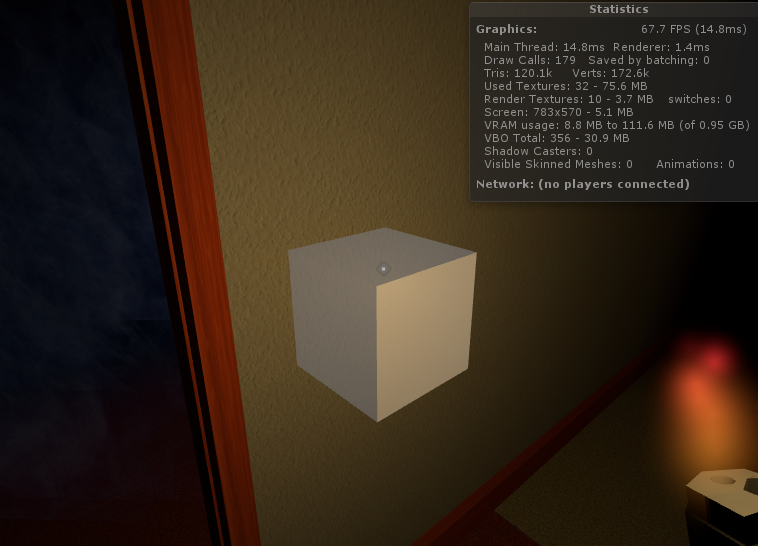
![![alt text][2]][1]

This is a picture of what's okay: The gameobject is picked up and relocates itself to the center of the player's cursor every time he moves.
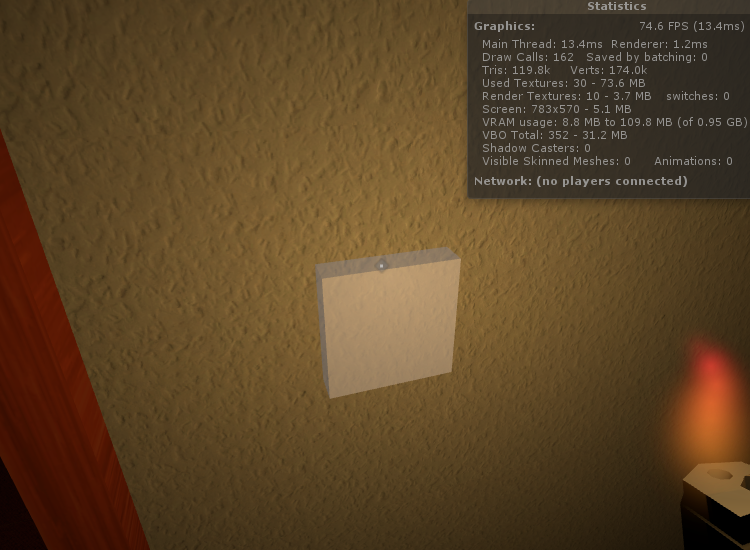
alt text

And this is what's happening that I DON'T like. As you can see, the carried object is actually right inside the wall, when it shouldn't be. If you were to walk a little closer, it would be right on the opposite side.

[2]: /storage/temp/14571-good.png

good.png (522.9 kB)
bad.png (479.4 kB)
Comment
Add comment
10 |3000 characters needed characters left characters exceeded
▼
  • Viewable by all users
  • Viewable by moderators
  • Viewable by moderators and the original poster
  • Advanced visibility
Viewable by all users

2 Replies

· Add your reply
  • Sort: 
avatar image
1

Answer by whydoidoit · Aug 21, 2013 at 02:33 PM

When you make it kinematic use OnCollisionEnter to identify when it hits something and either a) return it to the position it was the last frame or b) snap it to the position of the thing it collided with.

Comment
Add comment · Show 2 · Share
10 |3000 characters needed characters left characters exceeded
▼
  • Viewable by all users
  • Viewable by moderators
  • Viewable by moderators and the original poster
  • Advanced visibility
Viewable by all users
avatar image Aspiring_Failure · Aug 21, 2013 at 09:44 PM 0
Share

I'm not sure how to do either of those. I guess I could store it's transform position at the end of every frame and then recall it if it collides with something, but then the player could get his item "Hooked" on some geometry and then "lose it" by running off.

No clue how I would snap it to the position of the thing it collided with, and I feel like that would end up yielding similar results to using rigidbody.$$anonymous$$ovePosition.

Thanks a lot for the answer, though. I appreciate the help so far.

avatar image whydoidoit · Aug 21, 2013 at 09:47 PM 0
Share

Well snapping would involve using the contacts information in the collision to adjust the position of the item so that none of it's extents penetrated the edges you want protected. A bit of math, but doable.

avatar image
0

Answer by Xtro · Aug 21, 2013 at 02:12 PM

You can do a raycast to determine the distance of the object from the camera. This is for kinematic method.

Comment
Add comment · Share
10 |3000 characters needed characters left characters exceeded
▼
  • Viewable by all users
  • Viewable by moderators
  • Viewable by moderators and the original poster
  • Advanced visibility
Viewable by all users

Your answer

Hint: You can notify a user about this post by typing @username

Up to 2 attachments (including images) can be used with a maximum of 524.3 kB each and 1.0 MB total.

Follow this Question

Answers Answers and Comments

17 People are following this question.

avatar image avatar image avatar image avatar image avatar image avatar image avatar image avatar image avatar image avatar image avatar image avatar image avatar image avatar image avatar image avatar image avatar image

Related Questions

Complex Object Out of Control Collisions 1 Answer

How do I detect current collisions without using onCollisionEnter? 0 Answers

NonKinematic Rigidbody moved with Rigidbody.MovePosition not interacting with other NonKinematic Rigidbody as expected. 0 Answers

Simulating wheels without a wheel collider? 1 Answer

Inconsistent Trigger events 1 Answer


Enterprise
Social Q&A

Social
Subscribe on YouTube social-youtube Follow on LinkedIn social-linkedin Follow on Twitter social-twitter Follow on Facebook social-facebook Follow on Instagram social-instagram

Footer

  • Purchase
    • Products
    • Subscription
    • Asset Store
    • Unity Gear
    • Resellers
  • Education
    • Students
    • Educators
    • Certification
    • Learn
    • Center of Excellence
  • Download
    • Unity
    • Beta Program
  • Unity Labs
    • Labs
    • Publications
  • Resources
    • Learn platform
    • Community
    • Documentation
    • Unity QA
    • FAQ
    • Services Status
    • Connect
  • About Unity
    • About Us
    • Blog
    • Events
    • Careers
    • Contact
    • Press
    • Partners
    • Affiliates
    • Security
Copyright © 2020 Unity Technologies
  • Legal
  • Privacy Policy
  • Cookies
  • Do Not Sell My Personal Information
  • Cookies Settings
"Unity", Unity logos, and other Unity trademarks are trademarks or registered trademarks of Unity Technologies or its affiliates in the U.S. and elsewhere (more info here). Other names or brands are trademarks of their respective owners.
  • Anonymous
  • Sign in
  • Create
  • Ask a question
  • Spaces
  • Default
  • Help Room
  • META
  • Moderators
  • Explore
  • Topics
  • Questions
  • Users
  • Badges
