
Wayback Machinekoobas.hobune.stream
May JUN Jul
Previous capture 12 Next capture
2021 2022 2023
1 capture
12 Jun 22 - 12 Jun 22
sparklines
Close Help
  • Products
  • Solutions
  • Made with Unity
  • Learning
  • Support & Services
  • Community
  • Asset Store
  • Get Unity

UNITY ACCOUNT

You need a Unity Account to shop in the Online and Asset Stores, participate in the Unity Community and manage your license portfolio. Login Create account
  • Blog
  • Forums
  • Answers
  • Evangelists
  • User Groups
  • Beta Program
  • Advisory Panel

Navigation

  • Home
  • Products
  • Solutions
  • Made with Unity
  • Learning
  • Support & Services
  • Community
    • Blog
    • Forums
    • Answers
    • Evangelists
    • User Groups
    • Beta Program
    • Advisory Panel

Unity account

You need a Unity Account to shop in the Online and Asset Stores, participate in the Unity Community and manage your license portfolio. Login Create account

Language

  • Chinese
  • Spanish
  • Japanese
  • Korean
  • Portuguese
  • Ask a question
  • Spaces
    • Default
    • Help Room
    • META
    • Moderators
    • Topics
    • Questions
    • Users
    • Badges
  • Home /
  • Help Room /
avatar image
0
Question by DonnieRage · Oct 14, 2016 at 01:56 AM · nullreferenceexceptionroll a ball

Roll a Ball NullReferenceException

So i found another question relating to this on the boards but found no answer so I'm asking in regards to my specific error. The game actually still works perfectly fine but I'm getting an error at the bottom of the screen that reads NullReferenceException: Object reference not set to an instance of an object. Both errors point to my PlayerController script. The first says "PlayerController.SetCountText () (at Assets/Scripts/PlayerController.cs:44)". The second reads "PlayerController.OnTriggerEnter (UnityEngine>Collider other) (at Assets/scripts/PlayerController.cs:38)" I'm assuming those lines are telling me where in my code I'm having problems but wtf I can't figure it out. As far as I can tell my code is exactly the same as in the Roll A Ball tutorials. Here's my Player Controller code:

 1 using UnityEngine;
 2 using UnityEngine.UI;
 3 using System.Collections;
 4
 5  public class PlayerController : MonoBehaviour {
 6
 7   public float speed;
 8   public Text countText;
 9    public Text winText;
 10
 11    private Rigidbody rb;
 12    private int count;
 13
 14    void Start ()
 15    {
 16        rb = GetComponent<Rigidbody> ();
 17       count = 0;
 18       SetCountText ();
 19        winText.text = "";
 20    }
 21
 22    void FixedUpdate () 
 23    {
 24        float moveHorizontal = Input.GetAxis ("Horizontal");
 25        float moveVertical = Input.GetAxis ("Vertical");
 26
 27        Vector3 movement = new Vector3 (moveHorizontal, 0.0f, moveVertical);
 28
 29        rb.AddForce (movement * speed);
 30    }
 31
 32    void OnTriggerEnter(Collider other)
 33    {
 34        if (other.gameObject.CompareTag("Pick Up"))
 35       {
 36            other.gameObject.SetActive(false);
 37            count = count + 1;
 38            SetCountText();
 39        }
 40    }
 41
 42    void SetCountText ()
 43    {
 44        countText.text = "Count: " + count.ToString ();
 45        if (count >= 9)
 46        {
 47            winText.text = "You Win!";
 48        }
 49    }
 50 }
 51

Thanks in advance for any help!

Comment
Add comment
10 |3000 characters needed characters left characters exceeded
▼
  • Viewable by all users
  • Viewable by moderators
  • Viewable by moderators and the original poster
  • Advanced visibility
Viewable by all users

1 Reply

· Add your reply
  • Sort: 
avatar image
1

Answer by ElijahShadbolt · Oct 14, 2016 at 05:34 AM

if you didn't set countText in the inspector, it would be trying to access a null object (which doesn't have a variable text). You can fix this by changing line 44 to this:

 if (countText != null)
     countText.text = "Count: " + count.ToString();
 else
     Debug.LogWarning("Count Text is null!");

You may want to do the same with winText on lines 19 and 47, and even rb in case the GameObject happens to not have an attached Rigidbody.

Edit

As talked about in the tutorial, you must provide references to all the components and objects you want to access in your scripts. If any of these references are null, it will throw an error when you try to change their variables.

In the Roll-a-Ball tutorial, the UI Texts and Player GameObjects should look something like the image below. The Player GameObject should have a Rigidbody component, and the PlayerController script's Count Text and Win Text variables should reference the Text GameObjects in the scene hierarchy, by dragging the Text GameObjects from the hierarchy onto the script's variable fields.
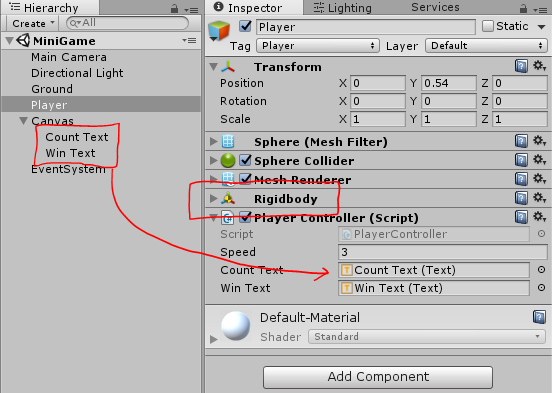
important components


capture2.png (48.9 kB)
Comment
Add comment · Show 1 · Share
10 |3000 characters needed characters left characters exceeded
▼
  • Viewable by all users
  • Viewable by moderators
  • Viewable by moderators and the original poster
  • Advanced visibility
Viewable by all users
avatar image gcangini · Dec 11, 2016 at 08:48 AM 0
Share

I have the same problem of null object...

@SublimeGamer what do you mean by "set rb in the inspector" ? (in my case the problem is with Rigidbody)

I just followed every step of the tutorial... I see a Rigidbody in the inspector of the Player Object, but I don't know where else I have to set it...

Your answer

Hint: You can notify a user about this post by typing @username

Up to 2 attachments (including images) can be used with a maximum of 524.3 kB each and 1.0 MB total.

Follow this Question

Answers Answers and Comments

77 People are following this question.

avatar image avatar image avatar image avatar image avatar image avatar image avatar image avatar image avatar image avatar image avatar image avatar image avatar image avatar image avatar image avatar image avatar image avatar image avatar image avatar image avatar image avatar image avatar image avatar image avatar image avatar image avatar image avatar image avatar image avatar image avatar image avatar image avatar image avatar image avatar image avatar image avatar image avatar image avatar image avatar image avatar image avatar image avatar image avatar image avatar image avatar image avatar image avatar image avatar image avatar image avatar image avatar image avatar image avatar image avatar image avatar image avatar image avatar image avatar image avatar image avatar image avatar image avatar image avatar image avatar image avatar image avatar image avatar image avatar image avatar image avatar image avatar image avatar image avatar image avatar image avatar image avatar image

Related Questions

Rotating camera makes ball move slower/faster 0 Answers

roller Ball for android 0 Answers

Coin Counter showing total coins per level help 0 Answers

Not sure why i'm getting NullReferenceException 0 Answers

Object reference not set to an instance of an object C# 0 Answers


Enterprise
Social Q&A

Social
Subscribe on YouTube social-youtube Follow on LinkedIn social-linkedin Follow on Twitter social-twitter Follow on Facebook social-facebook Follow on Instagram social-instagram

Footer

  • Purchase
    • Products
    • Subscription
    • Asset Store
    • Unity Gear
    • Resellers
  • Education
    • Students
    • Educators
    • Certification
    • Learn
    • Center of Excellence
  • Download
    • Unity
    • Beta Program
  • Unity Labs
    • Labs
    • Publications
  • Resources
    • Learn platform
    • Community
    • Documentation
    • Unity QA
    • FAQ
    • Services Status
    • Connect
  • About Unity
    • About Us
    • Blog
    • Events
    • Careers
    • Contact
    • Press
    • Partners
    • Affiliates
    • Security
Copyright © 2020 Unity Technologies
  • Legal
  • Privacy Policy
  • Cookies
  • Do Not Sell My Personal Information
  • Cookies Settings
"Unity", Unity logos, and other Unity trademarks are trademarks or registered trademarks of Unity Technologies or its affiliates in the U.S. and elsewhere (more info here). Other names or brands are trademarks of their respective owners.
  • Anonymous
  • Sign in
  • Create
  • Ask a question
  • Spaces
  • Default
  • Help Room
  • META
  • Moderators
  • Explore
  • Topics
  • Questions
  • Users
  • Badges
