
Wayback Machinekoobas.hobune.stream
May JUN Jul
Previous capture 13 Next capture
2021 2022 2023
1 capture
13 Jun 22 - 13 Jun 22
sparklines
Close Help
  • Products
  • Solutions
  • Made with Unity
  • Learning
  • Support & Services
  • Community
  • Asset Store
  • Get Unity

UNITY ACCOUNT

You need a Unity Account to shop in the Online and Asset Stores, participate in the Unity Community and manage your license portfolio. Login Create account
  • Blog
  • Forums
  • Answers
  • Evangelists
  • User Groups
  • Beta Program
  • Advisory Panel

Navigation

  • Home
  • Products
  • Solutions
  • Made with Unity
  • Learning
  • Support & Services
  • Community
    • Blog
    • Forums
    • Answers
    • Evangelists
    • User Groups
    • Beta Program
    • Advisory Panel

Unity account

You need a Unity Account to shop in the Online and Asset Stores, participate in the Unity Community and manage your license portfolio. Login Create account

Language

  • Chinese
  • Spanish
  • Japanese
  • Korean
  • Portuguese
  • Ask a question
  • Spaces
    • Default
    • Help Room
    • META
    • Moderators
    • Topics
    • Questions
    • Users
    • Badges
  • Home /
avatar image
0
Question by rustofelees · Jan 08, 2015 at 06:54 PM · renderingcoordinatescamerasminimapperspective

Make portion of mini map camera transparent

Here's an overview of what I'm trying to do.

I have a simple camera that orbits around a game object in the scene. I would like to render that game object as a UI element in the lower left part of the screen but with the same perspective that you see when looking through the main camera.

I initially tried parenting a duplicate object to the camera whose rotation was driven by the original. This looks bad because I have a large FOV (the object looks stretched into the camera). The perspective also does not match the original and is skewed because it's position is offset from the cameras forward. See image below.
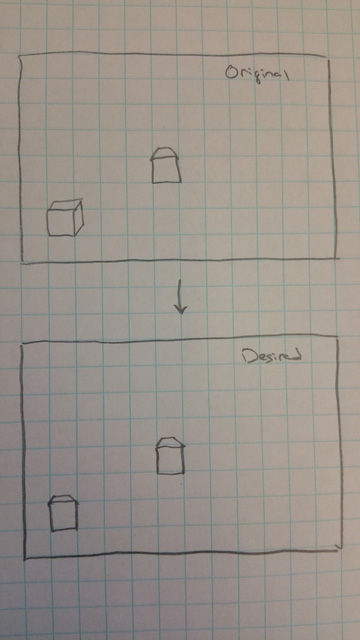
alt text

A solution that I believe would work is to have a second camera that points at the original but is drawn as a mini map in the bottom left corner. However, when doing so, I can still see the background color of the scene in the mini map and thus the whole camera rectangle.

I'm curious if I can draw the cube in the mini map rectangle, and leave the rest of the camera rectangle transparent based on a specific color (in this case the scene background color). In this case, the only object you would see in the bottom left hand corner is just the cube.

Am I thinking about this problem correctly? Is there an easier way draw an object on screen as you see it in the world?

skewed_box.jpg (75.4 kB)
Comment
Add comment · Show 3
10 |3000 characters needed characters left characters exceeded
▼
  • Viewable by all users
  • Viewable by moderators
  • Viewable by moderators and the original poster
  • Advanced visibility
Viewable by all users
avatar image Scribe · Jan 08, 2015 at 07:08 PM 2
Share

On the cameras inspector there is a field called 'clear flags' try setting that to 'Don't clear' or 'depth only' perhaps?

avatar image rustofelees · Jan 08, 2015 at 10:26 PM 0
Share

Thank you! I haven't tried this yet. I'll let you know if it's what I'm looking for.

avatar image rustofelees · Jan 09, 2015 at 04:05 AM 0
Share

$$anonymous$$any thanks Scribe! This was exactly what I was looking for. Per usual, there is an easier way to do what I wanted than expected. Cheers!

1 Reply

· Add your reply
  • Sort: 
avatar image
0

Answer by Steampunk_Droid · Jan 08, 2015 at 09:39 PM

This should help you a lot: (P.S. I've followed this and it works)

https://www.youtube.com/watch?v=ZuV9Xlt-l6g

Comment
Add comment · Show 1 · Share
10 |3000 characters needed characters left characters exceeded
▼
  • Viewable by all users
  • Viewable by moderators
  • Viewable by moderators and the original poster
  • Advanced visibility
Viewable by all users
avatar image rustofelees · Jan 08, 2015 at 10:25 PM 0
Share

Thank you for the response. I've watched this and while it's super cool, I don't think it will work for my purposes. Because the cube in the bottom left (that's a part of the $$anonymous$$i map camera) will rotate around to match the orientation of the cube from the main camera, there isn't a single texture that I can use for making the surrounding area of the camera rectangle transparent. Ins$$anonymous$$d of a texture, I think I would need to make the camera rectangle transparent based on a color.

Your answer

Hint: You can notify a user about this post by typing @username

Up to 2 attachments (including images) can be used with a maximum of 524.3 kB each and 1.0 MB total.

Follow this Question

Answers Answers and Comments

27 People are following this question.

avatar image avatar image avatar image avatar image avatar image avatar image avatar image avatar image avatar image avatar image avatar image avatar image avatar image avatar image avatar image avatar image avatar image avatar image avatar image avatar image avatar image avatar image avatar image avatar image avatar image avatar image avatar image

Related Questions

When more than two cameras my screen lags. 1 Answer

Disabling Camera MSAA has no effect if a later Camera has MSAA enabled 1 Answer

creating opacity on a mesh based on another overlaying mesh 0 Answers

materials visible if seen by (1) all or (2) any camera(s) 0 Answers

How to set the camera to render object exactly the same with what the other camera is rendering ? 0 Answers


Enterprise
Social Q&A

Social
Subscribe on YouTube social-youtube Follow on LinkedIn social-linkedin Follow on Twitter social-twitter Follow on Facebook social-facebook Follow on Instagram social-instagram

Footer

  • Purchase
    • Products
    • Subscription
    • Asset Store
    • Unity Gear
    • Resellers
  • Education
    • Students
    • Educators
    • Certification
    • Learn
    • Center of Excellence
  • Download
    • Unity
    • Beta Program
  • Unity Labs
    • Labs
    • Publications
  • Resources
    • Learn platform
    • Community
    • Documentation
    • Unity QA
    • FAQ
    • Services Status
    • Connect
  • About Unity
    • About Us
    • Blog
    • Events
    • Careers
    • Contact
    • Press
    • Partners
    • Affiliates
    • Security
Copyright © 2020 Unity Technologies
  • Legal
  • Privacy Policy
  • Cookies
  • Do Not Sell My Personal Information
  • Cookies Settings
"Unity", Unity logos, and other Unity trademarks are trademarks or registered trademarks of Unity Technologies or its affiliates in the U.S. and elsewhere (more info here). Other names or brands are trademarks of their respective owners.
  • Anonymous
  • Sign in
  • Create
  • Ask a question
  • Spaces
  • Default
  • Help Room
  • META
  • Moderators
  • Explore
  • Topics
  • Questions
  • Users
  • Badges