
Wayback Machinekoobas.hobune.stream
May JUN Jul
Previous capture 13 Next capture
2021 2022 2023
1 capture
13 Jun 22 - 13 Jun 22
sparklines
Close Help
  • Products
  • Solutions
  • Made with Unity
  • Learning
  • Support & Services
  • Community
  • Asset Store
  • Get Unity

UNITY ACCOUNT

You need a Unity Account to shop in the Online and Asset Stores, participate in the Unity Community and manage your license portfolio. Login Create account
  • Blog
  • Forums
  • Answers
  • Evangelists
  • User Groups
  • Beta Program
  • Advisory Panel

Navigation

  • Home
  • Products
  • Solutions
  • Made with Unity
  • Learning
  • Support & Services
  • Community
    • Blog
    • Forums
    • Answers
    • Evangelists
    • User Groups
    • Beta Program
    • Advisory Panel

Unity account

You need a Unity Account to shop in the Online and Asset Stores, participate in the Unity Community and manage your license portfolio. Login Create account

Language

  • Chinese
  • Spanish
  • Japanese
  • Korean
  • Portuguese
  • Ask a question
  • Spaces
    • Default
    • Help Room
    • META
    • Moderators
    • Topics
    • Questions
    • Users
    • Badges
  • Home /
avatar image
0
Question by Side.MZG · Dec 09, 2012 at 08:55 PM · fpszoomround

Zooming part of the screen without Render to texture

[source files lost. However, the responses are still useful]

Comment
Add comment · Show 1
10 |3000 characters needed characters left characters exceeded
▼
  • Viewable by all users
  • Viewable by moderators
  • Viewable by moderators and the original poster
  • Advanced visibility
Viewable by all users
avatar image shane.rachel · Dec 09, 2012 at 10:25 PM 0
Share

in-game or during editing?

2 Replies

· Add your reply
  • Sort: 
avatar image
0

Answer by Sixakoo_ · Dec 09, 2012 at 11:14 PM

I assume this is for aiming down a scope in an FPS game, isn't it? To be honest I don't really have the answer if you don't use the render to texture but consider this, most current FPS games that I play they don't use Render to texture technique but instead they just in lower the FOV for the whole camera, and some might add some blur outside the scope or mask it black for sniper rifle. I think they don't use render to texture to have better performance I guess. Here are some examples:-
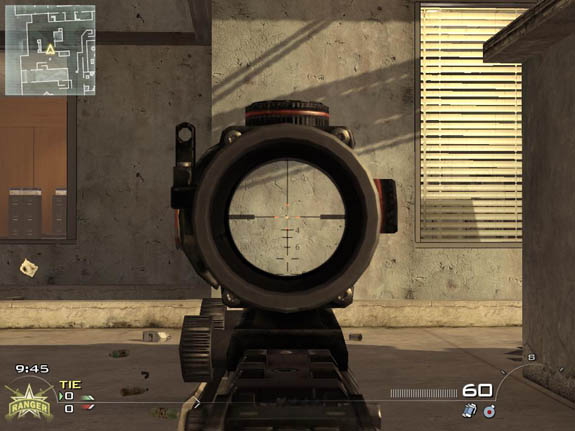
alt text alt text alt text

Sorry that I could only give a suggestion instead of a real solution.

Comment
Add comment · Show 3 · Share
10 |3000 characters needed characters left characters exceeded
▼
  • Viewable by all users
  • Viewable by moderators
  • Viewable by moderators and the original poster
  • Advanced visibility
Viewable by all users
avatar image shane.rachel · Dec 10, 2012 at 12:11 AM 0
Share

perhaps he could attach a second camera and have it in the center of the screen in a layer above the main camera? then he could manipulate the zoom on the second camera

avatar image Sixakoo_ · Dec 10, 2012 at 12:20 AM 0
Share

Yeah, you could do that, but the problem is that it would be square ins$$anonymous$$d of round. Although you could somehow mask the zoom camera, or place another game mesh on top of the screen but have make sure to cover all the square edge which would require a very wide scope rim. Another thing is the transition of ai$$anonymous$$g down scope would be abrupt due to no animation on transitioning second camera onto the main camera.

avatar image shane.rachel · Dec 10, 2012 at 12:49 AM 0
Share

transfor$$anonymous$$g the scale of the viewport of cam 2 with Time.deltaTime could possibly resolve that. He would, however need a very good animation going on in the main cam to make it look realistic

avatar image
0

Answer by Bunny83 · Dec 10, 2012 at 12:31 AM

Just use a second camera and adjust the screen rect (either rect with viewport coordinates (0..1) or pixelRect which is in pixels). Make sure your second camera (the smaller one) is drawn after the main camera by setting the depth value of your second camera to a higher value than the main cam.

If the scope graphics is just a texture, place it at the right spot. If you really want to use a model, you have to add a mesh that masks the whole screen except the hole. Use the **depthmask shader** on that mesh to mask out unwanted things. Using a model will probably require you to use another camera (so you have 3). It's not that complicated but requires a bit of fiddling with layermasks and renderorders.

Comment
Add comment · Share
10 |3000 characters needed characters left characters exceeded
▼
  • Viewable by all users
  • Viewable by moderators
  • Viewable by moderators and the original poster
  • Advanced visibility
Viewable by all users

Your answer

Hint: You can notify a user about this post by typing @username

Up to 2 attachments (including images) can be used with a maximum of 524.3 kB each and 1.0 MB total.

Follow this Question

Answers Answers and Comments

13 People are following this question.

avatar image avatar image avatar image avatar image avatar image avatar image avatar image avatar image avatar image avatar image avatar image avatar image avatar image

Related Questions

FPS sniper zoom effect without black texture? 3 Answers

Crosshair Fade on Zoom 0 Answers

Sniper Demo: When zoom the raycast change its aim ! 0 Answers

Rounding up Damage to an Int 2 Answers

gun scope cam not working 3 Answers


Enterprise
Social Q&A

Social
Subscribe on YouTube social-youtube Follow on LinkedIn social-linkedin Follow on Twitter social-twitter Follow on Facebook social-facebook Follow on Instagram social-instagram

Footer

  • Purchase
    • Products
    • Subscription
    • Asset Store
    • Unity Gear
    • Resellers
  • Education
    • Students
    • Educators
    • Certification
    • Learn
    • Center of Excellence
  • Download
    • Unity
    • Beta Program
  • Unity Labs
    • Labs
    • Publications
  • Resources
    • Learn platform
    • Community
    • Documentation
    • Unity QA
    • FAQ
    • Services Status
    • Connect
  • About Unity
    • About Us
    • Blog
    • Events
    • Careers
    • Contact
    • Press
    • Partners
    • Affiliates
    • Security
Copyright © 2020 Unity Technologies
  • Legal
  • Privacy Policy
  • Cookies
  • Do Not Sell My Personal Information
  • Cookies Settings
"Unity", Unity logos, and other Unity trademarks are trademarks or registered trademarks of Unity Technologies or its affiliates in the U.S. and elsewhere (more info here). Other names or brands are trademarks of their respective owners.
  • Anonymous
  • Sign in
  • Create
  • Ask a question
  • Spaces
  • Default
  • Help Room
  • META
  • Moderators
  • Explore
  • Topics
  • Questions
  • Users
  • Badges
