
Wayback Machinekoobas.hobune.stream
May JUN Jul
Previous capture 12 Next capture
2021 2022 2023
1 capture
12 Jun 22 - 12 Jun 22
sparklines
Close Help
  • Products
  • Solutions
  • Made with Unity
  • Learning
  • Support & Services
  • Community
  • Asset Store
  • Get Unity

UNITY ACCOUNT

You need a Unity Account to shop in the Online and Asset Stores, participate in the Unity Community and manage your license portfolio. Login Create account
  • Blog
  • Forums
  • Answers
  • Evangelists
  • User Groups
  • Beta Program
  • Advisory Panel

Navigation

  • Home
  • Products
  • Solutions
  • Made with Unity
  • Learning
  • Support & Services
  • Community
    • Blog
    • Forums
    • Answers
    • Evangelists
    • User Groups
    • Beta Program
    • Advisory Panel

Unity account

You need a Unity Account to shop in the Online and Asset Stores, participate in the Unity Community and manage your license portfolio. Login Create account

Language

  • Chinese
  • Spanish
  • Japanese
  • Korean
  • Portuguese
  • Ask a question
  • Spaces
    • Default
    • Help Room
    • META
    • Moderators
    • Topics
    • Questions
    • Users
    • Badges
  • Home /
  • Help Room /
avatar image
0
Question by kito-kito12 · Jan 31, 2017 at 09:59 AM · ontriggerenterontriggerexitspherecollider

OnTriggerEnter and OnTriggerExit called twice despite checking it

Hi everyone,

I have read a lot of questions about this problem but i couldn't solve it yet. I have one ball with an Sphere Collider and an invisible wall to restart the ball when it passes through it (on the onTriggerExit method). The problem is that i've not been able to solve it, even with a boolean to avoid entering the method.

Code:

 using UnityEngine;
 using System.Collections;
 
 public class ballRestart : MonoBehaviour
 {
     shootController instance;
     bool isColliding;
     // Use this for initialization
     void Start()
     {
         instance = Camera.main.GetComponent<shootController>();
         isColliding = false;
     }
     
 
     public void OnTriggerEnter(Collider col)
     {
         Debug.Log("TeEnter: " + isColliding);
         if (!isColliding)
         {
             isColliding = true;
             Debug.Log("TRIGGERED: "+isColliding);
         }
         
     }
 
     void OnTriggerExit(Collider hit)
     {
         Debug.Log("TeExit: " + isColliding);
         if (isColliding)
         {
             instance.initializeBall();
             isColliding = false;
             Debug.Log("exit");
         }
     }
 }

OUTPUT:
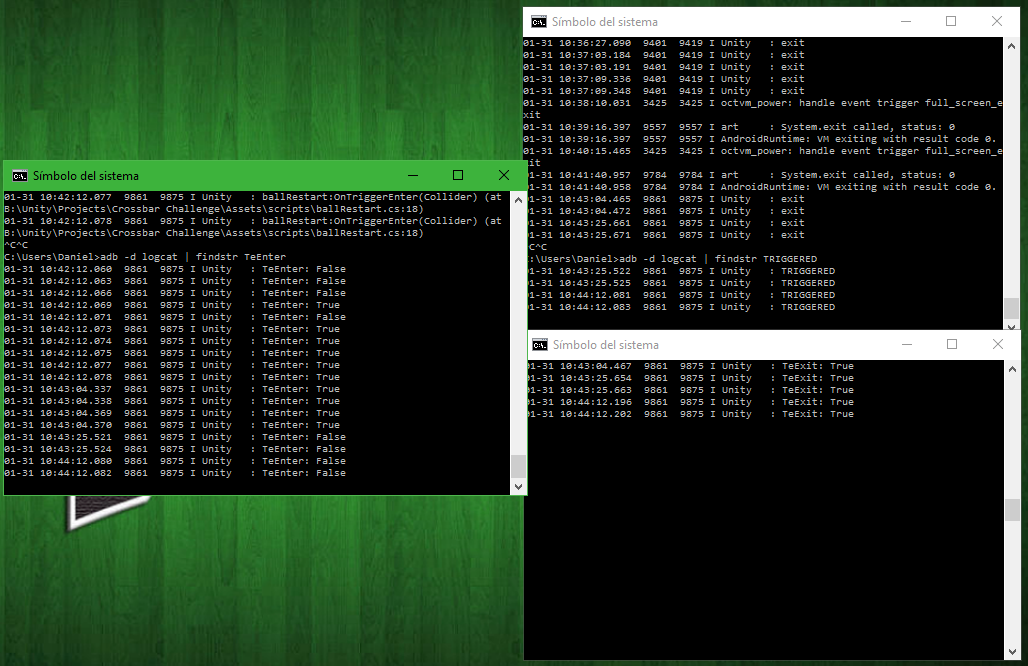
alt text

As you see, it enters twice each time the ball enters the collider and twice each time the ball exits the same collider. I don't know what happens here.

Thank you.

captura.png (386.5 kB)
Comment
Add comment
10 |3000 characters needed characters left characters exceeded
▼
  • Viewable by all users
  • Viewable by moderators
  • Viewable by moderators and the original poster
  • Advanced visibility
Viewable by all users

1 Reply

· Add your reply
  • Sort: 
avatar image
0

Answer by paramburu · Jan 31, 2017 at 03:58 PM

Hi, It hardly seems like enough information. Maybe extend it with the "shootController" code and captions of your game objects.

Depending on the "initializeBall" method it could be a number of things. Translating the ball again through the collider, instantiating a second ball with a second collider or two instances of "ballRestart". The latter would account for the isColliding bool issue because each instance would have their own.

Good luck.

Comment
Add comment · Show 2 · Share
10 |3000 characters needed characters left characters exceeded
▼
  • Viewable by all users
  • Viewable by moderators
  • Viewable by moderators and the original poster
  • Advanced visibility
Viewable by all users
avatar image kito-kito12 · Jan 31, 2017 at 05:14 PM 0
Share

Here you go:

     public void initializeBall()
     {
         GameObject aux = Instantiate(ball, initialPosition, initialRotation);
         Destroy(ball);
         ball = aux;
         rigidBodyBall = ball.GetComponent<Rigidbody>();
         audioShot = ball.GetComponent<AudioSource>();
 
         rigidBodyBall.angularVelocity = Vector3.zero;
         rigidBodyBall.velocity = Vector3.zero;
 
         canShoot = true;
         ejecutarFisicas = false;
 
         temporizadorInicial = 0;
 
         instanciaControladorEntrenamiento.resultado(crossbarHit); 
         crossbarHit = false; 

     }

Now it comes to my $$anonymous$$d that i had some problems trying to re-instantiate the ball to its initial point, I don't know if the way that i solved the problem is a good one.

Thank you

avatar image paramburu kito-kito12 · Jan 31, 2017 at 07:13 PM 0
Share

Hi, ball is a prefab? I don't understand because you are instantiating ball into aux, then destroying ball and then assigning aux into ball which would "overwrite" the prefab instance.

I would suggest that you instantiate the ball only once on the Start method and then reset it's transform with ball.transform.position = initialPosition and ball.transform.rotation = initialRotation.

Working with the same instance ins$$anonymous$$d of Destroying and Instantiating is also more performant.

Let me know if that works.

Your answer

Hint: You can notify a user about this post by typing @username

Up to 2 attachments (including images) can be used with a maximum of 524.3 kB each and 1.0 MB total.

Follow this Question

Answers Answers and Comments

91 People are following this question.

avatar image avatar image avatar image avatar image avatar image avatar image avatar image avatar image avatar image avatar image avatar image avatar image avatar image avatar image avatar image avatar image avatar image avatar image avatar image avatar image avatar image avatar image avatar image avatar image avatar image avatar image avatar image avatar image avatar image avatar image avatar image avatar image avatar image avatar image avatar image avatar image avatar image avatar image avatar image avatar image avatar image avatar image avatar image avatar image avatar image avatar image avatar image avatar image avatar image avatar image avatar image avatar image avatar image avatar image avatar image avatar image avatar image avatar image avatar image avatar image avatar image avatar image avatar image avatar image avatar image avatar image avatar image avatar image avatar image avatar image avatar image avatar image avatar image avatar image avatar image avatar image avatar image avatar image avatar image avatar image avatar image avatar image avatar image avatar image avatar image avatar image avatar image avatar image avatar image avatar image avatar image

Related Questions

I'm trying to make a climbable ladder, but when I climb down, the character controller falls through the ground, Can anybody help me with this? 0 Answers

i need a help with script Animation Trigger 1 Answer

Limit an amount of prefabs instantiated in javascript for Unity 5. 0 Answers

Pressure Switch Issues 0 Answers

C# - How can i solve this door problem in script? Can someone help me? 1 Answer


Enterprise
Social Q&A

Social
Subscribe on YouTube social-youtube Follow on LinkedIn social-linkedin Follow on Twitter social-twitter Follow on Facebook social-facebook Follow on Instagram social-instagram

Footer

  • Purchase
    • Products
    • Subscription
    • Asset Store
    • Unity Gear
    • Resellers
  • Education
    • Students
    • Educators
    • Certification
    • Learn
    • Center of Excellence
  • Download
    • Unity
    • Beta Program
  • Unity Labs
    • Labs
    • Publications
  • Resources
    • Learn platform
    • Community
    • Documentation
    • Unity QA
    • FAQ
    • Services Status
    • Connect
  • About Unity
    • About Us
    • Blog
    • Events
    • Careers
    • Contact
    • Press
    • Partners
    • Affiliates
    • Security
Copyright © 2020 Unity Technologies
  • Legal
  • Privacy Policy
  • Cookies
  • Do Not Sell My Personal Information
  • Cookies Settings
"Unity", Unity logos, and other Unity trademarks are trademarks or registered trademarks of Unity Technologies or its affiliates in the U.S. and elsewhere (more info here). Other names or brands are trademarks of their respective owners.
  • Anonymous
  • Sign in
  • Create
  • Ask a question
  • Spaces
  • Default
  • Help Room
  • META
  • Moderators
  • Explore
  • Topics
  • Questions
  • Users
  • Badges
