
Wayback Machinekoobas.hobune.stream
May JUN Jul
Previous capture 12 Next capture
2021 2022 2023
1 capture
12 Jun 22 - 12 Jun 22
sparklines
Close Help
  • Products
  • Solutions
  • Made with Unity
  • Learning
  • Support & Services
  • Community
  • Asset Store
  • Get Unity

UNITY ACCOUNT

You need a Unity Account to shop in the Online and Asset Stores, participate in the Unity Community and manage your license portfolio. Login Create account
  • Blog
  • Forums
  • Answers
  • Evangelists
  • User Groups
  • Beta Program
  • Advisory Panel

Navigation

  • Home
  • Products
  • Solutions
  • Made with Unity
  • Learning
  • Support & Services
  • Community
    • Blog
    • Forums
    • Answers
    • Evangelists
    • User Groups
    • Beta Program
    • Advisory Panel

Unity account

You need a Unity Account to shop in the Online and Asset Stores, participate in the Unity Community and manage your license portfolio. Login Create account

Language

  • Chinese
  • Spanish
  • Japanese
  • Korean
  • Portuguese
  • Ask a question
  • Spaces
    • Default
    • Help Room
    • META
    • Moderators
    • Topics
    • Questions
    • Users
    • Badges
  • Home /
  • Help Room /
avatar image
0
Question by LunaTrap · Aug 21, 2016 at 11:58 AM · collisionmovementphysicsrigidbodycharacter controller

Rigidbody sticks to wall

Hi, im moving my character with ridibody with a very simple script that changes the velocity of the ridigbody using the input axis, but when i move towards a wall and try to move in any perpendicular direction, it wons slide along the walls, this makes the movement very akward it feels like the walls are made from glue, now if instead of a rigidbody i use a character controller it will slide naturally.

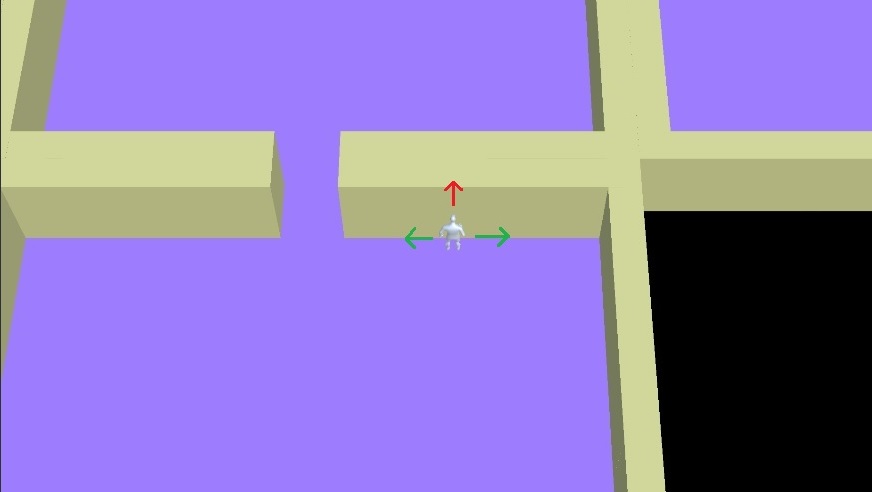
Looks at this image for illustration, im moving up and then i should be able to move left if i also press left, but it does not, it will only move left if i stop pressing up, this does not happens with character controller, my question is, how do i reproduce this for the rigidbody? i tried having a physics material with 0 friction, but it did not worked.
alt text

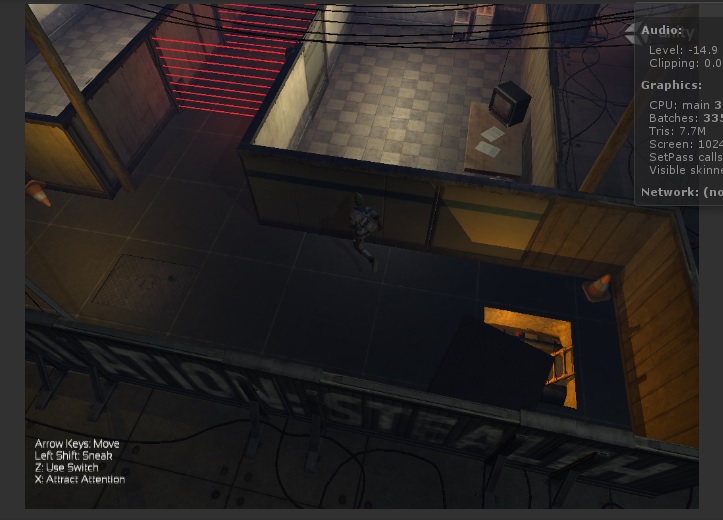
In fact the same happens in the Stealth tutorial, here im pressing up and left, but the character wont move
alt text

fdfr6664.jpg (23.9 kB)
fdfr66642.jpg (91.4 kB)
Comment
Add comment · Show 4
10 |3000 characters needed characters left characters exceeded
▼
  • Viewable by all users
  • Viewable by moderators
  • Viewable by moderators and the original poster
  • Advanced visibility
Viewable by all users
avatar image jakejolli · Aug 22, 2016 at 12:19 AM 1
Share

Could you provide the script, as well as some screenshots of the inspector for the character and wall?

avatar image LunaTrap jakejolli · Aug 22, 2016 at 01:30 AM 0
Share

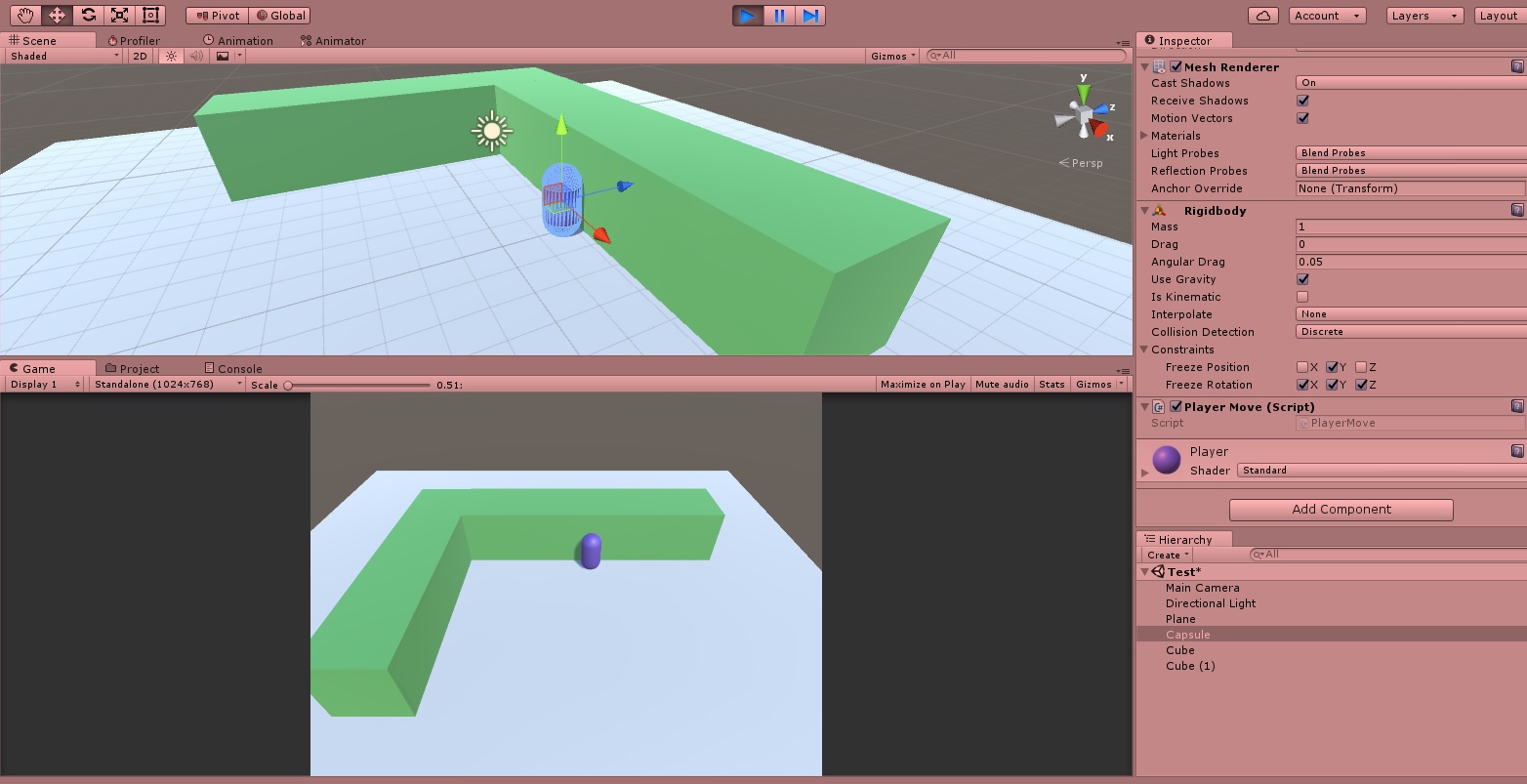
I dont think is necessary, its a simple script, i reproduced it in a new empty project, just a rigidbody with some contraints and a simple movement script

 public class Player$$anonymous$$ove : $$anonymous$$onoBehaviour
 {
     Rigidbody playerRigidbody;
     Vector3 movementVector;
     float movementSpeed = 500f;
 
     void Awake()
     {
         playerRigidbody = transform.GetComponent<Rigidbody>();
     }
 
     void Update()
     {
         Vector3 inputAxis = new Vector3(Input.GetAxisRaw("Horizontal"), 0f, Input.GetAxisRaw("Vertical")).normalized;
         movementVector = inputAxis * movementSpeed * Time.deltaTime;
     }
 
     void FixedUpdate()
     {
         playerRigidbody.velocity = movementVector;
     }
 }
alt text

testwallsliding.jpg (208.1 kB)
avatar image jakejolli LunaTrap · Aug 22, 2016 at 06:06 PM 0
Share

The only thing that stands out from what I see that might be causing the problem is that you're setting the velocity of the rigidbody directly. Because the rigidbody is NOT kinematic and IS using gravity, you and the physics engine are both manipulating the velocity, potentially fighting with each other.

You should hand off the management of the rigidbody's velocity completely to the physics engine. You can do this by using rigidbody.AddForce ins$$anonymous$$d of rigidbody.velocity = movementVector.

Show more comments

0 Replies

· Add your reply
  • Sort: 

Your answer

Hint: You can notify a user about this post by typing @username

Up to 2 attachments (including images) can be used with a maximum of 524.3 kB each and 1.0 MB total.

Follow this Question

Answers Answers and Comments

103 People are following this question.

avatar image avatar image avatar image avatar image avatar image avatar image avatar image avatar image avatar image avatar image avatar image avatar image avatar image avatar image avatar image avatar image avatar image avatar image avatar image avatar image avatar image avatar image avatar image avatar image avatar image avatar image avatar image avatar image avatar image avatar image avatar image avatar image avatar image avatar image avatar image avatar image avatar image avatar image avatar image avatar image avatar image avatar image avatar image avatar image avatar image avatar image avatar image avatar image avatar image avatar image avatar image avatar image avatar image avatar image avatar image avatar image avatar image avatar image avatar image avatar image avatar image avatar image avatar image avatar image avatar image avatar image avatar image avatar image avatar image avatar image avatar image avatar image avatar image avatar image avatar image avatar image avatar image avatar image avatar image avatar image avatar image avatar image avatar image avatar image avatar image avatar image avatar image avatar image avatar image avatar image avatar image avatar image avatar image avatar image avatar image avatar image avatar image avatar image avatar image avatar image avatar image avatar image avatar image

Related Questions

How to make rigidbody not effect movement while still using it for collisions? 0 Answers

[Help] Player stops moving when hitting wall diagonally 0 Answers

Rigidbody bouncing off other rigidbodies 0 Answers

Friction affects ball's direction after collision 0 Answers

Is there a way to limit animation on collision? 1 Answer


Enterprise
Social Q&A

Social
Subscribe on YouTube social-youtube Follow on LinkedIn social-linkedin Follow on Twitter social-twitter Follow on Facebook social-facebook Follow on Instagram social-instagram

Footer

  • Purchase
    • Products
    • Subscription
    • Asset Store
    • Unity Gear
    • Resellers
  • Education
    • Students
    • Educators
    • Certification
    • Learn
    • Center of Excellence
  • Download
    • Unity
    • Beta Program
  • Unity Labs
    • Labs
    • Publications
  • Resources
    • Learn platform
    • Community
    • Documentation
    • Unity QA
    • FAQ
    • Services Status
    • Connect
  • About Unity
    • About Us
    • Blog
    • Events
    • Careers
    • Contact
    • Press
    • Partners
    • Affiliates
    • Security
Copyright © 2020 Unity Technologies
  • Legal
  • Privacy Policy
  • Cookies
  • Do Not Sell My Personal Information
  • Cookies Settings
"Unity", Unity logos, and other Unity trademarks are trademarks or registered trademarks of Unity Technologies or its affiliates in the U.S. and elsewhere (more info here). Other names or brands are trademarks of their respective owners.
  • Anonymous
  • Sign in
  • Create
  • Ask a question
  • Spaces
  • Default
  • Help Room
  • META
  • Moderators
  • Explore
  • Topics
  • Questions
  • Users
  • Badges
