 koobas.hobune.stream


Inspector current highlighted element
Hello all:
I am making a custom inspector and I have a list of sprites. With those I want to do something (say print the sprite's name on the console) each time it is clicked (selected) but i don't know how. I know this functionality already exists when you click on something on the inspector it highlights it blue and shows the asset path on the project view, I'm just not being able to find the correct function to call. Could you help me with this, many thanks in advance
(The image shows the blue rectangle I mean. I'd like to know which is the element inside it, in this case Ref-Atlas) 

Looking for this as well. I need to know what was clicked on as well as highlight specific ones though gui button presses. The functionality is obviously there, but I can't find anything that works.

After spending hours searching for a way to do this I think I have come across the simplest solution. The biggest issue with the documentation is that it doesn't specifically mention how to get the selected item for custom editor GUIs. As it turns out, the method is basically the same as a non-editor GUI.
I was attempting to make a custom vertex list with selectable entries (using SelectableLabels). To figure out what list item the user selects, the code must assign a unique name to each item in the list using SetNextControlName when the list is created. Then, during successive iterations of the GUI update (OnInspectorGUI in my case), you can call GetNameOfFocusedControl which will return the unique name set for the selected item if that item is selected.
Here is a snippet from my code showing how the custom inspector elements are setup:
     public override void OnInspectorGUI() {
         serializedObject.Update();
         layoutVertList(); //create the list
         //display in console the unique name of the selected item
         Debug.Log("Focused control is: " + GUI.GetNameOfFocusedControl());
         if (GUI.changed) {
             serializedObject.ApplyModifiedProperties();
         }
     }

     private void layoutVertList() {
         SerializedProperty sv = serializedObject.FindProperty("selectedVerts");
         int len = sv.arraySize;

         //Use fold control to show or hide full list
         showVertFold = EditorGUILayout.Foldout(showVertFold, "Selected Points");
         if (showVertFold) {
             EditorGUI.indentLevel = 1;
             for (int i = 0; i < len; i++) {
                 Vector3 v = sv.GetArrayElementAtIndex(i).vector3Value;
                 //display index-value like '[5] (1.0, 2.0, 0.0)'
                 string vertText = "[" + i + "] (" + v.x + ", " + v.y + ", " + v.z + ")";
                 //set the unique identity for this list entry
                 GUI.SetNextControlName("vert" + i);
                 EditorGUILayout.SelectableLabel(vertText, GUILayout.Height(18)); //make the label with a compact height
             }
             EditorGUI.indentLevel = 0;
         }

     }
Result (selection in blue): 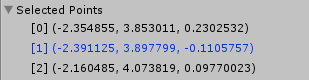

Each item in the list is identified by a common string value "vert" and the index of the item. So item 0 is "vert0" item 1 is "vert1" etc. Now, when "vert1" is selected, GUI.GetNameOfFocusedControl will return that string which can be used to take further action as desired.

4 year old topic and 2 year old answer, but I have no idea how many hours I've spent in the last couple days Googling and trying to make an inspector foldout menu have the last selected element show hover color but not show hover color on hovered elements (why there is no 'selected' color, we may never know). Thanks to you, my search is now over!

same problem here, how to get the selected object in the inspector... such basic stuff... it probably exists but were...
EDIT: please TRY this and tell if it works thx, i am atm on a cellphone cant check http://docs.unity3d.com/ScriptReference/Selection-activeObject.html

Are you referring to EditorGUIUtility.PingObject?

Not quite. What i do need is the object currently selected in the inspector. Right now, in the image, you can see the Ref Atlas is selected on the inspector but i want to be able to do something in the script with it. Im searching for wherever unity stores the current inspector selected element (Something like Editor.CurrentInspectorSelected that should return a Ref_Atlas object)

I was able to find what I needed to get my stuff working(close to) how I wanted.
This stuff might help you guys....
http://docs.unity3d.com/ScriptReference/GUI.SetNextControlName.html
http://docs.unity3d.com/ScriptReference/GUI.GetNameOfFocusedControl.html
http://docs.unity3d.com/ScriptReference/GUI.FocusControl.html
http://docs.unity3d.com/ScriptReference/EditorGUI.FocusTextInControl.html
http://docs.unity3d.com/ScriptReference/GUIUtility.html
http://docs.unity3d.com/ScriptReference/EditorGUIUtility.html




