 koobas.hobune.stream


EditorWindow - Child class gets cast back to parent class at compilation.
Hi,
I'm playing around with the EditorWindow class, and I got this annoying problem :
Open the window
Instantiate instances of the parent class and the child class, stored inside a list.
Change something in any script, save and back in Unity.
The list is now full of the parent class, the child instances have been cast.
My hierarchy is pretty simple. There is the parent, ClassA (with [System.Serializable]) and the child ClassB which inherits from ClassA.
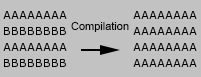
-> You can test it with this package, or that code and that one.
Any idea how to get around this ? Is hierarchy not possible in the editor ? Or just the list ?
--------------------------- [EDIT] ----------------------------------
Yep, Bunny's right. Here are the links with a version that works, plus the loading and saving as assets (package, or script 1, 2, 3 and 4. The scripts are, and must stay separated, and the files must have the name of the class, ClassA inside ClassA.cs !).
Here is an interesting thingy about ScriptableObjects, or, what a surprise, this answer :p

That has nothing to do with EditorWindow ;) It's Unity's serializer. Unity can only serialize it's own types. When you create a custom serializable class (not derived from MonoBehaviour or ScriptableObject) Unity will serialize the data along with the referencing class. So your class acts more like a struct. The type which is serialized is determined by the type of your variable. Since the variable (your list) has as type your base class, it will always be serialized as baseclass.
Furthermore when you store the same object several times in the list you will have several individual copies after deserialization. Again, they work more like structs. Basically you can't serialize custom classes in a baseclass variable.
The only types which do get serialized correctly (and can be used as base classes) are MonoBehaviour or ScriptableObject derived classes. A ScriptableObject has to be stored as Asset because Unity does not store it along with the referencing object (like "normal" classes). The best way to implement a class hierarchy that can be serialized by Unity is to use MonoBehaviours. You can attach all to the same GameObject if you want but in a lot cases it's easier to attach them to seperate GameObjects.
MonoBehaviour references are serialized correctly.
I haven't looked at Unity4 yet but i guess the serializer still works the same.
edit
btw, i figured that out the hard way :D I've done a quite complex node based editor just to discover Unity doesn't save any of my classes correctly. I switched completely to a MonoBehaviour based system.
ps. As far as i remember Strumpy's Shader editor uses ScriptableObjects to store the node tree, but it requires you to store them as Asset in the project, so they can't be saved to an object in the scene (like most serialization works beside prefabs).
second edit
Just saw that you stored the list directly in the EditorWindow class. Well, it actually doesn't make a difference. Unity does always serialize and deserialize all loaded objects when something changed in the project. Same happens when you press play or stop. The editor state get serialized and deserialized at runtime. When you come back to the edit mode it restores everything from the saved state.

Thanks for the answer Bunny :) It's too late though, I can barely keep my eyes opened ^^ I'll check it out tomorrow.

Same here ;) good luck on finding a workaround that fits you best.
All righty, I'm back on track. I'll give it a shot tonight. Just to be clear, I'm doing a GUI editor, where you can drag & drop a button here, a label there etc. Each one needs to be attached to a gameObject created specifically for it then ?
Yes, especially for a class based GUI system i would attach each component to a new Gameobject. That way you can use the transform class for positioning / scaling ( / rotating ).

That's because, from what I could tell of your code, your list is: List< class a >. When unity goes to de-serialize after any code compilation, it is going to only remember everything in that list as a class a type, not a class b type.
Does that make sense?
Serialization only works for the class that is actually defined in a generic list, not for any inherited types that are stored in the same list.
Yes, but as i said it actually treats the class like a struct.
An example:
 [System.Serializable]
 public class $$anonymous$$yClass
 {
     public string Name;
     public $$anonymous$$yClass(string aName)
     {
         Name = aName;
     }
 }


 public class $$anonymous$$yComponent : $$anonymous$$onoBehaviour
 {
     public List<$$anonymous$$yClass> list;
 }


 // in your editorwindow:
 $$anonymous$$yClass tmp = new $$anonymous$$yClass("Test");
 list.Add(tmp);  // add the same class 3 times
 list.Add(tmp);
 list.Add(tmp);
Do this right after the above code:
 list[0].Name = "NewName";
 Debug.Log(list[1].Name);  // prints "NewName" since all 3 points to the same class instance.
But when you do this, after deserialization you will have 3 independent instances of $$anonymous$$yClass
 list[0].Name = "Another name";
 Debug.Log(list[1].Name);  // prints "NewName"



