 koobas.hobune.stream


Fitting Bounds into Orthographic 2d Camera.
Hi!
I have a top down 2d game, and I am trying to figure out how to set the camera. As with everything, I google for a long time, but none of the answers so far have given me what I need.
Given a Bounds object of any size, how would one fit that bounds perfectly into the camera?
I also need to create a Margin but I guess that is pretty simple.
Thanks!
Edit:
I realised how broad this was. So to put it another way.
 float boundsToOrthographicSize(Bounds bounds, float margin){
        //magic here
 }
Additional references:
On that last one. I cannot seem to convertBoundsToRect to plug into the rest of it. So answering that, may answer this!
One last thing. it may be portrait or landscape, so you cannot assume that width is the first class citizen.
How to calculate the orthographicSize given any bounds.
 public class CameraTrackBounds: MonoBehaviour
 {
     //the Bounds object we want the camera to follow
     public Bounds targetBounds;

     void LateUpdate()
     {

         float screenRatio = (float)Screen.width / (float)Screen.height;
         float targetRatio = targetBounds.size.x / targetBounds.size.y;

         if (screenRatio >= targetRatio)
         {
             Camera.main.orthographicSize = targetBounds.size.y / 2;
         }
         else
         {
             float differenceInSize = targetRatio / screenRatio;
             Camera.main.orthographicSize = targetBounds.size.y / 2 * differenceInSize;
         }

         transform.position = new Vector3(targetBounds.center.x, targetBounds.center.y, -1f);

     }

 }
The results are thus.
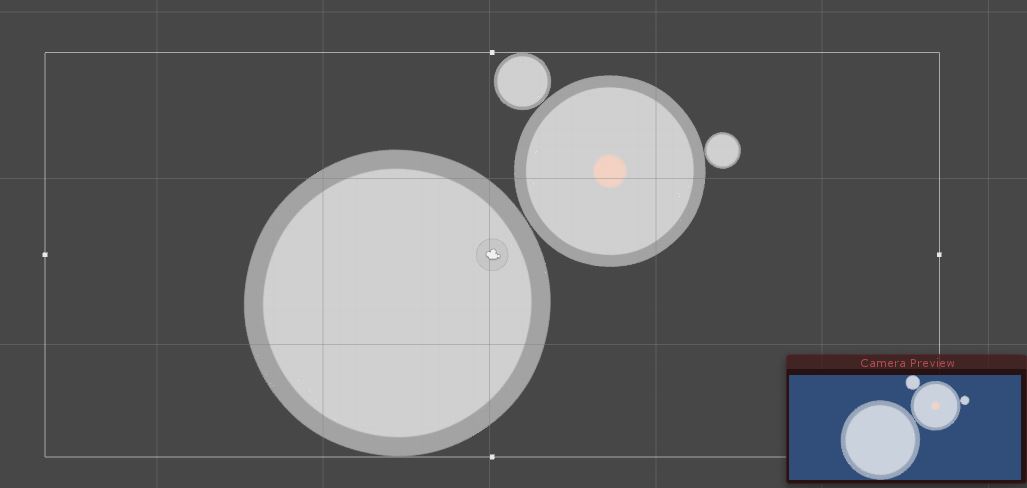
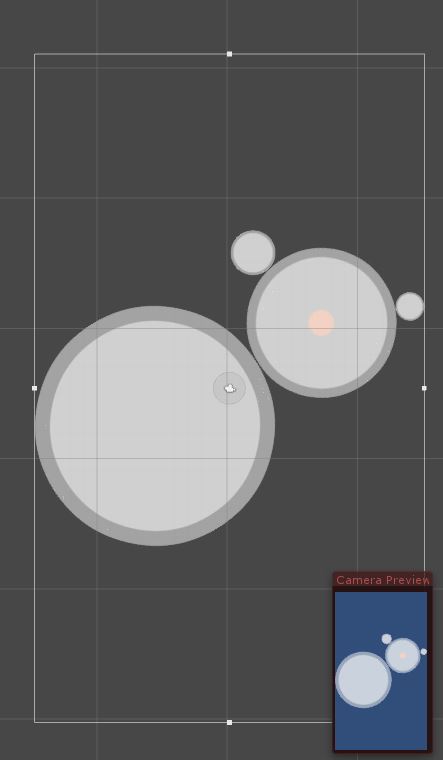
I am not finished this with this answer yet as I need to get these things smoothed and figure out a "border".

Hello mate @satchel82 ! I don't know if you see this but since yours, is probably the only solution that worked for me, I figured I asked out for some help. I am developing a 2D game for android and while your solutions works...it still is not right for me.
Anyways, what I am trying to achieve here is make the size of camera fit the edges of my phone. I have figured out how to make an adjustable aspect ratio but the thing is that the x bounds don't close on my edges as I would like to. There is still a lo of gap while the vertical extent seems to be working fine.
As a prt screen shows, all the black around my green space is actually the camera size How can I make the size of the camera fit just the green space?
I am working with randomly generated prefabs(2D sprites) all of which are under a parent. The bounds I have linked to your script are of a Plane's attached on top of the parent and matching the dimensions of the parent.
Still not luck. :(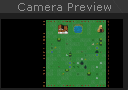

This is what i found while googling.. It think you mean this Source:https://gist.github.com/RyanNielson/9879056
 using UnityEngine;

 public class TrackTargets : MonoBehaviour {

     [SerializeField]
     Transform[] targets;

     [SerializeField]
     float boundingBoxPadding = 2f;

     [SerializeField]
     float minimumOrthographicSize = 8f;

     [SerializeField]
     float zoomSpeed = 20f;

     Camera camera;

     void Awake ()
     {
         camera = GetComponent<Camera>();
         camera.orthographic = true;
     }

     void LateUpdate()
     {
         Rect boundingBox = CalculateTargetsBoundingBox();
         transform.position = CalculateCameraPosition(boundingBox);
         camera.orthographicSize = CalculateOrthographicSize(boundingBox);
     }

     /// <summary>
     /// Calculates a bounding box that contains all the targets.
     /// </summary>
     /// <returns>A Rect containing all the targets.</returns>
     Rect CalculateTargetsBoundingBox()
     {
         float minX = Mathf.Infinity;
         float maxX = Mathf.NegativeInfinity;
         float minY = Mathf.Infinity;
         float maxY = Mathf.NegativeInfinity;

         foreach (Transform target in targets) {
             Vector3 position = target.position;

             minX = Mathf.Min(minX, position.x);
             minY = Mathf.Min(minY, position.y);
             maxX = Mathf.Max(maxX, position.x);
             maxY = Mathf.Max(maxY, position.y);
         }

         return Rect.MinMaxRect(minX - boundingBoxPadding, maxY + boundingBoxPadding, maxX + boundingBoxPadding, minY - boundingBoxPadding);
     }

     /// <summary>
     /// Calculates a camera position given the a bounding box containing all the targets.
     /// </summary>
     /// <param name="boundingBox">A Rect bounding box containg all targets.</param>
     /// <returns>A Vector3 in the center of the bounding box.</returns>
     Vector3 CalculateCameraPosition(Rect boundingBox)
     {
         Vector2 boundingBoxCenter = boundingBox.center;

         return new Vector3(boundingBoxCenter.x, boundingBoxCenter.y, -10f);
     }

     /// <summary>
     /// Calculates a new orthographic size for the camera based on the target bounding box.
     /// </summary>
     /// <param name="boundingBox">A Rect bounding box containg all targets.</param>
     /// <returns>A float for the orthographic size.</returns>
     float CalculateOrthographicSize(Rect boundingBox)
     {
         float orthographicSize = camera.orthographicSize;
         Vector3 topRight = new Vector3(boundingBox.x + boundingBox.width, boundingBox.y, 0f);
         Vector3 topRightAsViewport = camera.WorldToViewportPoint(topRight);

         if (topRightAsViewport.x >= topRightAsViewport.y)
             orthographicSize = Mathf.Abs(boundingBox.width) / camera.aspect / 2f;
         else
             orthographicSize = Mathf.Abs(boundingBox.height) / 2f;

         return Mathf.Clamp(Mathf.Lerp(camera.orthographicSize, orthographicSize, Time.deltaTime * zoomSpeed), minimumOrthographicSize, Mathf.Infinity);
     }
 }





