 koobas.hobune.stream


How to use sections of a texture?
Hello, I am new to Unity and am trying to create a simple puzzle game. I have an image and I want each puzzle piece to have a part of the image.
Say for example that my image is 100x by 100y. I want piece1 to go from (0x-50x,0y-50y), piece2 from (50x-100x,0y-50y), piece 3 (0x-50x,50y-100y), and piece 4 (50x-100x,50y-100y).
Making a lot of small textures and materials for every piece is impractical. I would like to have one image and through a script assign each piece.
So like... (made up code follows)
piece1 = image1(0-50,0-50)
piece2 = image1(50-100,0-50)
...and so on.
I could then have different images for the puzzle and would only need to change the name in the script.
As I understand sprites don't render lighting so I'd rather use something else, but if that is the only way then so be it.
So how can I accomplish this?

"As I understand sprites don't render lighting" Unlearn this. It depends upon the shader used.
I'd hazard to say that the best approach for your desire involves procedurally creating a subdivided quad with code. Your logic will visit each cell of the grid and assign the desired UV coordinates to each cell's verticies.
The cells can become individual objects you can displace and rearrange and let the user piece them back together. Conveniently, this approach will help you when deter$$anonymous$$ing whether the user has solved the puzzle; simply compare each piece's current position to its original position. Pieces might "snap" into place when placed near their original positions to indicate satisfactory placement.
Further explanation is a rather more complicated discussion than Unity Answers really welcomes. Look into procedural mesh generation; that's definitely the place to start. Ask your question on the forums if you're stuck, but there's bound to be a great deal of good info you can find if you do some research.

What your script could do is create different textures based on the pixels of the original one.
You would iterate the pixel array of the original to create the new texture from which you would create a sprite and use it in your game.
But wait, that would be the same as creating 4 sprites as prefab? Yes. So, my advice, you should not bother about making it with complex code when you can do it easily with prefabs.

@AlwaysSunny Thanks for your advice, I read and followed some tutorials on procedural generating and uv mapping, and I think this is just what I am looking for. I have a uv mapping problem now though lol, I'll post it below.
@fafase Unless I misunderstood you that is exactly what I don't want to do. If my puzzle was 2x2 then for each image I would need 4 smaller images. If I had 10 pictures then I would need 40 different sprites!
I want to take an image and have each puzzle piece only render a certain portion of it.
So I followed a tutorial on procedurally creating a mesh and a uv map. It works just how I want it to.
I then made a quad in Unity and tried uv mapping it but it isn't working. I can't find many articles about mapping a quad and the code samples that I find give me the same problem.
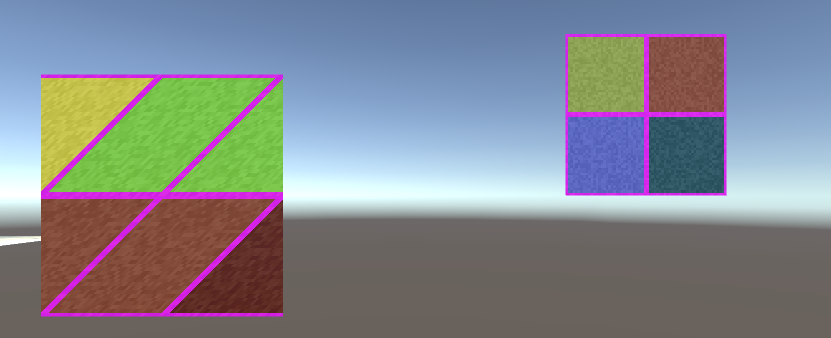
On the right is my procedure generated mesh with a uv map that shows the bottom left of the texture. On the left is my quad....
Any suggestions or links to articles about this? Thanks for the help so far!
This is a well-documented process for which there is abundant researchable information.
Some nested loop will build a two dimensional array of quads which, together, describe the dimensions of the texture. The methods for manipulating mesh data are found in the $$anonymous$$esh class. Each iteration of the nested loop will visit a vertex's position in the bigger picture (pun intended) and give you the opportunity to calculate the appropriate UV coordinate for that vertex.
Problem solved!
I had the vertices in the wrong order.
 using UnityEngine;
 using System.Collections;

 public class test2 : MonoBehaviour {

     private Mesh mesh;
     private Vector2[] uvs;

     void Start () {

         mesh = this.GetComponent<MeshFilter> ().mesh;
         uvs = mesh.uv;

         uvs[0] = new Vector2(0.0f, 0.0f);
         uvs[1] = new Vector2(1.0f, 1.0f);
         uvs[2] = new Vector2(1.0f, 0.0f);
         uvs[3] = new Vector2(0.0f, 1.0f);

         mesh.uv = uvs;

     }
 }
It seems the order for a unity created quad is: bottom left, top right, lower right, top left. This script gives me the full image but by adjusting the float values I can choose any portion I want.
Thank you so much! This is exactly what I wanted.



