 koobas.hobune.stream


Score won't work
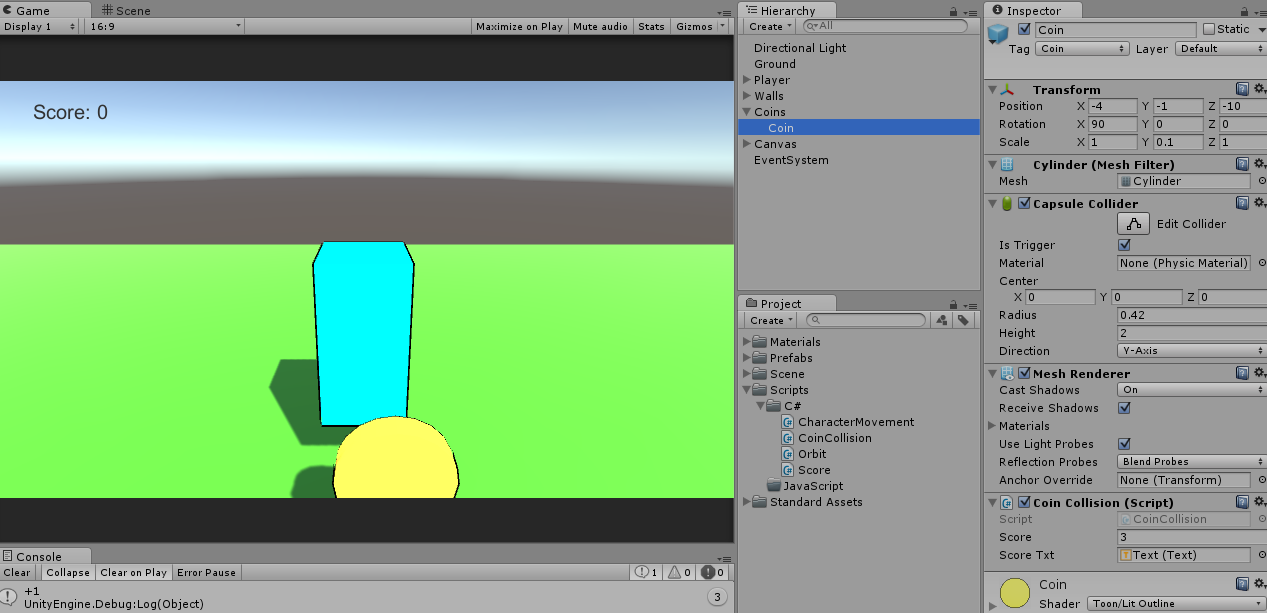
I'm trying to make a game and my score won't work. The int is showing that the score is 3. But the text still says zero here's my code:
Score: using UnityEngine; using UnityEngine.UI; using System.Collections;
public class Score : MonoBehaviour { public int score; public Text scoreTxt;
 // Use this for initialization
 void Start () {
     score = 0;
 }

 // Update is called once per frame
 void Update () {
     scoreTxt.text = "Score: " + score;
 }
} Now CoinCollision: using UnityEngine; using System.Collections;
public class CoinCollision : Score {
 public void init()
 {
     scoreTxt.text = score.ToString ();
 }
 // Use this for initialization
 void Start () {

 }

 // Update is called once per frame
 void Update () {

 }

 void OnTriggerEnter(Collider Col) {
     if (Col.tag == "Player") {
         score = score + 1;
         Debug.Log ("+1");

     }
 }
} Any ideas please let me know as soon as possible.

Class extending is useless here. You can make a score property static, but i not suggest it. Try to separate it. I wrote example:
Example:
 /// This class keeps a score and update a text.
 /// Attach it to the single game object.
 public class Score : $$anonymous$$onoBehaviour
 {
     public int score;
     public Text scoreTxt;

     void Start ()
     {
         score = 0;
     }

     void Update ()
     {
         scoreTxt.text = "Score: " + score;
     }
 }

 /// This class is attached to the coin. It sends a score + 1 if player touch it.
 public class CoinCollision : $$anonymous$$onoBehaviour
 {
     public Score scoreHandler;        // you need to put a score game object here (in inspector). You should make a game logic for this kind of fields (some singleton fe).

     void OnTriggerEnter(Collider col)
     {
         if (col.tag == "Player")
         {
             scoreHandler.score ++;

             Destroy(gameObject); // you should destroy it after touch.
         }
     }
 }

What would you put to be the gameObject from my screen? Or should I make one?
I need your help, $$anonymous$$asterio. How would I make a bullet shoot forward? Could you make a c# script and if it doesn't work I'll send you my project and you can see what is wrong and tell me or you can edit it and send it back to me. Please do this as soon as possible!
Simply create a new GameObject: call it "Score" and attach the Score script to it. Next place the Score object in scoreHandler field in every CoinCollision object.
The Score game object must be the only one object on the scene with the Score component.
If the player collided with the coin how would the score go up? Is the Coin the score gameObject you are on about? I don't understand what you mean could you make a unity project and do the score thing and take a screenshot and send it to me please. Thank you.
https://mega.nz/#!TshHXZpY!9BZmnCwGXNI8GVDIE2scjVx8tO9yT14tWYIDF7ZNX7g
thera are two ways with singleton or with handlers
It works but it still won't update I'll send it to you: https://www.dropbox.com/sh/gapkyisfidfyk8o/AAALfbEg9IiXqy6uZtiYwu3va?dl=0
You missed: 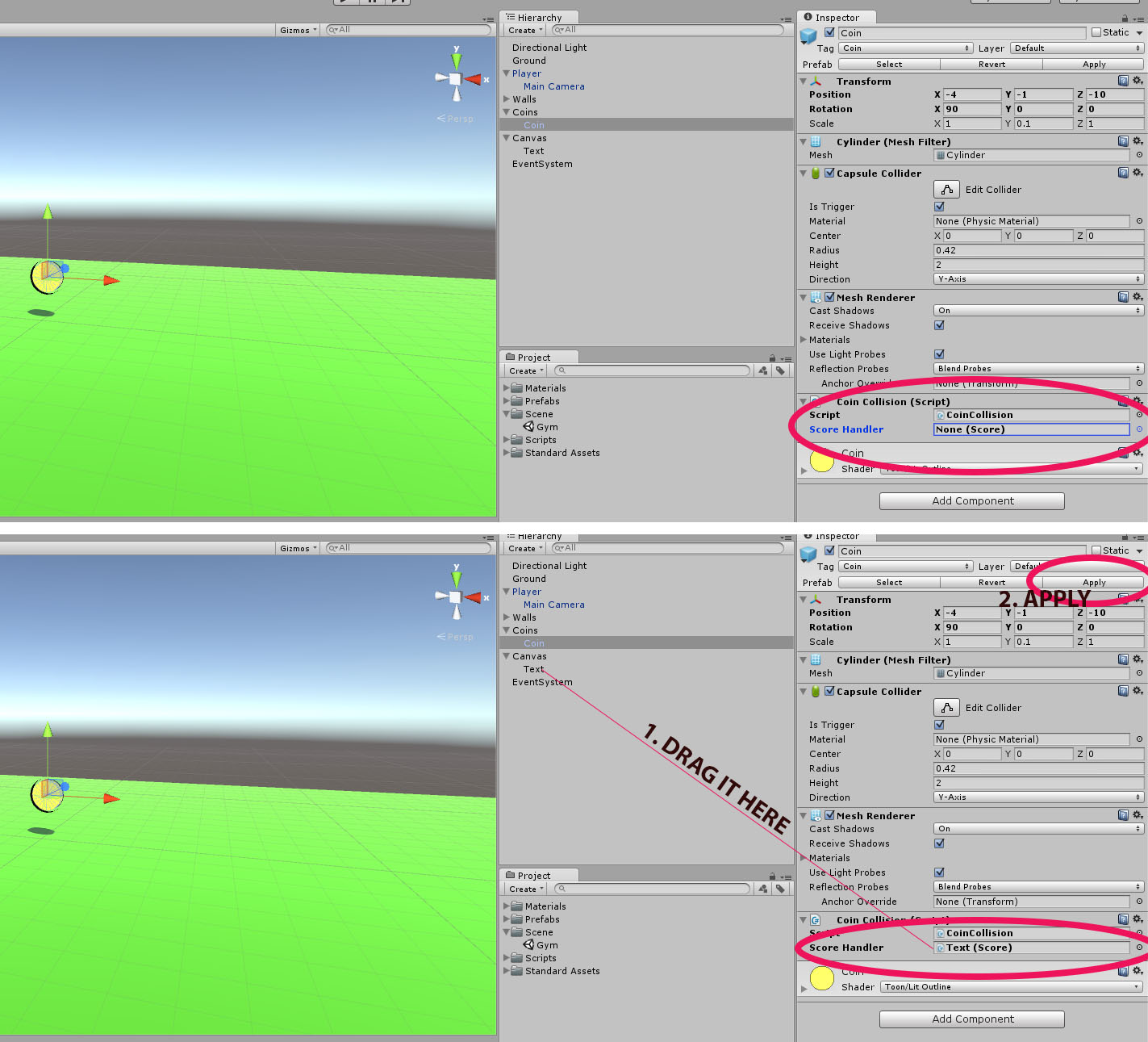
This is your reworked project lil bit. Added Game singleton, now you dont need to find Score handlers anymore.
https://mega.nz/#!3hoFWLgI!R9bJ2q4B4YXj$$anonymous$$r29ZVqSIcWN5Su4t7bPQWexfPL0WPA
I cannot say how much you have helped me with this. Thank you very much! What type of games do you make and could test one sometime?
I'am glad :) Press reward button if the answer helped you ;) I'm still looking for my direction, now i am works on 2D platformer game :)
I don't have any points also as you replied I can't you have to put an answer just like cdnDave did. If you are making any other games and you want someone to test it, let me know and I would sure enjoy testing your games.

It appears that the issue here is that the Update function in the base class (Score) isn't getting called because it's hidden by the Update function in the derived class(Coin Collision). Since the Update function in the derived class is empty anyway you should just be able to remove it. Doing that will unhide the base class Update function and it will be called every frame as you expect. The takeaway from this is that when you define a function in a derived class that already exists in the base class you're basically replacing the base class function. It seems that you're also defining a Start function in both classes, I expect that the base class start function is also not getting called.
Edit: From the looks of it you only have one coin right now but if you add more coins you are going to need to move the score handling to it's own script, right now each coin basically has it's own score instead of there being a single score that each coin increments.




