
Wayback Machinekoobas.hobune.stream
May JUN Jul
Previous capture 13 Next capture
2021 2022 2023
1 capture
13 Jun 22 - 13 Jun 22
sparklines
Close Help
  • Products
  • Solutions
  • Made with Unity
  • Learning
  • Support & Services
  • Community
  • Asset Store
  • Get Unity

UNITY ACCOUNT

You need a Unity Account to shop in the Online and Asset Stores, participate in the Unity Community and manage your license portfolio. Login Create account
  • Blog
  • Forums
  • Answers
  • Evangelists
  • User Groups
  • Beta Program
  • Advisory Panel

Navigation

  • Home
  • Products
  • Solutions
  • Made with Unity
  • Learning
  • Support & Services
  • Community
    • Blog
    • Forums
    • Answers
    • Evangelists
    • User Groups
    • Beta Program
    • Advisory Panel

Unity account

You need a Unity Account to shop in the Online and Asset Stores, participate in the Unity Community and manage your license portfolio. Login Create account

Language

  • Chinese
  • Spanish
  • Japanese
  • Korean
  • Portuguese
  • Ask a question
  • Spaces
    • Default
    • Help Room
    • META
    • Moderators
    • Topics
    • Questions
    • Users
    • Badges
  • Home /
avatar image
0
Question by digitalbath · Oct 02, 2014 at 03:55 PM · c#transformrotate

Find the Y rotation of a cylinderTarget tracked with Vuforia

I've setup the CylinderTarget AR tracking sample from the Vuforia website and it's tracking a Coke can well.

I'm trying to use the rotation of of the tracked can to control other aspects of my game.

When the can is pointing up, reading the rotation around the Y axis gives the expected result. however reading the y rotation once the cylinder is rotated into other directions by the tracking system messes everything up.

I've tried reading from a few different rotation values, eulerAngles.y, localEulerAngles.y, localRotation.y and just rotation.y but none seem to give me just the rotation around the local y axis.

When I spin the physical can on its Y axis, the other rotation values (Z and X) always change wildly too.

I know this could seem to be more of a Vuforia topic than Unity but I think I'm just missing something fundamental about Unity rotation transforms.

what I'm I getting wrong?? thanks.

Itransform example
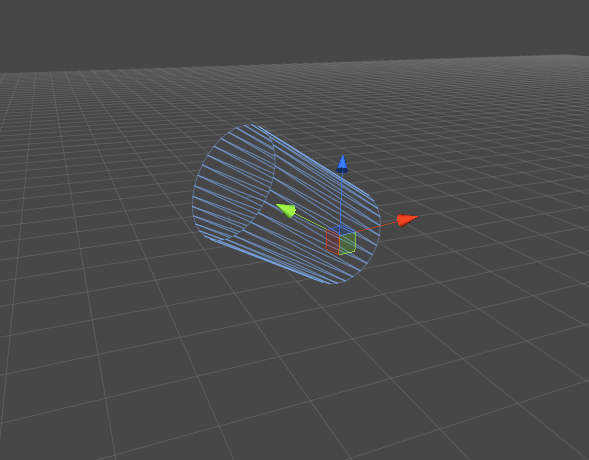
(I've set the ARCamera to World Centre Mode to CAMERA so that the Cylinder is the thing that moves not the camera.)

screen shot 2014-10-02 at 14.36.06.png (97.3 kB)
Comment
Add comment · Show 2
10 |3000 characters needed characters left characters exceeded
▼
  • Viewable by all users
  • Viewable by moderators
  • Viewable by moderators and the original poster
  • Advanced visibility
Viewable by all users
avatar image robertbu · Oct 02, 2014 at 03:56 PM 0
Share

Not a lot of experience with Vuforia, but Vuiforia rotates the camera, not objects, so your object is not rotating unless you are writing code that explicitly rotates it.

avatar image digitalbath · Oct 02, 2014 at 04:01 PM 0
Share

I found a setting in Vuforia to rotate the object ins$$anonymous$$d. - it's the World Centre $$anonymous$$ode setting I mentioned above.

1 Reply

· Add your reply
  • Sort: 
avatar image
1
Best Answer

Answer by robertbu · Oct 02, 2014 at 04:19 PM

I'm assuming you are reading transform.eulerAngles.y to get your rotation. The problem with eulerAngles is that they change representation. For example if you set a rotation of (180,0,0) and immediately read it back, you will get a rotation of (0,180,180)...the same physical rotation represented differently. I don't know how you are using this information. For some uses, the problem can be solved using vectors. Here is one calculation that may give you what you are looking for for some uses:

 var heading = Mathf.Atan2(transform.forward.z, transform.forward.x) * Mathf.Rad2Deg;

Note that the reference is the ground plane, and this calculation will fail if the local 'y' axis is parallel to the XZ plane.

Comment
Add comment · Show 2 · Share
10 |3000 characters needed characters left characters exceeded
▼
  • Viewable by all users
  • Viewable by moderators
  • Viewable by moderators and the original poster
  • Advanced visibility
Viewable by all users
avatar image digitalbath · Oct 03, 2014 at 12:58 PM 0
Share

that seems to have done it. thanks!! :)

avatar image Brain-_-Fail · Nov 22, 2019 at 04:34 AM 0
Share

Hi robertbu!. I'm trying to achieve something related to this. What I want is to detect the real world tilt/yaw/rotation along z-axis of a cylinder target in degrees independent of device camera rotation. I know this might need a slight modification in the equation you posted above, but i am not sure cause I don't understand the math behind Atan2. Will this calculate me the realworld z rotation of the detected cylinder target:?

var yaw= $$anonymous$$athf.Atan2(transform.forward.y, transform.forward.z) * $$anonymous$$athf.Rad2Deg;

Your answer

Hint: You can notify a user about this post by typing @username

Up to 2 attachments (including images) can be used with a maximum of 524.3 kB each and 1.0 MB total.

Follow this Question

Answers Answers and Comments

3 People are following this question.

avatar image avatar image avatar image

Related Questions

Distribute terrain in zones 3 Answers

how to rotate GameObject towards joystick 1 Answer

transform.Rotate will not work 1 Answer

Multiple Cars not working 1 Answer

Moving Camera on player stop then move and rotate to separate point? 0 Answers


Enterprise
Social Q&A

Social
Subscribe on YouTube social-youtube Follow on LinkedIn social-linkedin Follow on Twitter social-twitter Follow on Facebook social-facebook Follow on Instagram social-instagram

Footer

  • Purchase
    • Products
    • Subscription
    • Asset Store
    • Unity Gear
    • Resellers
  • Education
    • Students
    • Educators
    • Certification
    • Learn
    • Center of Excellence
  • Download
    • Unity
    • Beta Program
  • Unity Labs
    • Labs
    • Publications
  • Resources
    • Learn platform
    • Community
    • Documentation
    • Unity QA
    • FAQ
    • Services Status
    • Connect
  • About Unity
    • About Us
    • Blog
    • Events
    • Careers
    • Contact
    • Press
    • Partners
    • Affiliates
    • Security
Copyright © 2020 Unity Technologies
  • Legal
  • Privacy Policy
  • Cookies
  • Do Not Sell My Personal Information
  • Cookies Settings
"Unity", Unity logos, and other Unity trademarks are trademarks or registered trademarks of Unity Technologies or its affiliates in the U.S. and elsewhere (more info here). Other names or brands are trademarks of their respective owners.
  • Anonymous
  • Sign in
  • Create
  • Ask a question
  • Spaces
  • Default
  • Help Room
  • META
  • Moderators
  • Explore
  • Topics
  • Questions
  • Users
  • Badges
