 koobas.hobune.stream


FristPerson Problem
I have problem with firstperson. In unity i have error because of which i can not run Playmode. 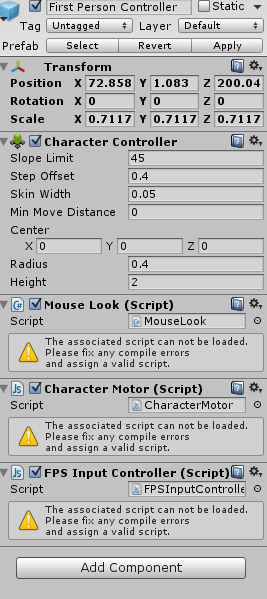
My settings in Mouse Look.
using UnityEngine; using System.Collections;
/// MouseLook rotates the transform based on the mouse delta. /// Minimum and Maximum values can be used to constrain the possible rotation
/// To make an FPS style character: /// - Create a capsule. /// - Add the MouseLook script to the capsule. /// -> Set the mouse look to use LookX. (You want to only turn character but not tilt it) /// - Add FPSInputController script to the capsule /// -> A CharacterMotor and a CharacterController component will be automatically added.
/// - Create a camera. Make the camera a child of the capsule. Reset it's transform. /// - Add a MouseLook script to the camera. /// -> Set the mouse look to use LookY. (You want the camera to tilt up and down like a head. The character already turns.) [AddComponentMenu("Camera-Control/Mouse Look")] public class MouseLook : MonoBehaviour {
 public enum RotationAxes { MouseXAndY = 0, MouseX = 1, MouseY = 2 }
 public RotationAxes axes = RotationAxes.MouseXAndY;
 public float sensitivityX = 15F;
 public float sensitivityY = 15F;

 public float minimumX = -360F;
 public float maximumX = 360F;

 public float minimumY = -60F;
 public float maximumY = 60F;

 float rotationY = 0F;

 void Update ()
 {
     if (axes == RotationAxes.MouseXAndY)
     {
         float rotationX = transform.localEulerAngles.y + Input.GetAxis("Mouse X") * sensitivityX;

         rotationY += Input.GetAxis("Mouse Y") * sensitivityY;
         rotationY = Mathf.Clamp (rotationY, minimumY, maximumY);

         transform.localEulerAngles = new Vector3(-rotationY, rotationX, 0);
     }
     else if (axes == RotationAxes.MouseX)
     {
         transform.Rotate(0, Input.GetAxis("Mouse X") * sensitivityX, 0);
     }
     else
     {
         rotationY += Input.GetAxis("Mouse Y") * sensitivityY;
         rotationY = Mathf.Clamp (rotationY, minimumY, maximumY);

         transform.localEulerAngles = new Vector3(-rotationY, transform.localEulerAngles.y, 0);
     }
 }
My settings in Character Monitor.
pragma strict
pragma implicit #pragma downcast
// Does this script currently respond to input? var canControl : boolean = true;
var useFixedUpdate : boolean = true;
// For the next variables, @System.NonSerialized tells Unity to not serialize the variable or show it in the inspector view. // Very handy for organization!
// The current global direction we want the character to move in. @System.NonSerialized var inputMoveDirection : Vector3 = Vector3.zero;
// Is the jump button held down? We use this interface instead of checking // for the jump button directly so this script can also be used by AIs. @System.NonSerialized var inputJump : boolean = false;
class CharacterMotorMovement { // The maximum horizontal speed when moving var maxForwardSpeed : float = 10.0; var maxSidewaysSpeed : float = 10.0; var maxBackwardsSpeed : float = 10.0;
 // Curve for multiplying speed based on slope (negative = downwards)
 var slopeSpeedMultiplier : AnimationCurve = AnimationCurve(Keyframe(-90, 1), Keyframe(0, 1), Keyframe(90, 0));

 // How fast does the character change speeds?  Higher is faster.
 var maxGroundAcceleration : float = 30.0;
 var maxAirAcceleration : float = 20.0;

 // The gravity for the character
 var gravity : float = 10.0;
 var maxFallSpeed : float = 20.0;

 // For the next variables, @System.NonSerialized tells Unity to not serialize the variable or show it in the inspector view.
 // Very handy for organization!

 // The last collision flags returned from controller.Move
 @System.NonSerialized
 var collisionFlags : CollisionFlags;

 // We will keep track of the character's current velocity,
 @System.NonSerialized
 var velocity : Vector3;

 // This keeps track of our current velocity while we're not grounded
 @System.NonSerialized
 var frameVelocity : Vector3 = Vector3.zero;

 @System.NonSerialized
 var hitPoint : Vector3 = Vector3.zero;

 @System.NonSerialized
 var lastHitPoint : Vector3 = Vector3(Mathf.Infinity, 0, 0);
}
var movement : CharacterMotorMovement = CharacterMotorMovement();
enum MovementTransferOnJump { None, // The jump is not affected by velocity of floor at all. InitTransfer, // Jump gets its initial velocity from the floor, then gradualy comes to a stop. PermaTransfer, // Jump gets its initial velocity from the floor, and keeps that velocity until landing. PermaLocked // Jump is relative to the movement of the last touched floor and will move together with that floor. }
// We will contain all the jumping related variables in one helper class for clarity. class CharacterMotorJumping { // Can the character jump? var enabled : boolean = true;
 // How high do we jump when pressing jump and letting go immediately
 var baseHeight : float = 1.0;

 // We add extraHeight units (meters) on top when holding the button down longer while jumping
 var extraHeight : float = 4.1;

 // How much does the character jump out perpendicular to the surface on walkable surfaces?
 // 0 means a fully vertical jump and 1 means fully perpendicular.
 var perpAmount : float = 0.0;

 // How much does the character jump out perpendicular to the surface on too steep surfaces?
 // 0 means a fully vertical jump and 1 means fully perpendicular.
 var steepPerpAmount : float = 0.5;

 // For the next variables, @System.NonSerialized tells Unity to not serialize the variable or show it in the inspector view.
 // Very handy for organization!

 // Are we jumping? (Initiated with jump button and not grounded yet)
 // To see if we are just in the air (initiated by jumping OR falling) see the grounded variable.
 @System.NonSerialized
 var jumping : boolean = false;

 @System.NonSerialized
 var holdingJumpButton : boolean = false;

 // the time we jumped at (Used to determine for how long to apply extra jump power after jumping.)
 @System.NonSerialized
 var lastStartTime : float = 0.0;

 @System.NonSerialized
 var lastButtonDownTime : float = -100;

 @System.NonSerialized
 var jumpDir : Vector3 = Vector3.up;
}
var jumping : CharacterMotorJumping = CharacterMotorJumping();
class CharacterMotorMovingPlatform { var enabled : boolean = true;
 var movementTransfer : MovementTransferOnJump = MovementTransferOnJump.PermaTransfer;

 @System.NonSerialized
 var hitPlatform : Transform;

 @System.NonSerialized
 var activePlatform : Transform;

 @System.NonSerialized
 var activeLocalPoint : Vector3;

 @System.NonSerialized
 var activeGlobalPoint : Vector3;

 @System.NonSerialized
 var activeLocalRotation : Quaternion;

 @System.NonSerialized
 var activeGlobalRotation : Quaternion;

 @System.NonSerialized
 var lastMatrix : Matrix4x4;

 @System.NonSerialized
 var platformVelocity : Vector3;

 @System.NonSerialized
 var newPlatform : boolean;
}
var movingPlatform : CharacterMotorMovingPlatform = CharacterMotorMovingPlatform();
class CharacterMotorSliding { // Does the character slide on too steep surfaces? var enabled : boolean = true;
 // How fast does the character slide on steep surfaces?
 var slidingSpeed : float = 15;

 // How much can the player control the sliding direction?
 // If the value is 0.5 the player can slide sideways with half the speed of the downwards sliding speed.
 var sidewaysControl : float = 1.0;

 // How much can the player influence the sliding speed?
 // If the value is 0.5 the player can speed the sliding up to 150% or slow it down to 50%.
 var speedControl : float = 0.4;
}
var sliding : CharacterMotorSliding = CharacterMotorSliding();
@System.NonSerialized var grounded : boolean = true;
@System.NonSerialized var groundNormal : Vector3 = Vector3.zero;
private var lastGroundNormal : Vector3 = Vector3.zero;
private var tr : Transform;
private var controller : CharacterController;
function Awake () { controller = GetComponent (CharacterController); tr = transform; }
private function UpdateFunction () { // We copy the actual velocity into a temporary variable that we can manipulate. var velocity : Vector3 = movement.velocity;
 // Update velocity based on input
 velocity = ApplyInputVelocityChange(velocity);

 // Apply gravity and jumping force
 velocity = ApplyGravityAndJumping (velocity);

 // Moving platform support
 var moveDistance : Vector3 = Vector3.zero;
 if (MoveWithPlatform()) {
     var newGlobalPoint : Vector3 = movingPlatform.activePlatform.TransformPoint(movingPlatform.activeLocalPoint);
     moveDistance = (newGlobalPoint - movingPlatform.activeGlobalPoint);
     if (moveDistance != Vector3.zero)
         controller.Move(moveDistance);

     // Support moving platform rotation as well:
     var newGlobalRotation : Quaternion = movingPlatform.activePlatform.rotation * movingPlatform.activeLocalRotation;
     var rotationDiff : Quaternion = newGlobalRotation * Quaternion.Inverse(movingPlatform.activeGlobalRotation);

     var yRotation = rotationDiff.eulerAngles.y;
     if (yRotation != 0) {
         // Prevent rotation of the local up vector
         tr.Rotate(0, yRotation, 0);
     }
 }

 // Save lastPosition for velocity calculation.
 var lastPosition : Vector3 = tr.position;

 // We always want the movement to be framerate independent.  Multiplying by Time.deltaTime does this.
 var currentMovementOffset : Vector3 = velocity * Time.deltaTime;

 // Find out how much we need to push towards the ground to avoid loosing grouning
 // when walking down a step or over a sharp change in slope.
 var pushDownOffset : float = Mathf.Max(controller.stepOffset, Vector3(currentMovementOffset.x, 0, currentMovementOffset.z).magnitude);
 if (grounded)
     currentMovementOffset -= pushDownOffset * Vector3.up;

 // Reset variables that will be set by collision function
 movingPlatform.hitPlatform = null;
 groundNormal = Vector3.zero;

    // Move our character!
 movement.collisionFlags = controller.Move (currentMovementOffset);

 movement.lastHitPoint = movement.hitPoint;
 lastGroundNormal = groundNormal;

 if (movingPlatform.enabled && movingPlatform.activePlatform != movingPlatform.hitPlatform) {
     if (movingPlatform.hitPlatform != null) {
         movingPlatform.activePlatform = movingPlatform.hitPlatform;
         movingPlatform.lastMatrix = movingPlatform.hitPlatform.localToWorldMatrix;
         movingPlatform.newPlatform = true;
     }
 }

 // Calculate the velocity based on the current and previous position.
 // This means our velocity will only be the amount the character actually moved as a result of collisions.
 var oldHVelocity : Vector3 = new Vector3(velocity.x, 0, velocity.z);
 movement.velocity = (tr.position - lastPosition) / Time.deltaTime;
 var newHVelocity : Vector3 = new Vector3(movement.velocity.x, 0, movement.velocity.z);

 // The CharacterController can be moved in unwanted directions when colliding with things.
 // We want to prevent this from influencing the recorded velocity.
 if (oldHVelocity == Vector3.zero) {
     movement.velocity = new Vector3(0, movement.velocity.y, 0);
 }
 else {
     var projectedNewVelocity : float = Vector3.Dot(newHVelocity, oldHVelocity) / oldHVelocity.sqrMagnitude;
     movement.velocity = oldHVelocity * Mathf.Clamp01(projectedNewVelocity) + movement.velocity.y * Vector3.up;
 }

 if (movement.velocity.y < velocity.y - 0.001) {
     if (movement.velocity.y < 0) {
         // Something is forcing the CharacterController down faster than it should.
         // Ignore this
         movement.velocity.y = velocity.y;
     }
     else {
         // The upwards movement of the CharacterController has been blocked.
         // This is treated like a ceiling collision - stop further jumping here.
         jumping.holdingJumpButton = false;
     }
 }

 // We were grounded but just loosed grounding
 if (grounded && !IsGroundedTest()) {
     grounded = false;

     // Apply inertia from platform
     if (movingPlatform.enabled &&
         (movingPlatform.movementTransfer == MovementTransferOnJump.InitTransfer ||
         movingPlatform.movementTransfer == MovementTransferOnJump.PermaTransfer)
     ) {
         movement.frameVelocity = movingPlatform.platformVelocity;
         movement.velocity += movingPlatform.platformVelocity;
     }

     SendMessage("OnFall", SendMessageOptions.DontRequireReceiver);
     // We pushed the character down to ensure it would stay on the ground if there was any.
     // But there wasn't so now we cancel the downwards offset to make the fall smoother.
     tr.position += pushDownOffset * Vector3.up;
 }
 // We were not grounded but just landed on something
 else if (!grounded && IsGroundedTest()) {
     grounded = true;
     jumping.jumping = false;
     SubtractNewPlatformVelocity();

     SendMessage("OnLand", SendMessageOptions.DontRequireReceiver);
 }

 // Moving platforms support
 if (MoveWithPlatform()) {
     // Use the center of the lower half sphere of the capsule as reference point.
     // This works best when the character is standing on moving tilting platforms.
     movingPlatform.activeGlobalPoint = tr.position + Vector3.up * (controller.center.y - controller.height*0.5 + controller.radius);
     movingPlatform.activeLocalPoint = movingPlatform.activePlatform.InverseTransformPoint(movingPlatform.activeGlobalPoint);

     // Support moving platform rotation as well:
     movingPlatform.activeGlobalRotation = tr.rotation;
     movingPlatform.activeLocalRotation = Quaternion.Inverse(movingPlatform.activePlatform.rotation) * movingPlatform.activeGlobalRotation;
 }
}
function FixedUpdate () { if (movingPlatform.enabled) { if (movingPlatform.activePlatform != null) { if (!movingPlatform.newPlatform) { var lastVelocity : Vector3 = movingPlatform.platformVelocity;
             movingPlatform.platformVelocity = (
                 movingPlatform.activePlatform.localToWorldMatrix.MultiplyPoint3x4(movingPlatform.activeLocalPoint)
                 - movingPlatform.lastMatrix.MultiplyPoint3x4(movingPlatform.activeLocalPoint)
             ) / Time.deltaTime;
         }
         movingPlatform.lastMatrix = movingPlatform.activePlatform.localToWorldMatrix;
         movingPlatform.newPlatform = false;
     }
     else {
         movingPlatform.platformVelocity = Vector3.zero;
     }
 }

 if (useFixedUpdate)
     UpdateFunction();
}
function Update () { if (!useFixedUpdate) UpdateFunction(); }
private function ApplyInputVelocityChange (velocity : Vector3) {
if (!canControl) inputMoveDirection = Vector3.zero;
 // Find desired velocity
 var desiredVelocity : Vector3;
 if (grounded && TooSteep()) {
     // The direction we're sliding in
     desiredVelocity = Vector3(groundNormal.x, 0, groundNormal.z).normalized;
     // Find the input movement direction projected onto the sliding direction
     var projectedMoveDir = Vector3.Project(inputMoveDirection, desiredVelocity);
     // Add the sliding direction, the spped control, and the sideways control vectors
     desiredVelocity = desiredVelocity + projectedMoveDir * sliding.speedControl + (inputMoveDirection - projectedMoveDir) * sliding.sidewaysControl;
     // Multiply with the sliding speed
     desiredVelocity *= sliding.slidingSpeed;
 }
 else
     desiredVelocity = GetDesiredHorizontalVelocity();

 if (movingPlatform.enabled && movingPlatform.movementTransfer == MovementTransferOnJump.PermaTransfer) {
     desiredVelocity += movement.frameVelocity;
     desiredVelocity.y = 0;
 }

 if (grounded)
     desiredVelocity = AdjustGroundVelocityToNormal(desiredVelocity, groundNormal);
 else
     velocity.y = 0;

 // Enforce max velocity change
 var maxVelocityChange : float = GetMaxAcceleration(grounded) * Time.deltaTime;
 var velocityChangeVector : Vector3 = (desiredVelocity - velocity);
 if (velocityChangeVector.sqrMagnitude > maxVelocityChange * maxVelocityChange) {
     velocityChangeVector = velocityChangeVector.normalized * maxVelocityChange;
 }
 // If we're in the air and don't have control, don't apply any velocity change at all.
 // If we're on the ground and don't have control we do apply it - it will correspond to friction.
 if (grounded || canControl)
     velocity += velocityChangeVector;

 if (grounded) {
     // When going uphill, the CharacterController will automatically move up by the needed amount.
     // Not moving it upwards manually prevent risk of lifting off from the ground.
     // When going downhill, DO move down manually, as gravity is not enough on steep hills.
     velocity.y = Mathf.Min(velocity.y, 0);
 }

 return velocity;
}
private function ApplyGravityAndJumping (velocity : Vector3) {
 if (!inputJump || !canControl) {
     jumping.holdingJumpButton = false;
     jumping.lastButtonDownTime = -100;
 }

 if (inputJump && jumping.lastButtonDownTime < 0 && canControl)
     jumping.lastButtonDownTime = Time.time;

 if (grounded)
     velocity.y = Mathf.Min(0, velocity.y) - movement.gravity * Time.deltaTime;
 else {
     velocity.y = movement.velocity.y - movement.gravity * Time.deltaTime;

     // When jumping up we don't apply gravity for some time when the user is holding the jump button.
     // This gives more control over jump height by pressing the button longer.
     if (jumping.jumping && jumping.holdingJumpButton) {
         // Calculate the duration that the extra jump force should have effect.
         // If we're still less than that duration after the jumping time, apply the force.
         if (Time.time < jumping.lastStartTime + jumping.extraHeight / CalculateJumpVerticalSpeed(jumping.baseHeight)) {
             // Negate the gravity we just applied, except we push in jumpDir rather than jump upwards.
             velocity += jumping.jumpDir * movement.gravity * Time.deltaTime;
         }
     }

     // Make sure we don't fall any faster than maxFallSpeed. This gives our character a terminal velocity.
     velocity.y = Mathf.Max (velocity.y, -movement.maxFallSpeed);
 }

 if (grounded) {
     // Jump only if the jump button was pressed down in the last 0.2 seconds.
     // We use this check instead of checking if it's pressed down right now
     // because players will often try to jump in the exact moment when hitting the ground after a jump
     // and if they hit the button a fraction of a second too soon and no new jump happens as a consequence,
     // it's confusing and it feels like the game is buggy.
     if (jumping.enabled && canControl && (Time.time - jumping.lastButtonDownTime < 0.2)) {
         grounded = false;
         jumping.jumping = true;
         jumping.lastStartTime = Time.time;
         jumping.lastButtonDownTime = -100;
         jumping.holdingJumpButton = true;

         // Calculate the jumping direction
         if (TooSteep())
             jumping.jumpDir = Vector3.Slerp(Vector3.up, groundNormal, jumping.steepPerpAmount);
         else
             jumping.jumpDir = Vector3.Slerp(Vector3.up, groundNormal, jumping.perpAmount);

         // Apply the jumping force to the velocity. Cancel any vertical velocity first.
         velocity.y = 0;
         velocity += jumping.jumpDir * CalculateJumpVerticalSpeed (jumping.baseHeight);

         // Apply inertia from platform
         if (movingPlatform.enabled &&
             (movingPlatform.movementTransfer == MovementTransferOnJump.InitTransfer ||
             movingPlatform.movementTransfer == MovementTransferOnJump.PermaTransfer)
         ) {
             movement.frameVelocity = movingPlatform.platformVelocity;
             velocity += movingPlatform.platformVelocity;
         }

         SendMessage("OnJump", SendMessageOptions.DontRequireReceiver);
     }
     else {
         jumping.holdingJumpButton = false;
     }
 }

 return velocity;
}
function OnControllerColliderHit (hit : ControllerColliderHit) { if (hit.normal.y > 0 && hit.normal.y > groundNormal.y && hit.moveDirection.y < 0) { if ((hit.point - movement.lastHitPoint).sqrMagnitude > 0.001 || lastGroundNormal == Vector3.zero) groundNormal = hit.normal; else groundNormal = lastGroundNormal;
     movingPlatform.hitPlatform = hit.collider.transform;
     movement.hitPoint = hit.point;
     movement.frameVelocity = Vector3.zero;
 }
}
private function SubtractNewPlatformVelocity () { // When landing, subtract the velocity of the new ground from the character's velocity // since movement in ground is relative to the movement of the ground. if (movingPlatform.enabled && (movingPlatform.movementTransfer == MovementTransferOnJump.InitTransfer || movingPlatform.movementTransfer == MovementTransferOnJump.PermaTransfer) ) { // If we landed on a new platform, we have to wait for two FixedUpdates // before we know the velocity of the platform under the character if (movingPlatform.newPlatform) { var platform : Transform = movingPlatform.activePlatform; yield WaitForFixedUpdate(); yield WaitForFixedUpdate(); if (grounded && platform == movingPlatform.activePlatform) yield 1; } movement.velocity -= movingPlatform.platformVelocity; } }
private function MoveWithPlatform () : boolean { return ( movingPlatform.enabled && (grounded || movingPlatform.movementTransfer == MovementTransferOnJump.PermaLocked) && movingPlatform.activePlatform != null ); }
private function GetDesiredHorizontalVelocity () { // Find desired velocity var desiredLocalDirection : Vector3 = tr.InverseTransformDirection(inputMoveDirection); var maxSpeed : float = MaxSpeedInDirection(desiredLocalDirection); if (grounded) { // Modify max speed on slopes based on slope speed multiplier curve var movementSlopeAngle = Mathf.Asin(movement.velocity.normalized.y) Mathf.Rad2Deg; maxSpeed = movement.slopeSpeedMultiplier.Evaluate(movementSlopeAngle); } return tr.TransformDirection(desiredLocalDirection * maxSpeed); }
private function AdjustGroundVelocityToNormal (hVelocity : Vector3, groundNormal : Vector3) : Vector3 { var sideways : Vector3 = Vector3.Cross(Vector3.up, hVelocity); return Vector3.Cross(sideways, groundNormal).normalized * hVelocity.magnitude; }
private function IsGroundedTest () { return (groundNormal.y > 0.01); }
function GetMaxAcceleration (grounded : boolean) : float { // Maximum acceleration on ground and in air if (grounded) return movement.maxGroundAcceleration; else return movement.maxAirAcceleration; }
function CalculateJumpVerticalSpeed (targetJumpHeight : float) { // From the jump height and gravity we deduce the upwards speed // for the character to reach at the apex. return Mathf.Sqrt (2 targetJumpHeight movement.gravity); }
function IsJumping () { return jumping.jumping; }
function IsSliding () { return (grounded && sliding.enabled && TooSteep()); }
function IsTouchingCeiling () { return (movement.collisionFlags & CollisionFlags.CollidedAbove) != 0; }
function IsGrounded () { return grounded; }
function TooSteep () { return (groundNormal.y <= Mathf.Cos(controller.slopeLimit * Mathf.Deg2Rad)); }
function GetDirection () { return inputMoveDirection; }
function SetControllable (controllable : boolean) { canControl = controllable; }
// Project a direction onto elliptical quater segments based on forward, sideways, and backwards speed. // The function returns the length of the resulting vector. function MaxSpeedInDirection (desiredMovementDirection : Vector3) : float { if (desiredMovementDirection == Vector3.zero) return 0; else { var zAxisEllipseMultiplier : float = (desiredMovementDirection.z > 0 ? movement.maxForwardSpeed : movement.maxBackwardsSpeed) / movement.maxSidewaysSpeed; var temp : Vector3 = new Vector3(desiredMovementDirection.x, 0, desiredMovementDirection.z / zAxisEllipseMultiplier).normalized; var length : float = new Vector3(temp.x, 0, temp.z zAxisEllipseMultiplier).magnitude movement.maxSidewaysSpeed; return length; } }
function SetVelocity (velocity : Vector3) { grounded = false; movement.velocity = velocity; movement.frameVelocity = Vector3.zero; SendMessage("OnExternalVelocity"); }
// Require a character controller to be attached to the same game object @script RequireComponent (CharacterController) @script AddComponentMenu ("Character/Character Motor")
My settings in FPS Input Controler.
private var motor : CharacterMotor;
// Use this for initialization function Awake () { motor = GetComponent(CharacterMotor); }
// Update is called once per frame function Update () { // Get the input vector from kayboard or analog stick var directionVector = new Vector3(Input.GetAxis("Horizontal"), 0, Input.GetAxis("Vertical"));
 if (directionVector != Vector3.zero) {
     // Get the length of the directon vector and then normalize it
     // Dividing by the length is cheaper than normalizing when we already have the length anyway
     var directionLength = directionVector.magnitude;
     directionVector = directionVector / directionLength;

     // Make sure the length is no bigger than 1
     directionLength = Mathf.Min(1, directionLength);

     // Make the input vector more sensitive towards the extremes and less sensitive in the middle
     // This makes it easier to control slow speeds when using analog sticks
     directionLength = directionLength * directionLength;

     // Multiply the normalized direction vector by the modified length
     directionVector = directionVector * directionLength;
 }

 // Apply the direction to the CharacterMotor
 motor.inputMoveDirection = transform.rotation * directionVector;
 motor.inputJump = Input.GetButton("Jump");
}
// Require a character controller to be attached to the same game object @script RequireComponent (CharacterMotor) @script AddComponentMenu ("Character/FPS Input Controller")
Please Help!



