 koobas.hobune.stream


Play FULL walking animation
I have a model i created in maya with 3 different animations ... an Idle, a walk and a run cycle...I imported it into Unity and split the animations and attached the following script to it:
private var walkSpeed : float = 1.0; private var gravity = 100.0; private var moveDirection : Vector3 = Vector3.zero; private var charController : CharacterController;
function Start() { charController = GetComponent(CharacterController); animation.wrapMode = WrapMode.Loop; }
function Update () { if(charController.isGrounded == true) { if(Input.GetAxis("Vertical") > .1) { if(Input.GetButton("Run")) { animation.CrossFade("run"); walkSpeed = 4; } else { animation["walk"].speed = 1; animation.CrossFade("walk"); walkSpeed = 1; } } else if(Input.GetAxis("Vertical") < -.1) { animation["walk"].speed = -1; animation.CrossFade("walk"); walkSpeed = 1; } else { animation.CrossFade("idle"); }
     // Create an animation cycle for when the character is turning on the spot
     if(Input.GetAxis("Horizontal") && !Input.GetAxis("Vertical"))
     {
         animation.CrossFade("walk");
     }


     transform.eulerAngles.y += Input.GetAxis("Horizontal");

     // Calculate the movement direction (forward motion)
     moveDirection = Vector3(0,0, Input.GetAxis("Vertical"));
     moveDirection = transform.TransformDirection(moveDirection);

 }

 moveDirection.y -= gravity * Time.deltaTime;
 charController.Move(moveDirection * (Time.deltaTime * walkSpeed));
}
The problem im having is when i play the game, the character plays the animations but not fully through...it will go through a few frames then jump right to the idle position...any ideas on how to make the full animation play?
Also, is there a way to speed up the animation? Because sometimes it looks like the animation plays very slow or takes a while to register... Thanks in advance!

I'm a n00b and I had this problem perplexing me as well. I'm still going through the tutorial videos, and I purchased a character just to play around with who has a long complex idle state in which she looks around shifts her body around and fidgets. It's humorous, but if I start walking, the walking animation isn't triggered by the state transition arrow. The character moves around the plane just fine, but she does so doing her idle animation.
Searching for answers in Google and in Unity Answers brought me to your question. Alas, it had no answers at the time, so I carried on.
I discovered there's a checkbox called HAS EXIT TIME (you have to be in the Animator, then click on each of the transition arrows, and you'll see the checkbox in the Inspector for this variable). If this is checked, then the animation can only be interrupted during its "exit time." So if you uncheck HAS EXIT TIME, the animation can be interrupted any time during the animation.
There's also a variable called LOOP TIME (you have to be in the Scene, then click on the animation in the Assets, and you'll see the checkbox in the Inspector for the animation). This variable must be checked for the animation to be repeated. This also perplexed me for a time. The character would do the walking animation for one loop, then freeze, even as I continued walking. When I checked LOOP TIME, the walking animation repeated as long as the character walked.
Now that I figured it out on my own, I thought to come back and answer your question. I see your question is several years old and still has no answers, so I hope my answer is still helpful for you.
So in summary, you want to uncheck HAS EXIT TIME in each transition, and you want to check LOOP TIME in each animation. This will let your animations repeat over and over as long as that state is true. And will let you interrupt an animation in the middle of that animation to change state to a different animation, which will repeat over and over while that state is true.

Single click the animation in animator it will Show a parameter of Speed in Inspector. There you can set the speed of the animation.
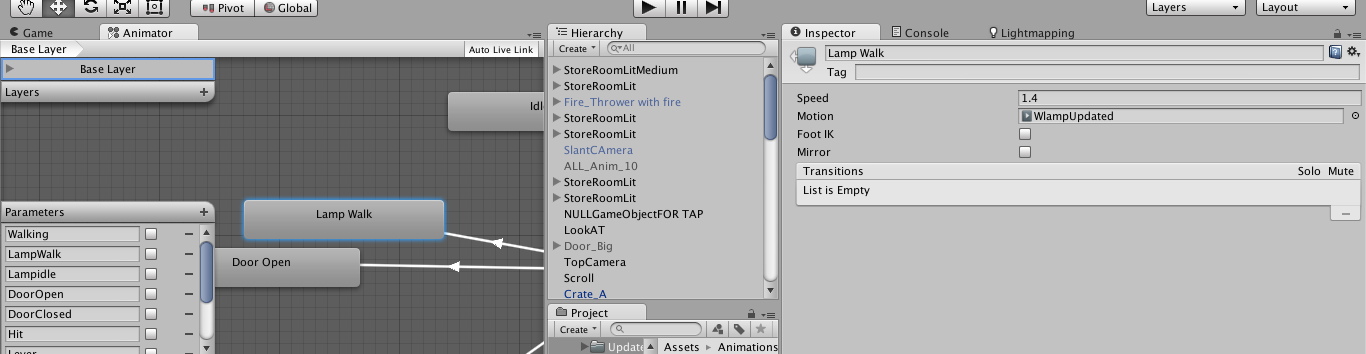
*Tip:- You can also give the speed in negative to invert the animation ( to reverse/backward the animation)
For complete the animation pls check the following links hope they will help
http://docs.unity3d.com/Manual/class-Transition.html http://answers.unity3d.com/questions/787976/what-can-interrupt-a-non-atomic-transition-in-the.html



