
Wayback Machinekoobas.hobune.stream
May JUN Jul
Previous capture 12 Next capture
2021 2022 2023
1 capture
12 Jun 22 - 12 Jun 22
sparklines
Close Help
  • Products
  • Solutions
  • Made with Unity
  • Learning
  • Support & Services
  • Community
  • Asset Store
  • Get Unity

UNITY ACCOUNT

You need a Unity Account to shop in the Online and Asset Stores, participate in the Unity Community and manage your license portfolio. Login Create account
  • Blog
  • Forums
  • Answers
  • Evangelists
  • User Groups
  • Beta Program
  • Advisory Panel

Navigation

  • Home
  • Products
  • Solutions
  • Made with Unity
  • Learning
  • Support & Services
  • Community
    • Blog
    • Forums
    • Answers
    • Evangelists
    • User Groups
    • Beta Program
    • Advisory Panel

Unity account

You need a Unity Account to shop in the Online and Asset Stores, participate in the Unity Community and manage your license portfolio. Login Create account

Language

  • Chinese
  • Spanish
  • Japanese
  • Korean
  • Portuguese
  • Ask a question
  • Spaces
    • Default
    • Help Room
    • META
    • Moderators
    • Topics
    • Questions
    • Users
    • Badges
  • Home /
avatar image
0
Question by SigmundVonWillendorf · Jul 03, 2016 at 07:44 PM · beginnermaterialsassignment

Beginner : What am I doing wrong assigning materials?

I am an absolute beginner with Unity and not even dreaming of making a game yet. However I have created this beautiful fantasy/medieval type of castle with a 3D software, which I decided to bring in Unity to bring it alive. I just don't understand why is it so difficult to assign all the beautiful materials I have collected. Do I really have to drag them from the bottom to the scene window for every piece I want to color with the same material? The process is really slow, clumsy and awkward. Most of the time the material won't even stick or misses the intended piece and just spreads all over the place instead. I must've missed something. Also, I've been looking for an asset that would allow me to pick a material and just keep painting my castle parts with one click. Anyone?

Thank you for reading.

Comment
Add comment
10 |3000 characters needed characters left characters exceeded
▼
  • Viewable by all users
  • Viewable by moderators
  • Viewable by moderators and the original poster
  • Advanced visibility
Viewable by all users

1 Reply

· Add your reply
  • Sort: 
avatar image
0

Answer by bodec · Jul 03, 2016 at 08:06 PM

your mats should be assigned in the modeling software then brought in and textures also some software has a smooth transition others take work more information is needed to answer this question for you if you are using blender say so nobody here shuns others for using free software.

Comment
Add comment · Show 1 · Share
10 |3000 characters needed characters left characters exceeded
▼
  • Viewable by all users
  • Viewable by moderators
  • Viewable by moderators and the original poster
  • Advanced visibility
Viewable by all users
avatar image SigmundVonWillendorf · Jul 03, 2016 at 08:45 PM 0
Share

Thank you for your interest. This project actually started with me doodling with SketchUp, little did I know where I'd end up. Here's a work-in-progress picture from the castle.alt text
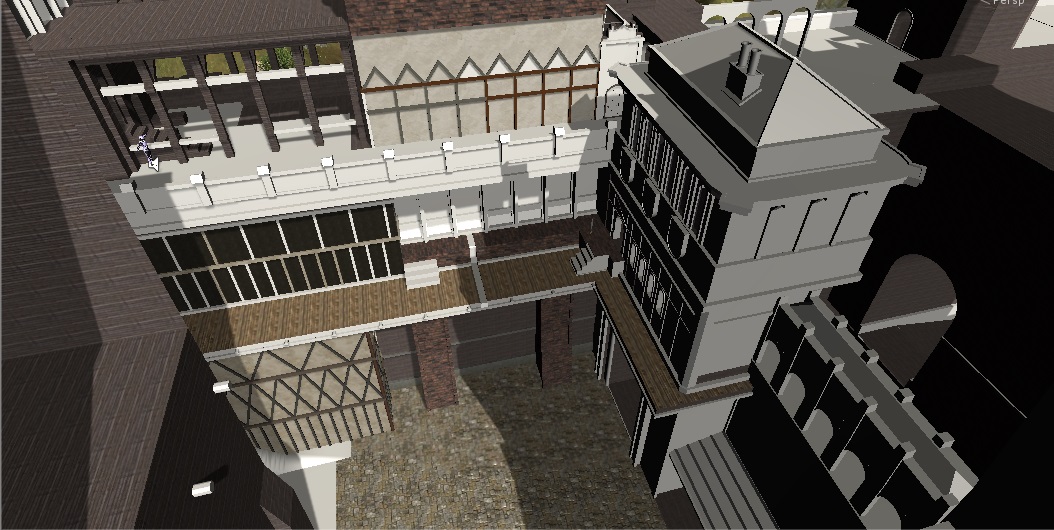
I've been very careful to make a component out every detail or area that would require a different material and as you can see it does work fairly well. The problem is still more about the materials only sticking on the 3rd or 4th try, if at all. The other issue being the material jumping to the neighboring component ins$$anonymous$$d. I was just wondering if there is something in Unity editor itself that would make this monumental task any easier.

castle.jpg (224.1 kB)

Your answer

Hint: You can notify a user about this post by typing @username

Up to 2 attachments (including images) can be used with a maximum of 524.3 kB each and 1.0 MB total.

Follow this Question

Answers Answers and Comments

4 People are following this question.

avatar image avatar image avatar image avatar image

Related Questions

Assignment working in Update() but not in Start()? 1 Answer

Not-Up-To-Date/Incomplete files from Unity Collab 0 Answers

How can you get multiple materials/textures on the same object in unity 5? 2 Answers

Split mesh faces C# 1 Answer

Beginner question about GUI scripting 2 Answers


Enterprise
Social Q&A

Social
Subscribe on YouTube social-youtube Follow on LinkedIn social-linkedin Follow on Twitter social-twitter Follow on Facebook social-facebook Follow on Instagram social-instagram

Footer

  • Purchase
    • Products
    • Subscription
    • Asset Store
    • Unity Gear
    • Resellers
  • Education
    • Students
    • Educators
    • Certification
    • Learn
    • Center of Excellence
  • Download
    • Unity
    • Beta Program
  • Unity Labs
    • Labs
    • Publications
  • Resources
    • Learn platform
    • Community
    • Documentation
    • Unity QA
    • FAQ
    • Services Status
    • Connect
  • About Unity
    • About Us
    • Blog
    • Events
    • Careers
    • Contact
    • Press
    • Partners
    • Affiliates
    • Security
Copyright © 2020 Unity Technologies
  • Legal
  • Privacy Policy
  • Cookies
  • Do Not Sell My Personal Information
  • Cookies Settings
"Unity", Unity logos, and other Unity trademarks are trademarks or registered trademarks of Unity Technologies or its affiliates in the U.S. and elsewhere (more info here). Other names or brands are trademarks of their respective owners.
  • Anonymous
  • Sign in
  • Create
  • Ask a question
  • Spaces
  • Default
  • Help Room
  • META
  • Moderators
  • Explore
  • Topics
  • Questions
  • Users
  • Badges
