
Wayback Machinekoobas.hobune.stream
May JUN Jul
Previous capture 12 Next capture
2021 2022 2023
1 capture
12 Jun 22 - 12 Jun 22
sparklines
Close Help
  • Products
  • Solutions
  • Made with Unity
  • Learning
  • Support & Services
  • Community
  • Asset Store
  • Get Unity

UNITY ACCOUNT

You need a Unity Account to shop in the Online and Asset Stores, participate in the Unity Community and manage your license portfolio. Login Create account
  • Blog
  • Forums
  • Answers
  • Evangelists
  • User Groups
  • Beta Program
  • Advisory Panel

Navigation

  • Home
  • Products
  • Solutions
  • Made with Unity
  • Learning
  • Support & Services
  • Community
    • Blog
    • Forums
    • Answers
    • Evangelists
    • User Groups
    • Beta Program
    • Advisory Panel

Unity account

You need a Unity Account to shop in the Online and Asset Stores, participate in the Unity Community and manage your license portfolio. Login Create account

Language

  • Chinese
  • Spanish
  • Japanese
  • Korean
  • Portuguese
  • Ask a question
  • Spaces
    • Default
    • Help Room
    • META
    • Moderators
    • Topics
    • Questions
    • Users
    • Badges
  • Home /
avatar image
0
Question by Fub0ski · Jun 29, 2016 at 07:29 AM · transparencyalpha-channelnormal map

White edges with my Normal Map: could be alpha channel the solution?

I know, the problem of white edges have been treated a lot, i read many threads dealing with this argument, but i can't solve my problem and often i can't even understand the answer in the forum (in particoular when the focus is photoshop, i'm a beginner in this huge world).

To be the clearest I can :

This is my low poly(8 vertices cube-unique smoothing group) and my high poly:
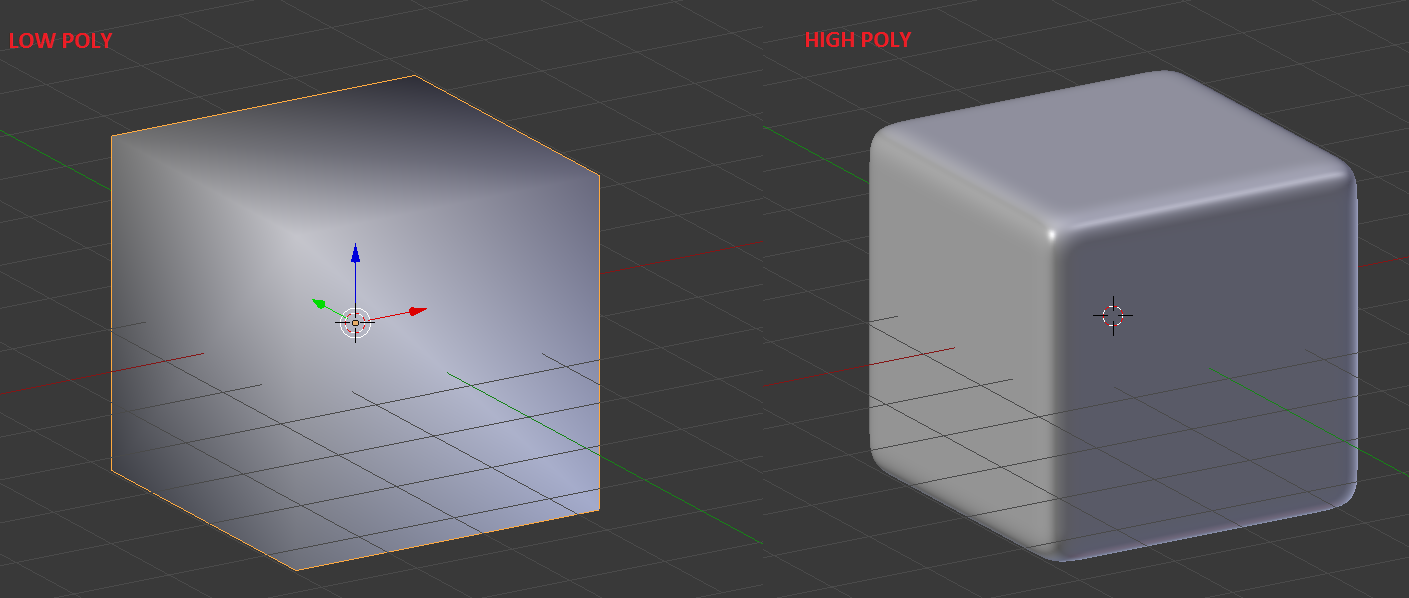
alt text

I baked with Xnormal the normal map and then export all in unity 5.3.4f1 64 bit.

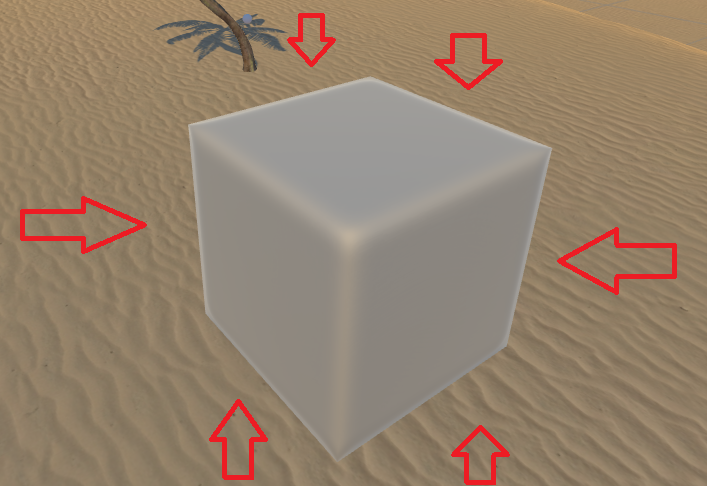
The final result is this one:
alt text

As you can see there are these white edges all long the cube. I can't find a way to fix them. Could be a problem of trasparency, or of mesh, maybe normals, or again tangnet space . . . I really can't realize. I try to solve it using the solution of @duck
http://answers.unity3d.com/questions/10302/messy-alpha-problem-white-around-edges.html

but didn't work. I would like to underline a thing: if i move around the cube, the white edges move with me, in other words, where the part of my cube should be trasparent (thanks to the normal map from the high poly) there will be the whit edge. COuld be a problem of poor geometry? Could be a problem that can be solved only with a texture, or is possible to have an alpha channel for Normal map?

Anyone can help me please?

zzzzzzzzzzz.png (185.1 kB)
zzzzzzzzzzzzzzzzzzzzzzzzzz.png (381.0 kB)
Comment
Add comment · Show 5
10 |3000 characters needed characters left characters exceeded
▼
  • Viewable by all users
  • Viewable by moderators
  • Viewable by moderators and the original poster
  • Advanced visibility
Viewable by all users
avatar image tanoshimi · Jul 01, 2016 at 06:29 PM 0
Share

You're using Unity 3.5?

avatar image Fub0ski tanoshimi · Jul 01, 2016 at 07:25 PM 0
Share

I'm using this version: Unity 5.3.4f1 64 bit $$anonymous$$y bad sorry, I edit the question.I realize now i wrote 3.5 ins$$anonymous$$d of 5.3. $$anonymous$$y sincere apologies.

avatar image _Yash_ · Jul 07, 2016 at 04:35 AM 0
Share

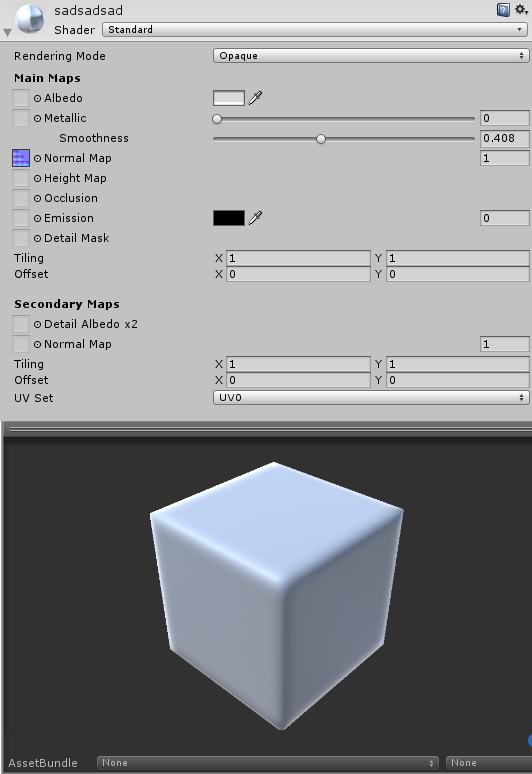
which shader you are using? attach the image of your shader parameters like first image in this page.
https://docs.unity3d.com/$$anonymous$$anual/class-$$anonymous$$aterial.html
avatar image Fub0ski _Yash_ · Jul 10, 2016 at 12:42 PM 0
Share

I used this sharer: alt text

zprova.png (71.6 kB)
avatar image Glurth · Jul 12, 2016 at 05:23 PM 0
Share

This looks to me, like each vertex of the model does NOT have 3 DIFFERENT normals (normal being the "face direction"), or if they do, they do not point the same direction as the cubes faces. This is why those edges looks rounded, and whiter. So for your mesh, you should have a TOTAL of 24 verticies ( 8 corner position points X 3 normals per vertex ... 8x3=24)

Each triangle of the mesh uses three of the vertices stored in the mesh. USUALLY, the three vertices that make up a triangle have the SA$$anonymous$$E normal (when you want it to look flat), but when they don't, you can get cool not-flat/curving surface lighting (like that white shine you want to eli$$anonymous$$ate)

This is a comment, not an answer, because I cannot help with the import of the mesh.

If you WANT those edges rounded, and still want to eli$$anonymous$$ate the white "shine", play with the metallic and smoothness setting in your shader, that might help reduce (but not eli$$anonymous$$ate) it.

0 Replies

· Add your reply
  • Sort: 

Your answer

Hint: You can notify a user about this post by typing @username

Up to 2 attachments (including images) can be used with a maximum of 524.3 kB each and 1.0 MB total.

Follow this Question

Answers Answers and Comments

5 People are following this question.

avatar image avatar image avatar image avatar image avatar image

Related Questions

Change alpha in runtime of gameObject with mobile shader 1 Answer

Cutout Shader getting Opaque when turning alpha off and on again 1 Answer

How would I add transparency to an outline shader? 2 Answers

[HDRP] Render Texture Alpha Channel 2 Answers

surface shading with transparency 1 Answer


Enterprise
Social Q&A

Social
Subscribe on YouTube social-youtube Follow on LinkedIn social-linkedin Follow on Twitter social-twitter Follow on Facebook social-facebook Follow on Instagram social-instagram

Footer

  • Purchase
    • Products
    • Subscription
    • Asset Store
    • Unity Gear
    • Resellers
  • Education
    • Students
    • Educators
    • Certification
    • Learn
    • Center of Excellence
  • Download
    • Unity
    • Beta Program
  • Unity Labs
    • Labs
    • Publications
  • Resources
    • Learn platform
    • Community
    • Documentation
    • Unity QA
    • FAQ
    • Services Status
    • Connect
  • About Unity
    • About Us
    • Blog
    • Events
    • Careers
    • Contact
    • Press
    • Partners
    • Affiliates
    • Security
Copyright © 2020 Unity Technologies
  • Legal
  • Privacy Policy
  • Cookies
  • Do Not Sell My Personal Information
  • Cookies Settings
"Unity", Unity logos, and other Unity trademarks are trademarks or registered trademarks of Unity Technologies or its affiliates in the U.S. and elsewhere (more info here). Other names or brands are trademarks of their respective owners.
  • Anonymous
  • Sign in
  • Create
  • Ask a question
  • Spaces
  • Default
  • Help Room
  • META
  • Moderators
  • Explore
  • Topics
  • Questions
  • Users
  • Badges
