 koobas.hobune.stream


Why won't the Score reset?
Hello. I am making a game that is for Android and is 2D. I am trying to figure out how to reset the gameScore when a button is pushed. The script I use for the score is
 using UnityEngine;
 using UnityEngine.UI;
 using System.Collections;

 public class ScoreManager : MonoBehaviour
 {
     public static int score;        // The player's score.


     Text text;                      // Reference to the Text component.


     void Awake ()
     {
         // Set up the reference.
         text = GetComponent <Text> ();


     }


     void Update ()
     {
         // Set the displayed text to be the word "Score" followed by the score value.
         text.text = "Score: " + score;
     }
 }
The script I have made to simply reset the score is
 using UnityEngine;
 using System.Collections;

 public class Slore : MonoBehaviour {

     // Update is called once per frame
     void OnMouseDown () {
         ScoreManager.score = 0;
     }
 }
How can this be changed so that it actually sets the score to zero?

Your OnMouseDown function is not being called, OnMouseDown works when clicking a GUIElement or something with a Collider.
If I understood you, you're using a UI Button, but buttons don't have a Collider component, and they're not "GUIElement" instances. If you're using a UI Button and want to call some function when it's clicked you have to register the function on the "On Click" event of the button. Look at this: https://www.youtube.com/watch?v=J5ZNuM6K27E&t=8m38s
Make sure the function you want to call when clicking the button is public, or it won't be shown as an option when trying to register a new function for the event.
EDIT: Just a suggestion, instead of calling
text.text = "Score " + score;
in the Update function (executed on every frame) you can just call some function that updates the score only when it's changed. For example:
 using UnityEngine;
 using UnityEngine.UI;
 using System.Collections;

 public class ScoreManager : MonoBehaviour
 {
     public static int score; // The player's score.
     Text text; // Reference to the Text component.

     void Awake ()
     {
         text = GetComponent <Text> ();
     }

     public void SetScore (int newScore)
     {
         ScoreManager.score = newScore; //update the static score variable
         text.text = "Score: " + score;
     }
 }
And when registering a new function to the OnClick event of the button you don't need another script, you can select the SetScore function of ScoreManager, and since the function receives an int you can set up the event to send a "0" to it when it's clicked.

Thank you for responding. I have done everything you have told me to do, but the ScoreText doesn't actually change/ display the score. It just remains as the original text.

The code you showed starts with score at 0 (C# default for uninitialized int variables is "0"), and the only code that modifies the value sets it to 0. You obviously have some more code changing the score, so share that code too. If you registered the function correctly you're probably updating the score somewhere else, and it overwrites the 0 you set in the On$$anonymous$$ouseDown (or SetScore) function.
Also, what did you exactly do? Show us how did you set up the components and the code you have now.
Alright so this I used the code you gave for Score$$anonymous$$anager which is
 using UnityEngine;
 using UnityEngine.UI;
 using System.Collections;

 public class Score$$anonymous$$anager : $$anonymous$$onoBehaviour
 {
     public static int score; // The player's score.
     Text text; // Reference to the Text component.

     void Awake ()
     {
         text = GetComponent <Text> ();
     }

     public void SetScore (int newScore)
     {
         Score$$anonymous$$anager.score = newScore; //update the static score variable
         text.text = "Score: " + score;
     }
 }
On the UIButton on the menu I attached the ScoreText as the " Object " and put Score$$anonymous$$anager,SetScore as the command that I want to be done when the button is clicked.
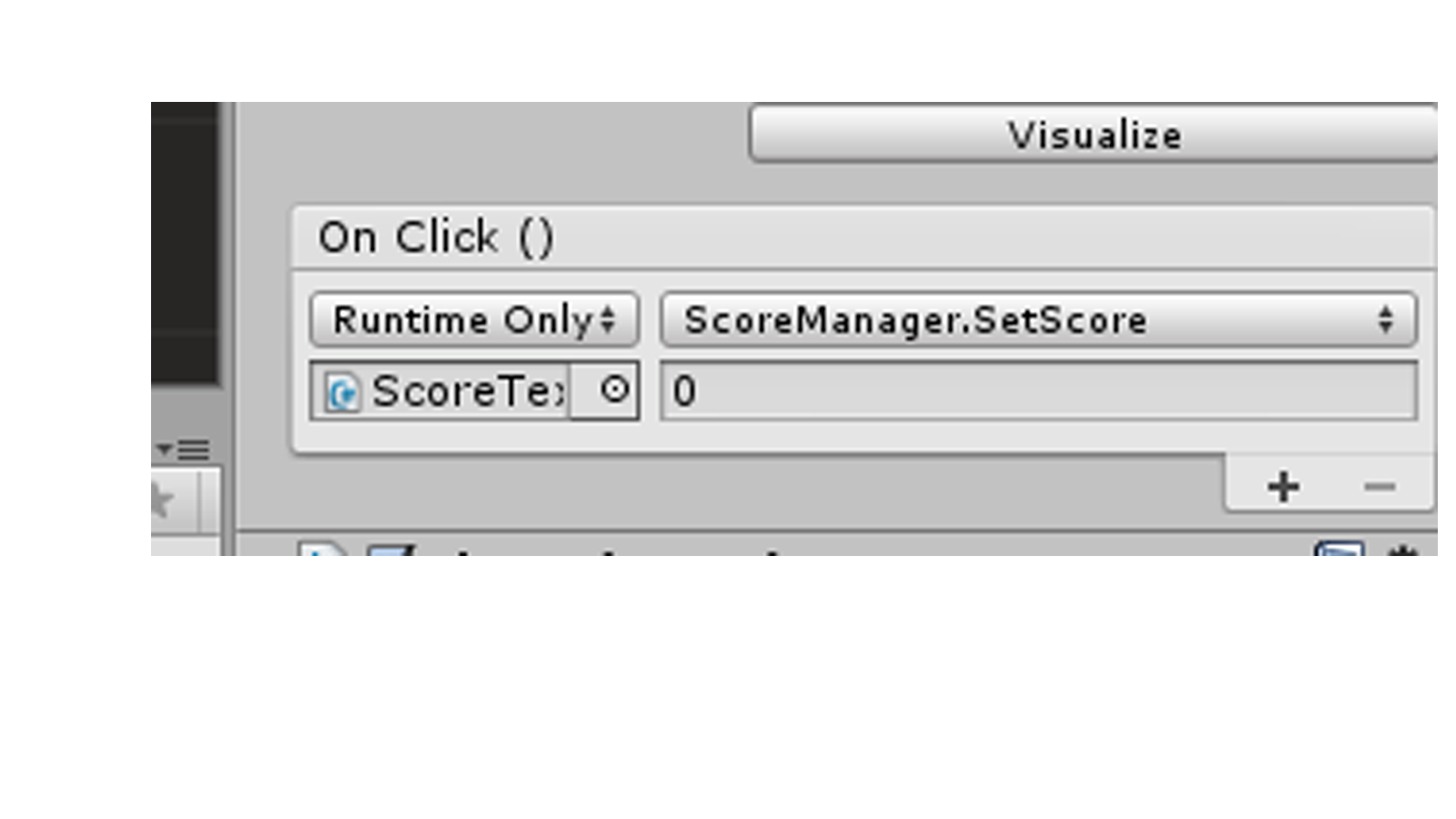
The script I use to add the point is
 using UnityEngine;
 using System.Collections;

 public class Score : $$anonymous$$onoBehaviour {

     public int scoreValue = 1;
     void On$$anonymous$$ouseDown () {

         Score$$anonymous$$anager.score += scoreValue;

     }
 }
The Score$$anonymous$$anager script is still attached to the ScoreText.
O$$anonymous$$, I get it now, I forgot you where setting the score text on every update frame.
In the Awake method of Score$$anonymous$$anager, after getting the Text component, call the "SetScore" method to set the inital score (it could be any value, but I guess you start at 0). If you set the initial value to some other value and then press the button you should see the score being reseted.
For the On$$anonymous$$ouseDown function on the Score component you showed, call the SetScore function of the component you have attached to the Text game object, that's the function that updates the Text. If you modify Score$$anonymous$$anager.score directly you're just changing the value, but the code that changes the Text's text is never executed.
Try this code: using UnityEngine; using System.Collections;
 public class Score : $$anonymous$$onoBehaviour {
     public int scoreValue = 1;
     public Score$$anonymous$$anager score$$anonymous$$anager;

     void On$$anonymous$$ouseDown () {
         score$$anonymous$$anager.SetScore(Score$$anonymous$$anager.score + scoreValue);
     }
 }
And drag and drop the game object with the Score$$anonymous$$anager component to the Score$$anonymous$$anager slot in the inspector.
Also, remember to make sure the Score component is attached to a GameObject with a Collider or that is a GUIElement, or On$$anonymous$$ouseDOwn won't be called when you click on it.
I'm confused. Do you want me to add the Score$$anonymous$$anager script to every object that I want to use for adding the score? Because as of right now the only thing with the Score$$anonymous$$anager script is the ScoreText.

It may not be an actual answer to your question, but you should not make idle use of static variables and classes. It would be a better idea, to have a GameManager-class, which knows all your other managers (has 'public ScoreManager scoreManager;' etc.), and let that handle things. Your new GameManager class:
 using UnityEngine;
 using UnityEngine.UI;
 using System.Collections;

 public class GameManager : MonoBehaviour
     public ScoreManager scoreManager = new ScoreManager();
 }
Then everything you make (monsters etc.) that has to interact with something else in the game, just has to have a reference to the GameManager in them. If you want that in your 'Slore'-class, you can do:
 public GameObject gameManagerObject; // this is the variable, that will be visible in the Inspector
 private GameManager gameManager;

 void Awake(){
     gameManager = gameManagerObject.GetComponent<GameManager>();
 }

 void OnClick () {
      gameManager.scoreManager.score = 0;
 }
Then in the Inspector, you simply drag the GameObject from your scene, which has the GameManager script on it, onto the GameManagerObject 'slot' of the Slore object.
Since Slore is supposed to be a button, there's already an event-system, that can help you do this, so you don't need to attach your own script to the button. Simply drag the new gameobject with the GameManager-script on it to a new OnClick-event on your button, choose the GameManager-script and method you want, and any parameters (if there are any; in the case of your ResetScore(), there are no parameters). See the video DiegoSLTS posted, to see how this is done.
Also, I'd recommend not updating text.text every update. You only need to update it whenever the score changes. Plus, having static variables like that score, is bad practice. You should consider making your ScoreManager manage the score, instead of just having it just be a container for the score variable.
First, you should remove 'static' from your score-variable. Then make methods in your ScoreManager like this:
 public void ApplyScoreChange(int change){
     score += change;
     UpdateScoreText();
 }
and one like this:
 public void SetScore(int newScore){
     score = newScore;
     UpdateScoreText();
 }
and one like this:
 public void ResetScore(){
     score = 0;
     UpdateScoreText();
 }
and one like this:
 public void UpdateScoreText(){
     text.text = score;
 }
Then, whenever you want to change the score, you know it'll always be the same code doing the changes, and you can use these methods in your gameobjects, and even the OnClick() event on buttons.
I firstly would like to thank you for taking the time to help me with this. The Game$$anonymous$$anager script has the error
Assets/Standard Assets ($$anonymous$$obile)/Textures/Game$$anonymous$$anager.cs(7,8): error CS0246: The type or namespace name `SomeOther$$anonymous$$anager' could not be found. Are you missing a using directive or an assembly reference?
Also a question about the Game$$anonymous$$anager, where would I exactly add that script to?
your Score$$anonymous$$anager class isn't static. It has to be, if you want to use it like that. That's not advisable, though. You should only use static variables and classes for things that are just that, static. Like text-strings for GUI (if you really need to), and data that never changes.
What he's doing is O$$anonymous$$, the class doesn't have to be static if it has static members. Also, "static" doesn't mean "something that never changes", it means "this variable is accesible without an instance of this class". The keyword might be confusing, but if you want something to never change (usually refered to as a constant), you have the "readonly" keyword.
Having static (and not constant) variables in a non-static class has it's uses. $$anonymous$$aybe this case isn't the best scenario to use a static variable, but it should work.

Fixed my solution :) And you should definitely check out that video that DiegoSLTS posted.
@DiegoSLTS: You're right; bad explanation on my part. I might have explained it more like I personally make use of static variables. I'd rather go the longer way, to ensure that not ALL classes anywhere can change my non-constant variables. It quickly turns into a mess, where you can't figure out what is changing it, and why. $$anonymous$$anager-classes are great for that, containing the changes to a single class, making it easier to debug.
Thank you for responding again. This error pops up in the " Slore " script
Assets/Standard Assets ($$anonymous$$obile)/Textures/Slore.cs(9,9): error CS1520: Class, struct, or interface method must have a return type
I missed a 'void' in front of Awake (), and to instantiate the Score$$anonymous$$anager in the Game$$anonymous$$anager script.
Edited the code for both classes.



