
Wayback Machinekoobas.hobune.stream
May JUN Jul
Previous capture 12 Next capture
2021 2022 2023
1 capture
12 Jun 22 - 12 Jun 22
sparklines
Close Help
  • Products
  • Solutions
  • Made with Unity
  • Learning
  • Support & Services
  • Community
  • Asset Store
  • Get Unity

UNITY ACCOUNT

You need a Unity Account to shop in the Online and Asset Stores, participate in the Unity Community and manage your license portfolio. Login Create account
  • Blog
  • Forums
  • Answers
  • Evangelists
  • User Groups
  • Beta Program
  • Advisory Panel

Navigation

  • Home
  • Products
  • Solutions
  • Made with Unity
  • Learning
  • Support & Services
  • Community
    • Blog
    • Forums
    • Answers
    • Evangelists
    • User Groups
    • Beta Program
    • Advisory Panel

Unity account

You need a Unity Account to shop in the Online and Asset Stores, participate in the Unity Community and manage your license portfolio. Login Create account

Language

  • Chinese
  • Spanish
  • Japanese
  • Korean
  • Portuguese
  • Ask a question
  • Spaces
    • Default
    • Help Room
    • META
    • Moderators
    • Topics
    • Questions
    • Users
    • Badges
  • Home /
avatar image
0
Question by ishdagz · Jun 11, 2016 at 06:59 PM · clothropestretchswing

Attach to cloth Unity5 - How to pull cloth objects instead of push?

I am trying to use Unity Cloth to make a somewhat passable rope type object that can be connected at both ends and possible swing as if the top was affixed to the ceiling and the bottom to a swinging / falling weight (think Home Alone paint bucket on the staircase scene).

In older versions of unity I was able to use the 'Attached Colliders' and afix it to the ends of cloth objects. If one end moved, the whole thing would deform and get pulled around as intended. I can't seem to get it to work with the newer cloth and most tutorials or videos or UnityAnswers questions I find are for the older system.

In the attached image I made a made a cloth with a cylinder mesh, and constrained the top vertices to keep it in place on the top. The two spheres in the image were one attempt to figure out how to use the 'new' collider types. I tried it with having them start as connected and then moving the bottom among other things but can't seem to replicate the effects.

TL;DR: I can make spheres that push the cloth around, but I can't 'attach' the cloth to a sphere and have it follow as the sphere drops with gravity or moves via scene view. I know I can make a rope / chain type object with joints but am trying to attain a more cloth-rope-looking thing.

Anyone have any ideas?

Thanks!
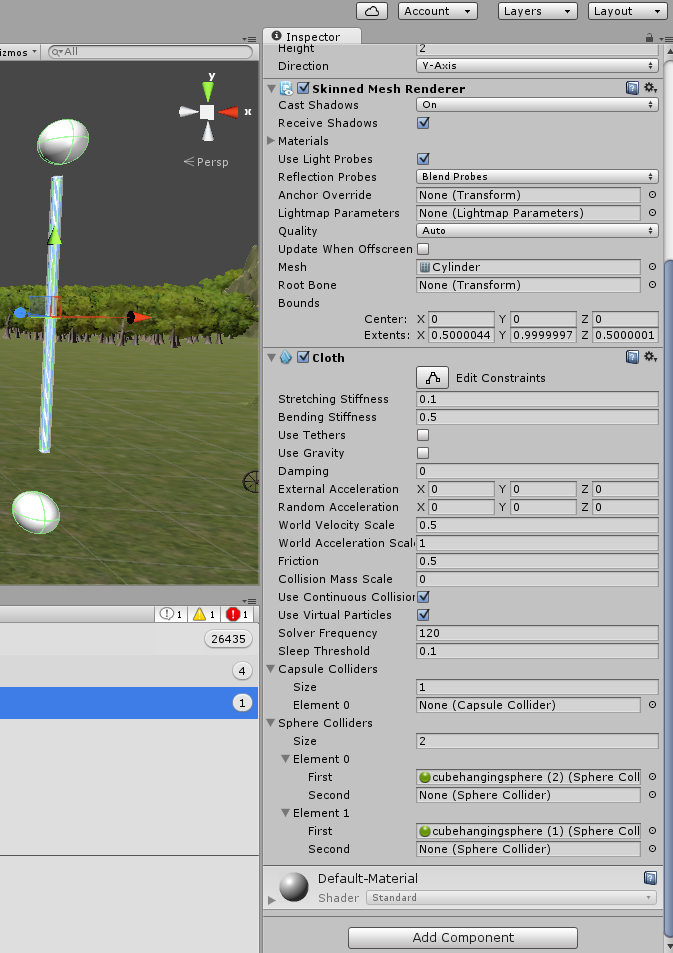
alt text

clothropeexample.png (253.5 kB)
Comment
Add comment
10 |3000 characters needed characters left characters exceeded
▼
  • Viewable by all users
  • Viewable by moderators
  • Viewable by moderators and the original poster
  • Advanced visibility
Viewable by all users

0 Replies

· Add your reply
  • Sort: 

Your answer

Hint: You can notify a user about this post by typing @username

Up to 2 attachments (including images) can be used with a maximum of 524.3 kB each and 1.0 MB total.

Follow this Question

Answers Answers and Comments

3 People are following this question.

avatar image avatar image avatar image

Related Questions

what would be a good way to do rope physics that stretch? 0 Answers

2D Platforme Rope 1 Answer

Interactable vines in 2d platformer 0 Answers

Grapple and swing/pull mechanic 2 Answers

Creating a rope from C# that attaches to a tag and lets you swing from it? 0 Answers


Enterprise
Social Q&A

Social
Subscribe on YouTube social-youtube Follow on LinkedIn social-linkedin Follow on Twitter social-twitter Follow on Facebook social-facebook Follow on Instagram social-instagram

Footer

  • Purchase
    • Products
    • Subscription
    • Asset Store
    • Unity Gear
    • Resellers
  • Education
    • Students
    • Educators
    • Certification
    • Learn
    • Center of Excellence
  • Download
    • Unity
    • Beta Program
  • Unity Labs
    • Labs
    • Publications
  • Resources
    • Learn platform
    • Community
    • Documentation
    • Unity QA
    • FAQ
    • Services Status
    • Connect
  • About Unity
    • About Us
    • Blog
    • Events
    • Careers
    • Contact
    • Press
    • Partners
    • Affiliates
    • Security
Copyright © 2020 Unity Technologies
  • Legal
  • Privacy Policy
  • Cookies
  • Do Not Sell My Personal Information
  • Cookies Settings
"Unity", Unity logos, and other Unity trademarks are trademarks or registered trademarks of Unity Technologies or its affiliates in the U.S. and elsewhere (more info here). Other names or brands are trademarks of their respective owners.
  • Anonymous
  • Sign in
  • Create
  • Ask a question
  • Spaces
  • Default
  • Help Room
  • META
  • Moderators
  • Explore
  • Topics
  • Questions
  • Users
  • Badges
