
Wayback Machinekoobas.hobune.stream
May JUN Jul
Previous capture 12 Next capture
2021 2022 2023
1 capture
12 Jun 22 - 12 Jun 22
sparklines
Close Help
  • Products
  • Solutions
  • Made with Unity
  • Learning
  • Support & Services
  • Community
  • Asset Store
  • Get Unity

UNITY ACCOUNT

You need a Unity Account to shop in the Online and Asset Stores, participate in the Unity Community and manage your license portfolio. Login Create account
  • Blog
  • Forums
  • Answers
  • Evangelists
  • User Groups
  • Beta Program
  • Advisory Panel

Navigation

  • Home
  • Products
  • Solutions
  • Made with Unity
  • Learning
  • Support & Services
  • Community
    • Blog
    • Forums
    • Answers
    • Evangelists
    • User Groups
    • Beta Program
    • Advisory Panel

Unity account

You need a Unity Account to shop in the Online and Asset Stores, participate in the Unity Community and manage your license portfolio. Login Create account

Language

  • Chinese
  • Spanish
  • Japanese
  • Korean
  • Portuguese
  • Ask a question
  • Spaces
    • Default
    • Help Room
    • META
    • Moderators
    • Topics
    • Questions
    • Users
    • Badges
  • Home /
  • Help Room /
avatar image
0
Question by peterk1968 · Mar 19, 2016 at 05:36 PM · beginnermaskmasking

Masking out portions of a GameObject's children

Hi Everyone,

I'm struggling with something that feels like it should be fairly simple, so thought I would ask before possibly going off in completely the wrong direction.

I recently completed an app version of a card/strategy boardgame intended for tablets. Players have hands of 6 cards. I designed the layout of the game so that all cards are legible without the need for constant zooming.

https://www.dropbox.com/s/lyh9w1sldp2wri6/game.jpg?dl=0

It's working well but I wasn't able to release the game to phones because the text on the cards ended up being too small. Now, I'm trying to correct that.

I've magnified the size of the card greatly so that 2 out of 6 can be displayed on screen. To access the others the user can swipe or just move his finger on the left side of the screen to scroll a parent object that contains all 6 cards.

alt text

The problem is that I have 2 such player boards close to one another and when the player slides that card holder object up, it will obscure the opponents cards. When the player turn ends or if the player decides to take a look at his opponent's board the display is messed up.
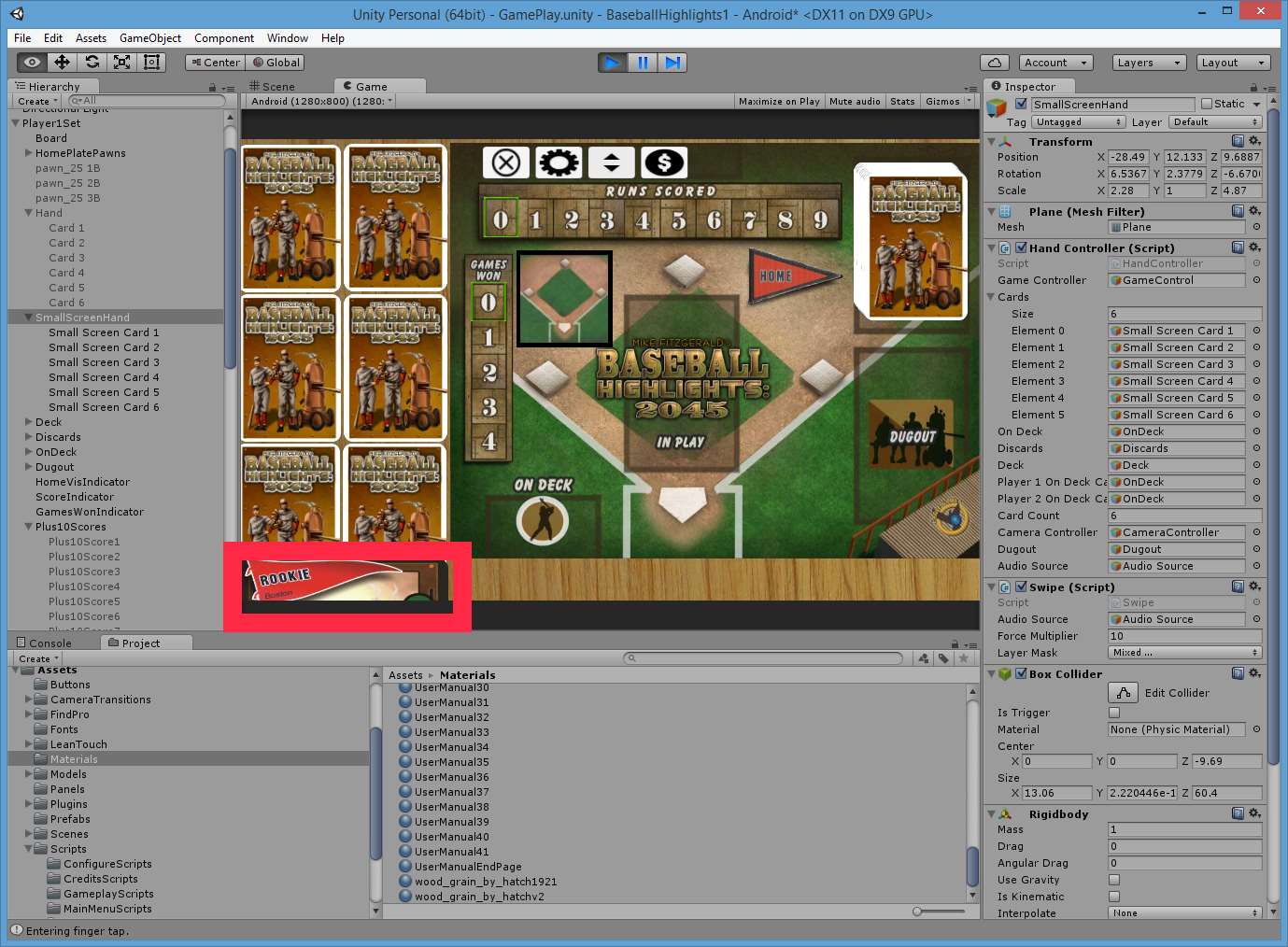
alt text

I've highlighted an area in red which is showing the problem, but it can actually be much bigger and worse than what I'm displaying here.

This is what my full game world looks like.

https://www.dropbox.com/s/p8ppy01ivolpmyg/FullScene.jpg?dl=0

==================

My question is: Is there a (fairly easy) way for that sliding panel that contains all 6 cards to mask out everything except that region beside the player's board so that 1 player's cards never intrude on the others?

I could probably avoid the problem just by spacing out player 1 and player 2's boards in the game world so there's never any overlap, but I would like to avoid that because I make use of camera animations to move between the two boards after a player plays a card. There's an advantage to keeping things spaced closely together.

smallscreenhand.jpg (193.5 kB)
smallscreenhand2.jpg (196.2 kB)
Comment
Add comment
10 |3000 characters needed characters left characters exceeded
▼
  • Viewable by all users
  • Viewable by moderators
  • Viewable by moderators and the original poster
  • Advanced visibility
Viewable by all users

1 Reply

· Add your reply
  • Sort: 
avatar image
0

Answer by peterk1968 · Mar 21, 2016 at 01:58 PM

I've been thinking about it some more and it looks like the best solution would be to go into blender and create a new plane to use for my wood tabletop. If I create some portholes in the plane exactly where the players' hands are displayed, I can then position the cards slightly below the tabletop and when the user slides up/down, the uneeded cards will then get masked by the tabletop.

Bit of work, but it's sounding good.

...or, I can replace my one big tabletop plane with a bunch of smaller ones that will also give me the same effect. This will probably be a lot less work. Will have to check if it still looks good that way.

Comment
Add comment · Share
10 |3000 characters needed characters left characters exceeded
▼
  • Viewable by all users
  • Viewable by moderators
  • Viewable by moderators and the original poster
  • Advanced visibility
Viewable by all users

Your answer

Hint: You can notify a user about this post by typing @username

Up to 2 attachments (including images) can be used with a maximum of 524.3 kB each and 1.0 MB total.

Follow this Question

Answers Answers and Comments

53 People are following this question.

avatar image avatar image avatar image avatar image avatar image avatar image avatar image avatar image avatar image avatar image avatar image avatar image avatar image avatar image avatar image avatar image avatar image avatar image avatar image avatar image avatar image avatar image avatar image avatar image avatar image avatar image avatar image avatar image avatar image avatar image avatar image avatar image avatar image avatar image avatar image avatar image avatar image avatar image avatar image avatar image avatar image avatar image avatar image avatar image avatar image avatar image avatar image avatar image avatar image avatar image avatar image avatar image avatar image

Related Questions

[2D] Generating small translucent circles inside a large rectangle 0 Answers

Cover up (or mask) portion of gameobject(s) 0 Answers

Disable Avatar Mask 1 Answer

New Unity Sprite Mask alpha support 1 Answer

Invisible transition mask 0 Answers


Enterprise
Social Q&A

Social
Subscribe on YouTube social-youtube Follow on LinkedIn social-linkedin Follow on Twitter social-twitter Follow on Facebook social-facebook Follow on Instagram social-instagram

Footer

  • Purchase
    • Products
    • Subscription
    • Asset Store
    • Unity Gear
    • Resellers
  • Education
    • Students
    • Educators
    • Certification
    • Learn
    • Center of Excellence
  • Download
    • Unity
    • Beta Program
  • Unity Labs
    • Labs
    • Publications
  • Resources
    • Learn platform
    • Community
    • Documentation
    • Unity QA
    • FAQ
    • Services Status
    • Connect
  • About Unity
    • About Us
    • Blog
    • Events
    • Careers
    • Contact
    • Press
    • Partners
    • Affiliates
    • Security
Copyright © 2020 Unity Technologies
  • Legal
  • Privacy Policy
  • Cookies
  • Do Not Sell My Personal Information
  • Cookies Settings
"Unity", Unity logos, and other Unity trademarks are trademarks or registered trademarks of Unity Technologies or its affiliates in the U.S. and elsewhere (more info here). Other names or brands are trademarks of their respective owners.
  • Anonymous
  • Sign in
  • Create
  • Ask a question
  • Spaces
  • Default
  • Help Room
  • META
  • Moderators
  • Explore
  • Topics
  • Questions
  • Users
  • Badges
