 koobas.hobune.stream


Can someone help me translate this to c#?
We really really need this done within the next two or three days. We'll credit whoever does it first in our game. Thanks so much!
 #pragma strict
 var spawner : Transform;
 var projectile : Transform;
 var bulletCount = 0;
 var damp = .3;
 static var fastFire = false;
 private var nextFire = 0.0;
 var fireRate = 0.1;

 function Start () {
 bulletCount = 0;
 }

 function Update () {
 var playerplane = new Plane(Vector3.up, transform.position);
 var ray = Camera.main.ScreenPointToRay (Input.mousePosition);
 var target = 0.0;
  if(playerplane.Raycast (ray, target)){
     var targetpoint = ray.GetPoint(target);
     var targetRotation = Quaternion.LookRotation(targetpoint - transform.position);
     //transform.rotation = targetRotation;
     transform.rotation = Quaternion.Slerp(transform.rotation,targetRotation, Time.deltaTime * damp);
     }

 // && bulletCount <7

 if(Input.GetMouseButtonDown(0) && fastFire == false)
  {
   bulletCount += 1;
   var bullet = Instantiate(projectile,spawner.position,Quaternion.identity);
    bullet.rigidbody.AddForce(transform.forward * 1000);
    audio.Play();
  }
  if(Input.GetMouseButton(0) && fastFire && Time.time > nextFire)
  {
   nextFire = Time.time + fireRate;
   bulletCount += 1;
   var bullet2 = Instantiate(projectile,spawner.position,Quaternion.identity);
    bullet2.rigidbody.AddForce(transform.forward * 1000);
    audio.Play();


  }
 // bullet.rigidbody.AddForce(transform.forward * 1000)x;


 }
Thank you so much :)

If you're writing the game in C#, why can't you translate it? Not that there's anything special in this, approx. 60 seconds of work. Just give proper types for the members in the declaration section, like Transform spawner;
function Update() --> void Update().
In UnityScript the members are public by default, but in C# they are private by default, so if you want them public (visible in the inspector), make them public: public Transform spawner; but you should already know these if you need the stuff in C#.


I had some time so I made it for you:
 public Transform spawner;
 public Transform projectile;
 public int bulletCount = 0;
 public float damp = 0.3f;
 Transform static bool fastFire = false;
 private float nextFire = 0.0f;
 public float fireRate = 0.1f;

 private Ray ray;
 public float target;
 public GameObject bullet,bullet2;
 public Vector3 targetpoint;
 public Quaternion targetRotation;
 public bool fastFire = false;

 void Start () {
 bulletCount = 0;
 }

 void Update () {
 Plane playerplane = new Plane(Vector3.up, transform.position);
 ray = Camera.main.ScreenPointToRay (Input.mousePosition);
 target = 0.0f;
  if(playerplane.Raycast (ray, out target)){
     targetpoint = ray.GetPoint(target);
     targetRotation = Quaternion.LookRotation(targetpoint - transform.position);
     //transform.rotation = targetRotation;
     transform.rotation = Quaternion.Slerp(transform.rotation,targetRotation, Time.deltaTime * damp);
     }

 // && bulletCount <7

 if(Input.GetMouseButtonDown(0) && fastFire == false)
  {
   bulletCount += 1;
   bullet = Instantiate(projectile,spawner.position,Quaternion.identity);
   bullet.rigidbody.AddForce(transform.forward * 1000);
   audio.Play();
  }
  if(Input.GetMouseButton(0) && fastFire && Time.time > nextFire)
  {
   nextFire = Time.time + fireRate;
   bulletCount += 1;
   bullet2 = Instantiate(projectile,spawner.position,Quaternion.identity);
   bullet2.rigidbody.AddForce(transform.forward * 1000);
   audio.Play();


  }
 // bullet.rigidbody.AddForce(transform.forward * 1000)x;
You can play around with the public/private however you want. I didn't test this so if it gives you errors let me know and i'll try to fix it.
Hey man, thanks so much. It generates a few errors, though.
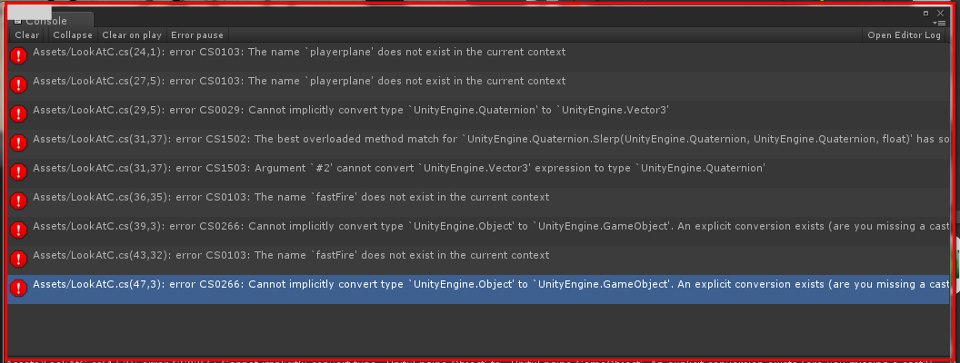
Have a look, I've just uploaded the image as another answer to my question.

I don't see any image or anything. you can just copy paste the log here as a comment and I'll look at it.
Good plan, done and done :)
Assets/LookAtC.cs(47,3): error CS0266: Cannot implicitly convert type UnityEngine.Object' to UnityEngine.GameObject'. An explicit conversion exists (are you missing a cast?)
Assets/LookAtC.cs(43,32): error CS0103: The name fastFire' does not exist in the current context Assets/LookAtC.cs(39,3): error CS0266: Cannot implicitly convert type UnityEngine.Object' to UnityEngine.GameObject'. An explicit conversion exists (are you missing a cast?) Assets/LookAtC.cs(36,35): error CS0103: The name fastFire' does not exist in the current context
Assets/LookAtC.cs(31,37): error CS1503: Argument #2' cannot convert UnityEngine.Vector3' expression to type UnityEngine.Quaternion' Assets/LookAtC.cs(27,5): error CS0103: The name playerplane' does not exist in the current context
Assets/LookAtC.cs(24,1): error CS0103: The name playerplane' does not exist in the current context Assets/LookAtC.cs(31,37): error CS1502: The best overloaded method match for UnityEngine.Quaternion.Slerp(UnityEngine.Quaternion, UnityEngine.Quaternion, float)' has some invalid arguments
Assets/LookAtC.cs(29,5): error CS0029: Cannot implicitly convert type UnityEngine.Quaternion' to UnityEngine.Vector3'
Ok, I think I fixed it. Give it a try and see if it give more errors.(I edited my original post)
That took care of most of them, but there are two remaining
Assets/LookAtC.cs(25,16): error CS1502: The best overloaded method match for UnityEngine.Plane.Raycast(UnityEngine.Ray, out float)' has some invalid arguments Assets/LookAtC.cs(25,16): error CS1620: Argument #2' is missing `out' modifier
Thanks so much man :P



