
Wayback Machinekoobas.hobune.stream
May JUN Jul
Previous capture 13 Next capture
2021 2022 2023
1 capture
13 Jun 22 - 13 Jun 22
sparklines
Close Help
  • Products
  • Solutions
  • Made with Unity
  • Learning
  • Support & Services
  • Community
  • Asset Store
  • Get Unity

UNITY ACCOUNT

You need a Unity Account to shop in the Online and Asset Stores, participate in the Unity Community and manage your license portfolio. Login Create account
  • Blog
  • Forums
  • Answers
  • Evangelists
  • User Groups
  • Beta Program
  • Advisory Panel

Navigation

  • Home
  • Products
  • Solutions
  • Made with Unity
  • Learning
  • Support & Services
  • Community
    • Blog
    • Forums
    • Answers
    • Evangelists
    • User Groups
    • Beta Program
    • Advisory Panel

Unity account

You need a Unity Account to shop in the Online and Asset Stores, participate in the Unity Community and manage your license portfolio. Login Create account

Language

  • Chinese
  • Spanish
  • Japanese
  • Korean
  • Portuguese
  • Ask a question
  • Spaces
    • Default
    • Help Room
    • META
    • Moderators
    • Topics
    • Questions
    • Users
    • Badges
  • Home /
avatar image
0
Question by osamh · Jun 25, 2015 at 03:17 PM · c#rigidbodyspherecast

Are Raycasts only used to check something? Why can't I use Raycasts to perform an action?

Hi! I've been playing around with Raycasts and SphereCasts and whatnot and currently i'm trying to perform an event for when a Ray has been activated, is this possible? Or are Rays only for checking or "see only" purposes?

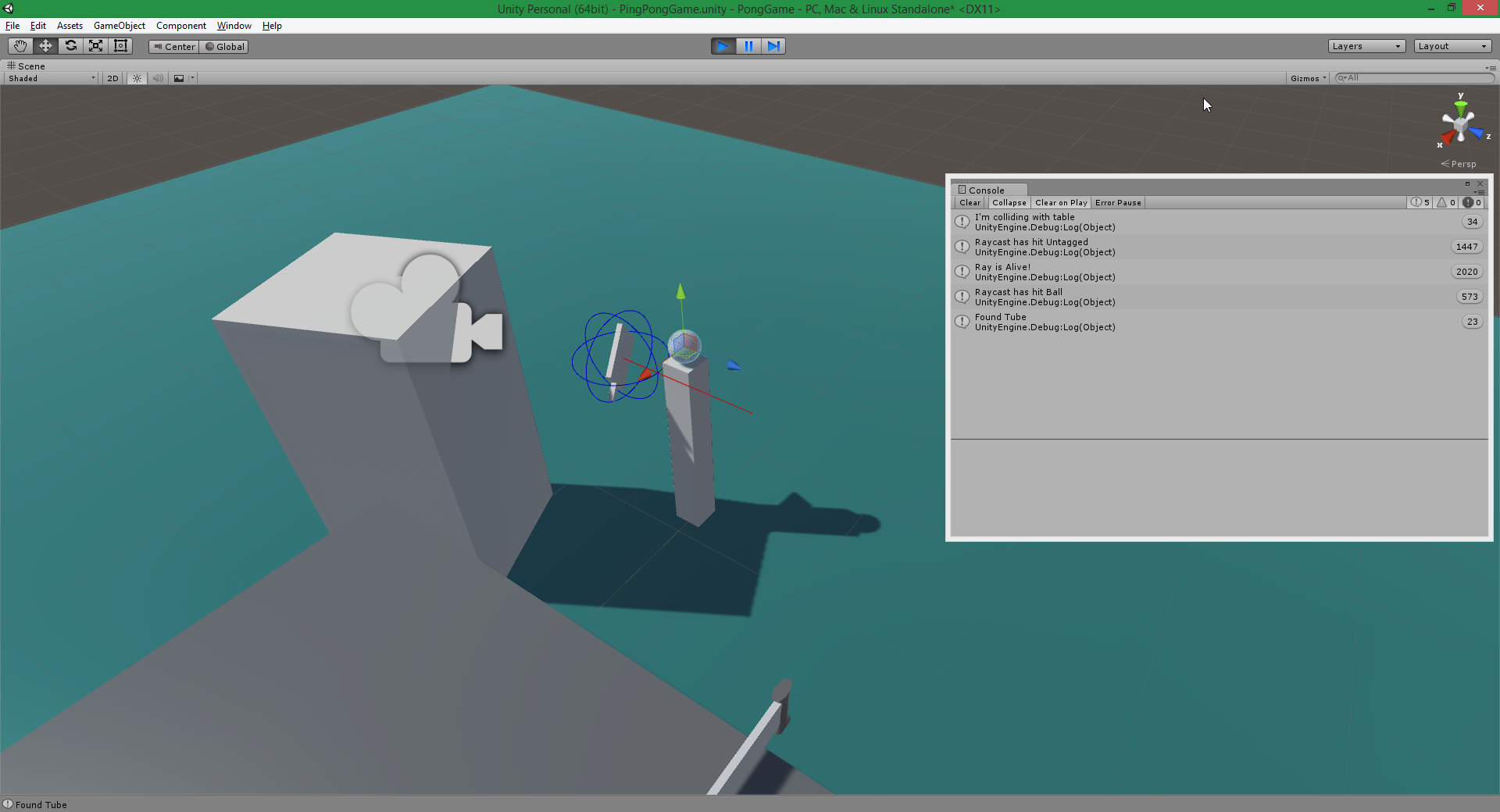
Here is a picture of the Ray being activated when the ball is in sight, everything is working fine, the only issue is AddForce isn't actually affecting the Ball.
alt text

And here is the code for what i'm trying to do.

    public void castRayCast()
     {
         float booster = 100;
         objectPos = transform.position;
         if (Physics.SphereCast(objectPos, rayRadius, Vector3.forward, out hitInfo, rayDistance))
         {
             rayAlive = true;
             Debug.Log("Raycast has hit " + hitInfo.transform.gameObject.tag);
             Debug.DrawRay(objectPos, Vector3.forward, Color.red);
             GameObject ball = pongPrefab;
             if (rayAlive)
             {
                 ball.GetComponent<Rigidbody>().AddForce(transform.forward * booster, ForceMode.Impulse);
                 Debug.Log("Ray is Alive!");
             }
             else
                 Debug.LogError("Failed to bounce ball back");
         }
         else
             rayAlive = false;
 
     }


Any sort of help is appreciated! Thanks in advance :)

pingradius.png (282.6 kB)
Comment
Add comment · Show 3
10 |3000 characters needed characters left characters exceeded
▼
  • Viewable by all users
  • Viewable by moderators
  • Viewable by moderators and the original poster
  • Advanced visibility
Viewable by all users
avatar image troien · Jun 25, 2015 at 03:40 PM 0
Share

What is 'pongPrefab' in your code?

Is it a prefab from the project window as the name suggests? If so, thats why it isn't working, sinse you want to change the force of the instantiated ball (the one in the scene/hierarchy) ins$$anonymous$$d of the prefab which isn't the ball you are looking at in your scene...

ps. Is this all of the code? Because if so, the second if is pointless, as rayAlive will always be true...

avatar image osamh · Jun 25, 2015 at 10:32 PM 0
Share

Yeah pongBall is a prefab, it's never in the scene until it's been instantiated, hence why i created a "ball" gameObject to play around with it in code.

Nothing in the scene has Raycasting enabled apart from the ball, so Raycasting is always off unless it's hitting the ball.

avatar image osamh · Jun 25, 2015 at 10:35 PM 0
Share

It was just for testing purposes :P

1 Reply

· Add your reply
  • Sort: 
avatar image
0

Answer by Ibzy · Jun 25, 2015 at 03:55 PM

You are not checking anything from the RaycastHit, just if it hit.

 if(hitInfo.transform.CompareTag("Ball")){
     hitInfo.GetComponent<RigidBody>().AddForce(transform.forward * booster, ForceMode.Impulse);
 }

This should check that your sphere hit the Ball, then get the RigidBody of it and apply the force.

Comment
Add comment · Show 1 · Share
10 |3000 characters needed characters left characters exceeded
▼
  • Viewable by all users
  • Viewable by moderators
  • Viewable by moderators and the original poster
  • Advanced visibility
Viewable by all users
avatar image osamh · Jun 25, 2015 at 10:43 PM 0
Share

I tried inputting your code but it still doesn't seem to be working. Although i'm just a little confused, isn't my first if statement checking if it hit something? And if so, AddForce to the ball?

Isn't that the same as checking (hitInfo.transform.CompareTag)? Just trying to understand the code, i'm not saying your wrong :)

ps. Everything in my scene has Raycasting disabled apart from the ball.

Your answer

Hint: You can notify a user about this post by typing @username

Up to 2 attachments (including images) can be used with a maximum of 524.3 kB each and 1.0 MB total.

Follow this Question

Answers Answers and Comments

4 People are following this question.

avatar image avatar image avatar image avatar image

Related Questions

Distribute terrain in zones 3 Answers

Multiple Cars not working 1 Answer

Cancel out a Addforce && Addtorque? 1 Answer

Question about topdown-movement and mouse-facing-foward-check 0 Answers

Further collision beyond the OnCollisionEnter() event 1 Answer


Enterprise
Social Q&A

Social
Subscribe on YouTube social-youtube Follow on LinkedIn social-linkedin Follow on Twitter social-twitter Follow on Facebook social-facebook Follow on Instagram social-instagram

Footer

  • Purchase
    • Products
    • Subscription
    • Asset Store
    • Unity Gear
    • Resellers
  • Education
    • Students
    • Educators
    • Certification
    • Learn
    • Center of Excellence
  • Download
    • Unity
    • Beta Program
  • Unity Labs
    • Labs
    • Publications
  • Resources
    • Learn platform
    • Community
    • Documentation
    • Unity QA
    • FAQ
    • Services Status
    • Connect
  • About Unity
    • About Us
    • Blog
    • Events
    • Careers
    • Contact
    • Press
    • Partners
    • Affiliates
    • Security
Copyright © 2020 Unity Technologies
  • Legal
  • Privacy Policy
  • Cookies
  • Do Not Sell My Personal Information
  • Cookies Settings
"Unity", Unity logos, and other Unity trademarks are trademarks or registered trademarks of Unity Technologies or its affiliates in the U.S. and elsewhere (more info here). Other names or brands are trademarks of their respective owners.
  • Anonymous
  • Sign in
  • Create
  • Ask a question
  • Spaces
  • Default
  • Help Room
  • META
  • Moderators
  • Explore
  • Topics
  • Questions
  • Users
  • Badges
