
Wayback Machinekoobas.hobune.stream
May JUN Jul
Previous capture 12 Next capture
2021 2022 2023
1 capture
12 Jun 22 - 12 Jun 22
sparklines
Close Help
  • Products
  • Solutions
  • Made with Unity
  • Learning
  • Support & Services
  • Community
  • Asset Store
  • Get Unity

UNITY ACCOUNT

You need a Unity Account to shop in the Online and Asset Stores, participate in the Unity Community and manage your license portfolio. Login Create account
  • Blog
  • Forums
  • Answers
  • Evangelists
  • User Groups
  • Beta Program
  • Advisory Panel

Navigation

  • Home
  • Products
  • Solutions
  • Made with Unity
  • Learning
  • Support & Services
  • Community
    • Blog
    • Forums
    • Answers
    • Evangelists
    • User Groups
    • Beta Program
    • Advisory Panel

Unity account

You need a Unity Account to shop in the Online and Asset Stores, participate in the Unity Community and manage your license portfolio. Login Create account

Language

  • Chinese
  • Spanish
  • Japanese
  • Korean
  • Portuguese
  • Ask a question
  • Spaces
    • Default
    • Help Room
    • META
    • Moderators
    • Topics
    • Questions
    • Users
    • Badges
  • Home /
  • Help Room /
avatar image
0
Question by cdonlan87 · May 22, 2016 at 07:23 PM · audiosource

How to switch between 2 background songs in Unity: Survival Shooter?

I've been futzing around with the survival shooter after the tutorial, and I added a damage chain score. I wanted to switch between the background songs once the damage chain gets high enough (from the original song to "Enter Sandman").

However, I ran into a problem: I couldn't attach the two audio sources to the background music component in the hierarchy without hiding the one of the audio sources.

I think the simplest way to explain the problem is to post my configuration and my code:
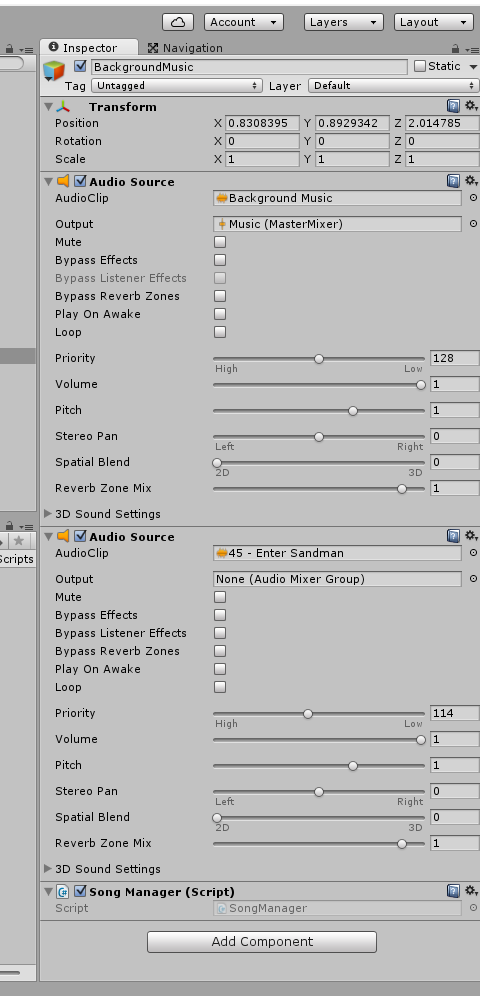
alt text

And here is my code (which, obviously, does not work right now--actually, it doesn't play anything at all...so it may be that the way I'm structuring the code is incorrect as well)...

 using UnityEngine;
 using System.Collections;

 public class SongManager : MonoBehaviour {
     AudioSource regular_music;
     AudioSource high_dmg_music;
     // Use this for initialization
     void Start () {
         regular_music = GetComponent<AudioSource> ();
         high_dmg_music = GetComponent<AudioSource> ();

         regular_music.loop = true;
         regular_music.Play ();

         high_dmg_music.loop = false;
         high_dmg_music.Stop ();
     }
     
     // Update is called once per frame
     void Update () {
         if (DamageManager.dmg_chain > 1500) {
             regular_music.loop = false;
             high_dmg_music.loop = true;
             high_dmg_music.Play ();
         } else {
             if (high_dmg_music.isPlaying) {
                 high_dmg_music.loop = false;
                 high_dmg_music.Stop ();
                 regular_music.loop = true;
                 regular_music.Play ();
             }
         }
     
     }
 }


How do I grab the correct audio sources and get the songs to toggle back and forth? (And any advice on how to make "Enter Sandman" play over the sound effects (and play louder) than the original background music would be huge too...since I want the player to be able to appreciate the atmosphere change, while they will be basically holding down the trigger (I made some changes to the spawn rate, firing speed, area of effect, etc, so there are a LOT of zombunnies and bears out there...)).

unity-audio.png (60.2 kB)
Comment
Add comment
10 |3000 characters needed characters left characters exceeded
▼
  • Viewable by all users
  • Viewable by moderators
  • Viewable by moderators and the original poster
  • Advanced visibility
Viewable by all users

1 Reply

· Add your reply
  • Sort: 
avatar image
1
Best Answer

Answer by TBruce · May 22, 2016 at 08:10 PM

Try playing your sounds with just one AudioSource and switching between clips instead like this

 using UnityEngine;
 using System.Collections;
 
 public class SongManager : MonoBehaviour
 {
     public AudioClip regularAudioClip;
     public AudioClip highDamageAudioClip;
 
     private AudioSource audioSource;
 
     // Use this for initialization
     void Start ()
     {
         if ((regularAudioClip == null) || (highDamageAudioClip == null))
         {
             string error = "";
             if (regularAudioClip == null)
                 error = "The Regular Audio Clip has not been initialized in the inspector, please do this now. ";
             if (highDamageAudioClip == null)
                 error += "The High Damage Audio Clip has not been initialized in the inspector, please do this now. ";
             Debug.LogError(error);
         }
 
         audioSource = gameObject.GetComponent<AudioSource>();
         if (audioSource == null)
         {
             Debug.LogWarning("AudioSource component missing from this gameobject. Adding one.");
             audioSource = gameObject.AddComponent<AudioSource>();
         }
         PlayRegularAudioClip();
     }
     
     public void PlayRegularAudioClip()
     {
         audioSource.Stop();
         audioSource.loop = true;
         audioSource.PlayOneShot(regularAudioClip);
     }
     
     public void PlayHighDamageAudioClip()
     {
         audioSource.Stop();
         audioSource.loop = true;
         audioSource.PlayOneShot(highDamageAudioClip);
     }
 
     // Update is called once per frame
     void Update ()
     {
         if (DamageManager.dmg_chain > 1500)
         {
             PlayHighDamageAudioClip();
         }
         else
         {
             if (high_dmg_music.isPlaying)
             {
                 PlayRegularAudioClip();
             }
         }
     }
 }
Comment
Add comment · Share
10 |3000 characters needed characters left characters exceeded
▼
  • Viewable by all users
  • Viewable by moderators
  • Viewable by moderators and the original poster
  • Advanced visibility
Viewable by all users

Your answer

Hint: You can notify a user about this post by typing @username

Up to 2 attachments (including images) can be used with a maximum of 524.3 kB each and 1.0 MB total.

Follow this Question

Answers Answers and Comments

55 People are following this question.

avatar image avatar image avatar image avatar image avatar image avatar image avatar image avatar image avatar image avatar image avatar image avatar image avatar image avatar image avatar image avatar image avatar image avatar image avatar image avatar image avatar image avatar image avatar image avatar image avatar image avatar image avatar image avatar image avatar image avatar image avatar image avatar image avatar image avatar image avatar image avatar image avatar image avatar image avatar image avatar image avatar image avatar image avatar image avatar image avatar image avatar image avatar image avatar image avatar image avatar image avatar image avatar image avatar image avatar image avatar image

Related Questions

Audio source is playing everywhere 0 Answers

Audio Source not loaded attached with prefab 0 Answers

Several music tracks on camera controlled by AudioSource.mute 1 Answer

Looping wav creates gap between plays 0 Answers

Searching Audio by Tag and change volume HELP 0 Answers


Enterprise
Social Q&A

Social
Subscribe on YouTube social-youtube Follow on LinkedIn social-linkedin Follow on Twitter social-twitter Follow on Facebook social-facebook Follow on Instagram social-instagram

Footer

  • Purchase
    • Products
    • Subscription
    • Asset Store
    • Unity Gear
    • Resellers
  • Education
    • Students
    • Educators
    • Certification
    • Learn
    • Center of Excellence
  • Download
    • Unity
    • Beta Program
  • Unity Labs
    • Labs
    • Publications
  • Resources
    • Learn platform
    • Community
    • Documentation
    • Unity QA
    • FAQ
    • Services Status
    • Connect
  • About Unity
    • About Us
    • Blog
    • Events
    • Careers
    • Contact
    • Press
    • Partners
    • Affiliates
    • Security
Copyright © 2020 Unity Technologies
  • Legal
  • Privacy Policy
  • Cookies
  • Do Not Sell My Personal Information
  • Cookies Settings
"Unity", Unity logos, and other Unity trademarks are trademarks or registered trademarks of Unity Technologies or its affiliates in the U.S. and elsewhere (more info here). Other names or brands are trademarks of their respective owners.
  • Anonymous
  • Sign in
  • Create
  • Ask a question
  • Spaces
  • Default
  • Help Room
  • META
  • Moderators
  • Explore
  • Topics
  • Questions
  • Users
  • Badges
