Wayback Machinekoobas.hobune.stream
May JUN Jul
Previous capture 13 Next capture
2021 2022 2023
1 capture
13 Jun 22 - 13 Jun 22
sparklines
Close Help
  • Products
  • Solutions
  • Made with Unity
  • Learning
  • Support & Services
  • Community
  • Asset Store
  • Get Unity

UNITY ACCOUNT

You need a Unity Account to shop in the Online and Asset Stores, participate in the Unity Community and manage your license portfolio. Login Create account
  • Blog
  • Forums
  • Answers
  • Evangelists
  • User Groups
  • Beta Program
  • Advisory Panel

Navigation

  • Home
  • Products
  • Solutions
  • Made with Unity
  • Learning
  • Support & Services
  • Community
    • Blog
    • Forums
    • Answers
    • Evangelists
    • User Groups
    • Beta Program
    • Advisory Panel

Unity account

You need a Unity Account to shop in the Online and Asset Stores, participate in the Unity Community and manage your license portfolio. Login Create account

Language

  • Chinese
  • Spanish
  • Japanese
  • Korean
  • Portuguese
  • Ask a question
  • Spaces
    • Default
    • Help Room
    • META
    • Moderators
    • Topics
    • Questions
    • Users
    • Badges
  • Home /
avatar image
0
Question by Mitrovic_Z · Dec 17, 2021 at 04:15 AM · rigidbody2dcollision detectioncollider2d

Enemy bullets pass through my walls

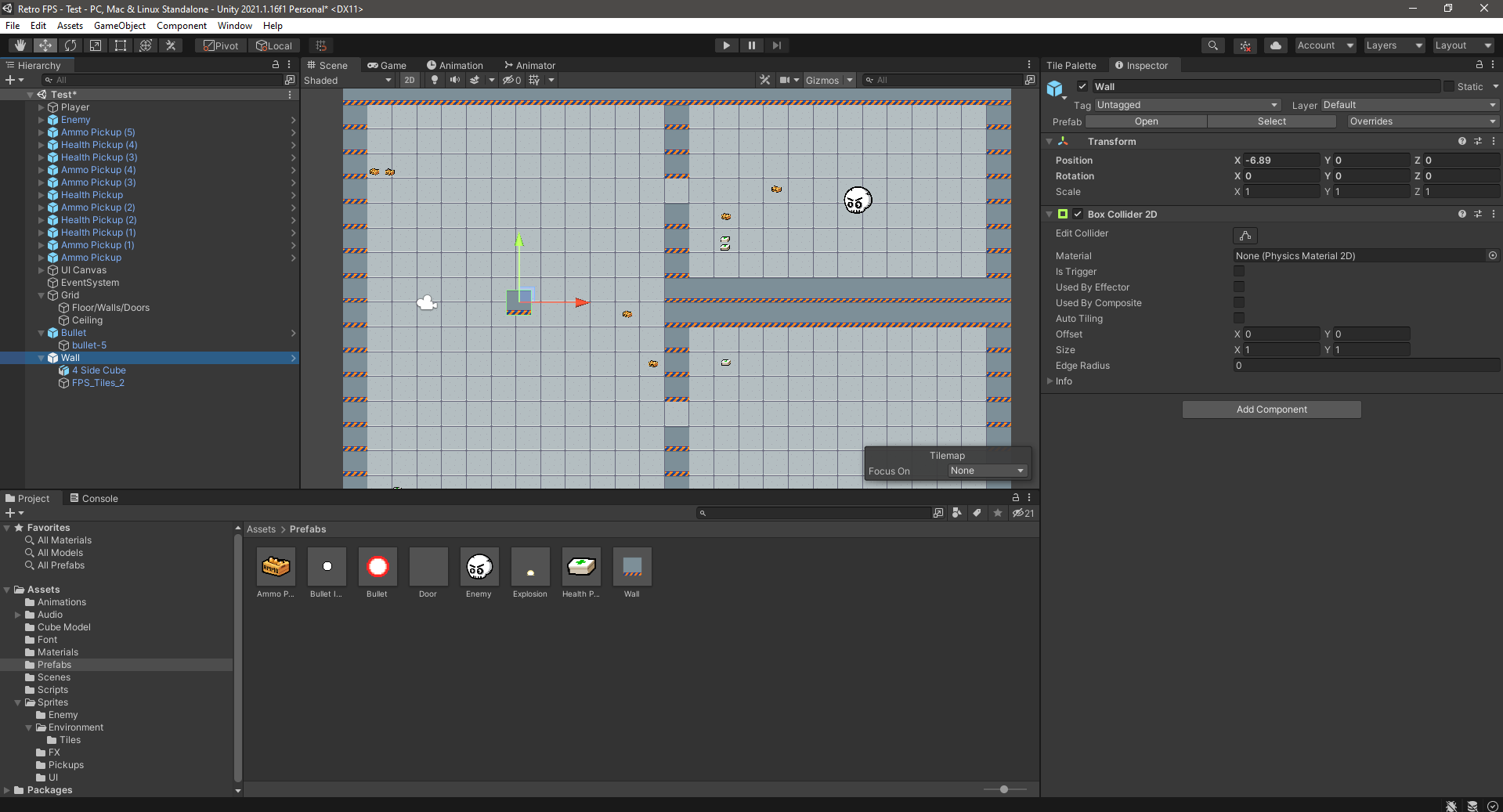
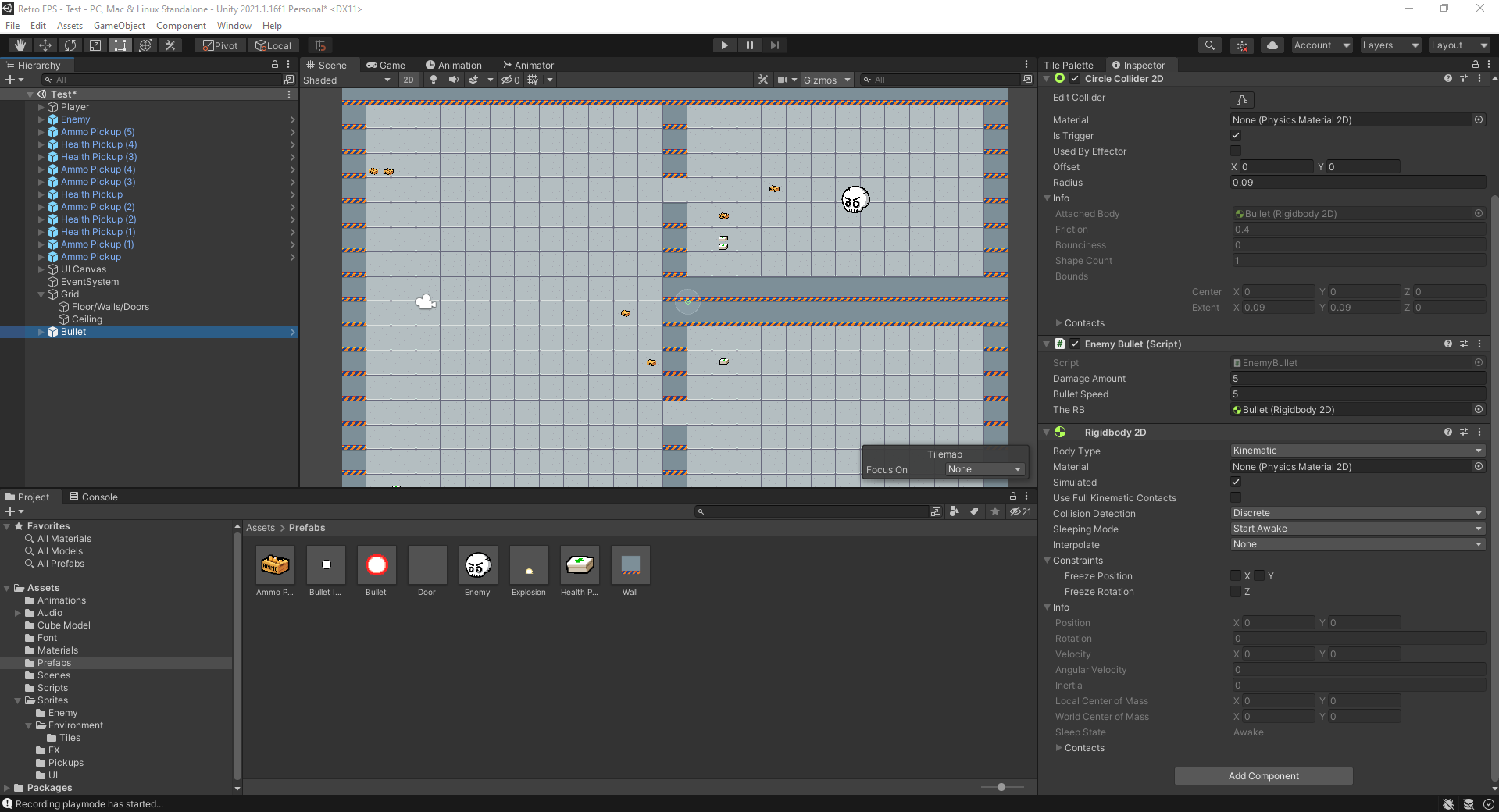
I've been wanting to make a retro fps game for a long time and now, I finally have time to start it, so i looked up on the internet for tutorials to start understanding its mechanics and I found a whole series containing everything I needed to know. After following it very closely, everything seems to work but one thing. My enemies shoot bullets, those bullets have a 2D circle collider which acts as a trigger, and a rigidbody 2D set to kinematic. My walls have 2D box colliders and yet those bullets pass through the walls like they were nothing!

Here are a couple of screenshots of my scripts and editor:

This is the inspector for my bullet game object: alt text
and here is the one for my wall : alt text

and here is the script for my bullet : public class EnemyBullet : MonoBehaviour { public int damageAmount; public float bulletSpeed = 3f; public Rigidbody2D theRB; private Vector3 direction;

 // Start is called before the first frame update
 void Start()
 {
     direction = PlayerController.instance.transform.position - transform.position;
     direction.Normalize();
     direction = direction * bulletSpeed;
 }

 // Update is called once per frame
 void Update()
 {
     theRB.velocity = direction * bulletSpeed;
 }

  void OnTriggerEnter2D(Collider2D other){
     if(other.tag == "Player"){
         PlayerController.instance.TakeDamage(damageAmount);
         Destroy(gameObject);
     }

 }

}

Any help given is super appreciated and I thank you for taking your time to read this. Let me know if you need more details :)

bullet-inspector.png (193.9 kB)
wall-inspector.png (165.3 kB)
Comment
Add comment
10 |3000 characters needed characters left characters exceeded
▼
  • Viewable by all users
  • Viewable by moderators
  • Viewable by moderators and the original poster
  • Advanced visibility
Viewable by all users

2 Replies

· Add your reply
  • Sort: 
avatar image
0
Best Answer

Answer by Mitrovic_Z · Dec 17, 2021 at 04:47 AM

I FOUND MY SOLUTION!

My solution was to add this to the trigger void:

private void OnTriggerEnter2D(Collider2D other){ if(other.tag == "Player"){ PlayerController.instance.TakeDamage(damageAmount); Destroy(gameObject); }else if(other.tag == "Wall" || other.tag == "Door"){ Destroy(gameObject); } }

Comment
Add comment · Share
10 |3000 characters needed characters left characters exceeded
▼
  • Viewable by all users
  • Viewable by moderators
  • Viewable by moderators and the original poster
  • Advanced visibility
Viewable by all users
avatar image
0

Answer by ryanlin138 · Dec 17, 2021 at 04:35 AM

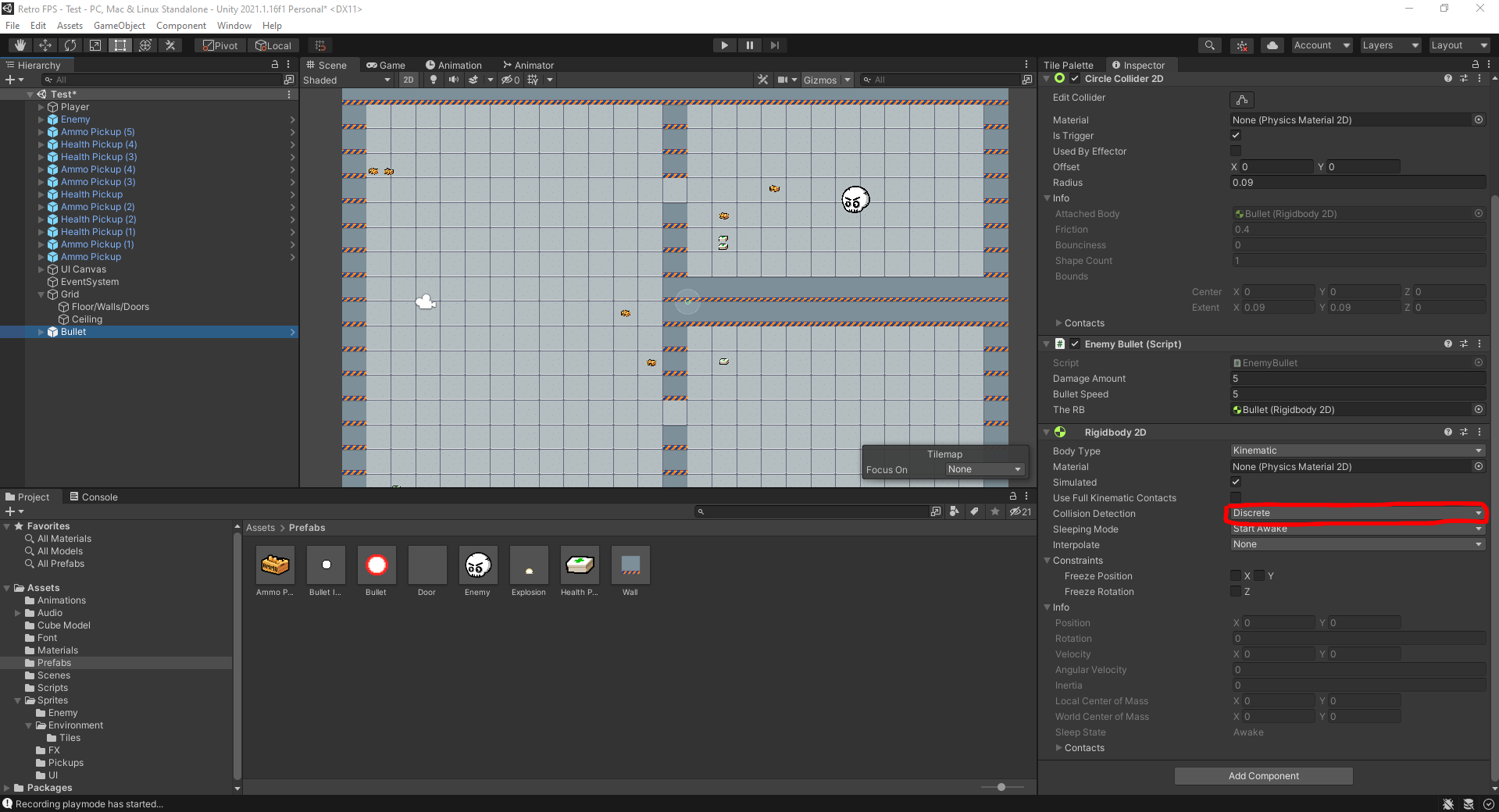
You have to set the Rigidbody2D's collision detection mode to continuous because discrete collision will cause small fast objects to go through thin walls.alt text

190060-bullet-inspector.png (196.1 kB)
Comment
Add comment · Show 1 · Share
10 |3000 characters needed characters left characters exceeded
▼
  • Viewable by all users
  • Viewable by moderators
  • Viewable by moderators and the original poster
  • Advanced visibility
Viewable by all users
avatar image Mitrovic_Z · Dec 17, 2021 at 04:36 AM 0
Share

Hi just tried it! Doesn't change anything unfortunately...

Your answer

Hint: You can notify a user about this post by typing @username

Up to 2 attachments (including images) can be used with a maximum of 524.3 kB each and 1.0 MB total.

Follow this Question

Answers Answers and Comments

142 People are following this question.

avatar image avatar image avatar image avatar image avatar image avatar image avatar image avatar image avatar image avatar image avatar image avatar image avatar image avatar image avatar image avatar image avatar image avatar image avatar image avatar image avatar image avatar image avatar image avatar image avatar image avatar image avatar image avatar image avatar image avatar image avatar image avatar image avatar image avatar image avatar image avatar image avatar image avatar image avatar image avatar image avatar image avatar image avatar image avatar image avatar image avatar image avatar image avatar image avatar image avatar image avatar image avatar image avatar image avatar image avatar image avatar image avatar image avatar image avatar image avatar image avatar image avatar image avatar image avatar image avatar image avatar image avatar image avatar image avatar image avatar image avatar image avatar image avatar image avatar image avatar image avatar image avatar image avatar image avatar image avatar image avatar image avatar image avatar image avatar image avatar image avatar image avatar image avatar image avatar image avatar image avatar image avatar image avatar image avatar image avatar image avatar image avatar image avatar image avatar image avatar image avatar image avatar image avatar image avatar image avatar image avatar image avatar image avatar image avatar image avatar image avatar image avatar image avatar image avatar image avatar image avatar image avatar image avatar image avatar image avatar image avatar image avatar image avatar image avatar image avatar image avatar image avatar image avatar image avatar image avatar image avatar image avatar image avatar image avatar image avatar image avatar image avatar image avatar image avatar image avatar image avatar image avatar image

Related Questions

dragging on a gameObject messes with collisions 1 Answer

Is it possible to have continuous collision detection with dynamic points on Edge Colliders? 0 Answers

Player not taking damage on collision with enemy 1 Answer

multiple objects on oncollissionstay2d 1 Answer

Why do GameObjects need Rigidbodies to collide? 0 Answers


Enterprise
Social Q&A

Social
Subscribe on YouTube social-youtube Follow on LinkedIn social-linkedin Follow on Twitter social-twitter Follow on Facebook social-facebook Follow on Instagram social-instagram

Footer

  • Purchase
    • Products
    • Subscription
    • Asset Store
    • Unity Gear
    • Resellers
  • Education
    • Students
    • Educators
    • Certification
    • Learn
    • Center of Excellence
  • Download
    • Unity
    • Beta Program
  • Unity Labs
    • Labs
    • Publications
  • Resources
    • Learn platform
    • Community
    • Documentation
    • Unity QA
    • FAQ
    • Services Status
    • Connect
  • About Unity
    • About Us
    • Blog
    • Events
    • Careers
    • Contact
    • Press
    • Partners
    • Affiliates
    • Security
Copyright © 2020 Unity Technologies
  • Legal
  • Privacy Policy
  • Cookies
  • Do Not Sell My Personal Information
  • Cookies Settings
"Unity", Unity logos, and other Unity trademarks are trademarks or registered trademarks of Unity Technologies or its affiliates in the U.S. and elsewhere (more info here). Other names or brands are trademarks of their respective owners.
  • Anonymous
  • Sign in
  • Create
  • Ask a question
  • Spaces
  • Default
  • Help Room
  • META
  • Moderators
  • Explore
  • Topics
  • Questions
  • Users
  • Badges