 koobas.hobune.stream


Scene view stretches camera frustum gizmo
Hi,
I am drawing my own camera frustums using Gizmos because I want camera frustums to always be visible, not just when I select the camera object.
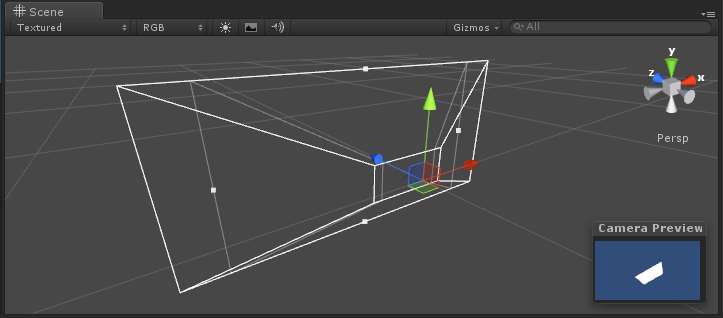
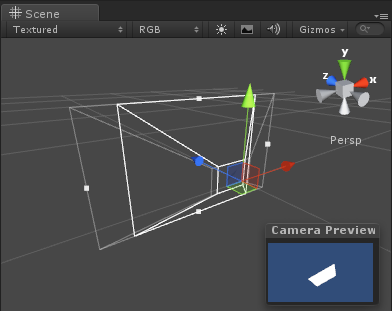
The problem is that when I resize the 'scene' window the gizmo stretches as if it's trying to match the aspect ratio of the scene view. The Unity camera frustum however doesn't stretch like this.
Attached is my code and screenshots. Thanks!
 using UnityEngine;
 using System.Collections;

 [RequireComponent(typeof(Camera))]
 public class ShowCameraFrustum : MonoBehaviour
 {
  void OnDrawGizmos()
  {
  // Top left
  Vector3 tlN = this.camera.ScreenToWorldPoint(new Vector3(Screen.width*0, Screen.height, this.camera.nearClipPlane));
  Vector3 tlF = this.camera.ScreenToWorldPoint(new Vector3(Screen.width*0, Screen.height, this.camera.farClipPlane));

  // Top right
  Vector3 trN = this.camera.ScreenToWorldPoint(new Vector3(Screen.width, Screen.height, this.camera.nearClipPlane));
  Vector3 trF = this.camera.ScreenToWorldPoint(new Vector3(Screen.width, Screen.height, this.camera.farClipPlane));

  // Bottom left
  Vector3 blN = this.camera.ScreenToWorldPoint(new Vector3(0.0f, 0.0f, this.camera.nearClipPlane));
  Vector3 blF = this.camera.ScreenToWorldPoint(new Vector3(0.0f, 0.0f, this.camera.farClipPlane));

  // Bottom right
  Vector3 brN = this.camera.ScreenToWorldPoint(new Vector3(Screen.width, 0.0f, this.camera.nearClipPlane));
  Vector3 brF = this.camera.ScreenToWorldPoint(new Vector3(Screen.width, 0.0f, this.camera.farClipPlane));

  Gizmos.color = Color.white;

  // Near
  Gizmos.DrawLine(tlN, trN);
  Gizmos.DrawLine(trN, brN);
  Gizmos.DrawLine(brN, blN);
  Gizmos.DrawLine(blN, tlN);

  // Far
  Gizmos.DrawLine(tlF, trF);
  Gizmos.DrawLine(trF, brF);
  Gizmos.DrawLine(brF, blF);
  Gizmos.DrawLine(blF, tlF);

  // Sides
  Gizmos.DrawLine(tlN, tlF);
  Gizmos.DrawLine(trN, trF);
  Gizmos.DrawLine(brN, brF);
  Gizmos.DrawLine(blN, blF);
  }
 }
SOLVED
Using the code from here to get the size of the game viewport: http://answers.unity3d.com/questions/179775/game-window-size-from-editor-window-in-editor-mode.html
Naturally as this is using reflection and undocumented 'features' it's a bit of a hack but it's good enough for me :) Hope this little script is usesome to someone :)
Here's the final code:
 using UnityEngine;
 using System.Collections;

 [RequireComponent(typeof(Camera))]
 public class ShowCameraFrustum : MonoBehaviour
 {
  public static Vector2 GetMainGameViewSize()
  {
      System.Type T = System.Type.GetType("UnityEditor.GameView,UnityEditor");
      System.Reflection.MethodInfo GetSizeOfMainGameView = T.GetMethod("GetSizeOfMainGameView",System.Reflection.BindingFlags.NonPublic | System.Reflection.BindingFlags.Static);
      System.Object Res = GetSizeOfMainGameView.Invoke(null,null);
      return (Vector2)Res;
  }

  void OnDrawGizmos()
  {
  Camera cam = this.camera;

  // Top left
  Vector3 tlN = cam.ScreenToWorldPoint(new Vector3(Screen.width*0, Screen.height, cam.nearClipPlane));
  Vector3 tlF = cam.ScreenToWorldPoint(new Vector3(Screen.width*0, Screen.height, cam.farClipPlane));

  // Top right
  Vector3 trN = cam.ScreenToWorldPoint(new Vector3(Screen.width, Screen.height, cam.nearClipPlane));
  Vector3 trF = cam.ScreenToWorldPoint(new Vector3(Screen.width, Screen.height, cam.farClipPlane));

  // Bottom left
  Vector3 blN = cam.ScreenToWorldPoint(new Vector3(0.0f, 0.0f, cam.nearClipPlane));
  Vector3 blF = cam.ScreenToWorldPoint(new Vector3(0.0f, 0.0f, cam.farClipPlane));

  // Bottom right
  Vector3 brN = cam.ScreenToWorldPoint(new Vector3(Screen.width, 0.0f, cam.nearClipPlane));
  Vector3 brF = cam.ScreenToWorldPoint(new Vector3(Screen.width, 0.0f, cam.farClipPlane));

  // Scale for aspect ratio
  Vector2 gameViewsize = GetMainGameViewSize();
  float gameViewAspect = gameViewsize.x / gameViewsize.y;
  float s = gameViewAspect / cam.aspect;
  tlN.x *= s;
  tlF.x *= s;
  trN.x *= s;
  trF.x *= s;
  blN.x *= s;
  blF.x *= s;
  brN.x *= s;
  brF.x *= s;

  Gizmos.color = Color.white;

  // Near
  Gizmos.DrawLine(tlN, trN);
  Gizmos.DrawLine(trN, brN);
  Gizmos.DrawLine(brN, blN);
  Gizmos.DrawLine(blN, tlN);

  // Far
  Gizmos.DrawLine(tlF, trF);
  Gizmos.DrawLine(trF, brF);
  Gizmos.DrawLine(brF, blF);
  Gizmos.DrawLine(blF, tlF);

  // Sides
  Gizmos.DrawLine(tlN, tlF);
  Gizmos.DrawLine(trN, trF);
  Gizmos.DrawLine(brN, brF);
  Gizmos.DrawLine(blN, blF);
  }
 }

Don't use Screen.width / .height. Use Camera.ViewportToWorldPoint with normalized coordinates instead (0.0 - 1.0).
Btw, i'm not sure if Unity will use the size of the scene view for all cameras, in this case, there's not much you can do about that. If not, make sure you keep your game view at the same size. Each camera as an aspect ratio and it's always calculated from the rendertarget.
You might want to set a fix aspect ratio for your camera.

I trid Camera.ViewporttoWorldPoint - same thing It seems the aspect ratio of the camera changes when I resize the 'scene' window even though game window size remains static...weird!
UPDATE
It seems the the aspect ratio set in the 'game' view affects the camera frustum display in Unity. I can't seem to find a way to get this aspect ratio though...
I found a fix that works:
 float gameAspect = 1280.0f / 720.0f;  // hardcoded for now
 float scale = gameAspect / camera.aspect;
 tlN.x *= scale;
 tlF.x *= scale;
...
So this scales the X component for all the points in the code above. This works well (in this case if you 'game' view is set to resolution 1280:720 or 16:9 aspect. It's possible to set this resolution to 'free' or 4:3 which breaks it though, so I guess this is partial fix.

put this on a camera script
void OnDrawGizmos() { Gizmos.matrix = transform.localToWorldMatrix; Gizmos.DrawFrustum( transform.position, camera.fieldOfView, camera.farClipPlane, camera.nearClipPlane, 1 ); }




