Wayback Machinekoobas.hobune.stream
May JUN Jul
Previous capture 13 Next capture
2021 2022 2023
1 capture
13 Jun 22 - 13 Jun 22
sparklines
Close Help
  • Products
  • Solutions
  • Made with Unity
  • Learning
  • Support & Services
  • Community
  • Asset Store
  • Get Unity

UNITY ACCOUNT

You need a Unity Account to shop in the Online and Asset Stores, participate in the Unity Community and manage your license portfolio. Login Create account
  • Blog
  • Forums
  • Answers
  • Evangelists
  • User Groups
  • Beta Program
  • Advisory Panel

Navigation

  • Home
  • Products
  • Solutions
  • Made with Unity
  • Learning
  • Support & Services
  • Community
    • Blog
    • Forums
    • Answers
    • Evangelists
    • User Groups
    • Beta Program
    • Advisory Panel

Unity account

You need a Unity Account to shop in the Online and Asset Stores, participate in the Unity Community and manage your license portfolio. Login Create account

Language

  • Chinese
  • Spanish
  • Japanese
  • Korean
  • Portuguese
  • Ask a question
  • Spaces
    • Default
    • Help Room
    • META
    • Moderators
    • Topics
    • Questions
    • Users
    • Badges
  • Home /
avatar image
1
Question by RudaSwinia · Mar 11, 2021 at 07:51 AM · physicsraycastmeshcollider

Physics Raycast gives hit in wrong place

Hello. In my game I need to get distance from the path (which is in my case a LineRenderer fed with path points). As I did not find any better solution to get distance from LineRenderer in Unity I am doing it this way:

  1. I am generating a mesh collider for followed line (based on its points) perpendicular to X-Z plane with some hight.

  2. From point where I want measure distance to path I am sending 360 Raycasts (every 1° degree) in all directions.

  3. From all successful hits (I am checking Physics.Raycast return value and a tag of hit object if it is "Path") I am selecting hit with the smallest distance.

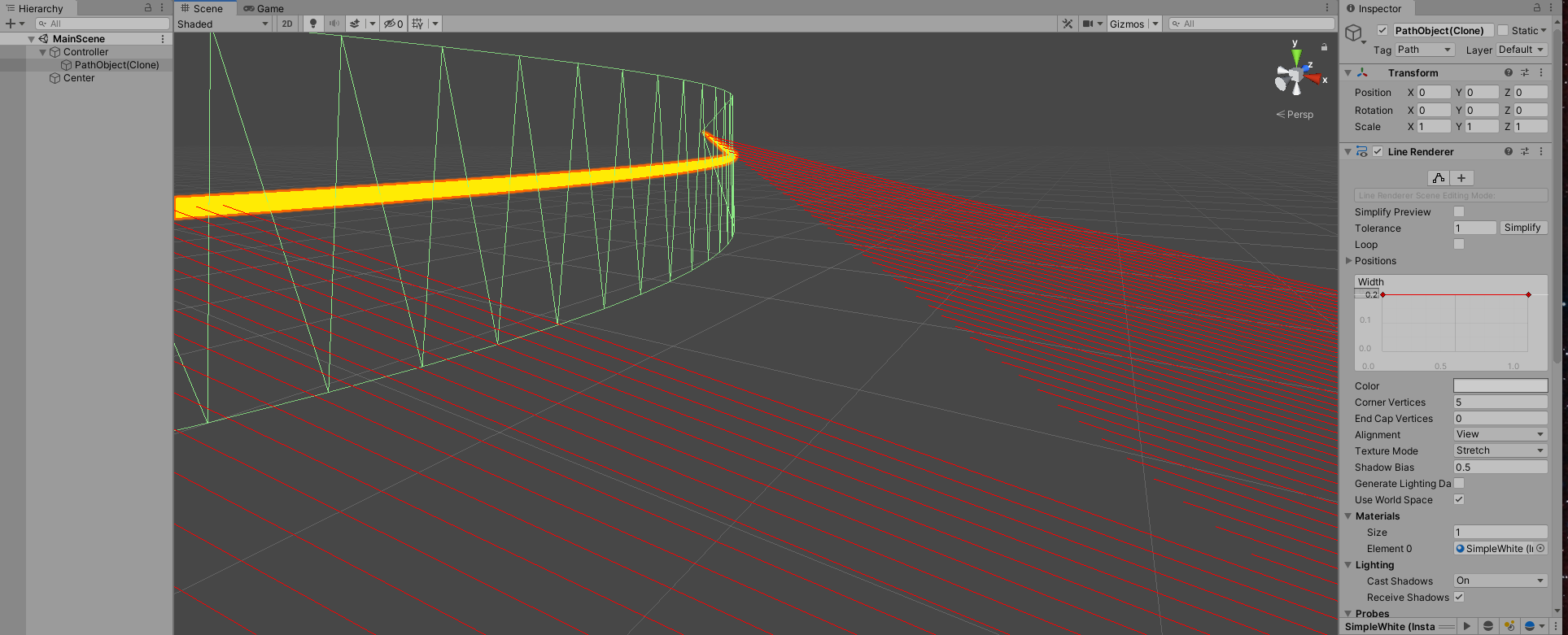
    And that works for most of the time. The problem is that lately I have found out that in some cases the shortest ray is actually wrong - especially close to the place where path is curved. Then I have added Debug.DrawLine() to see what ray hits are actually sensed. It turned out that some of successfully returned hits, event if the tag of collider is "Path" stop in the middle of the distance to the LineRenderer in empty space. Hence sometimes the shortest distance to the followed path is false.


Please see attached screenshots: alt text alt text
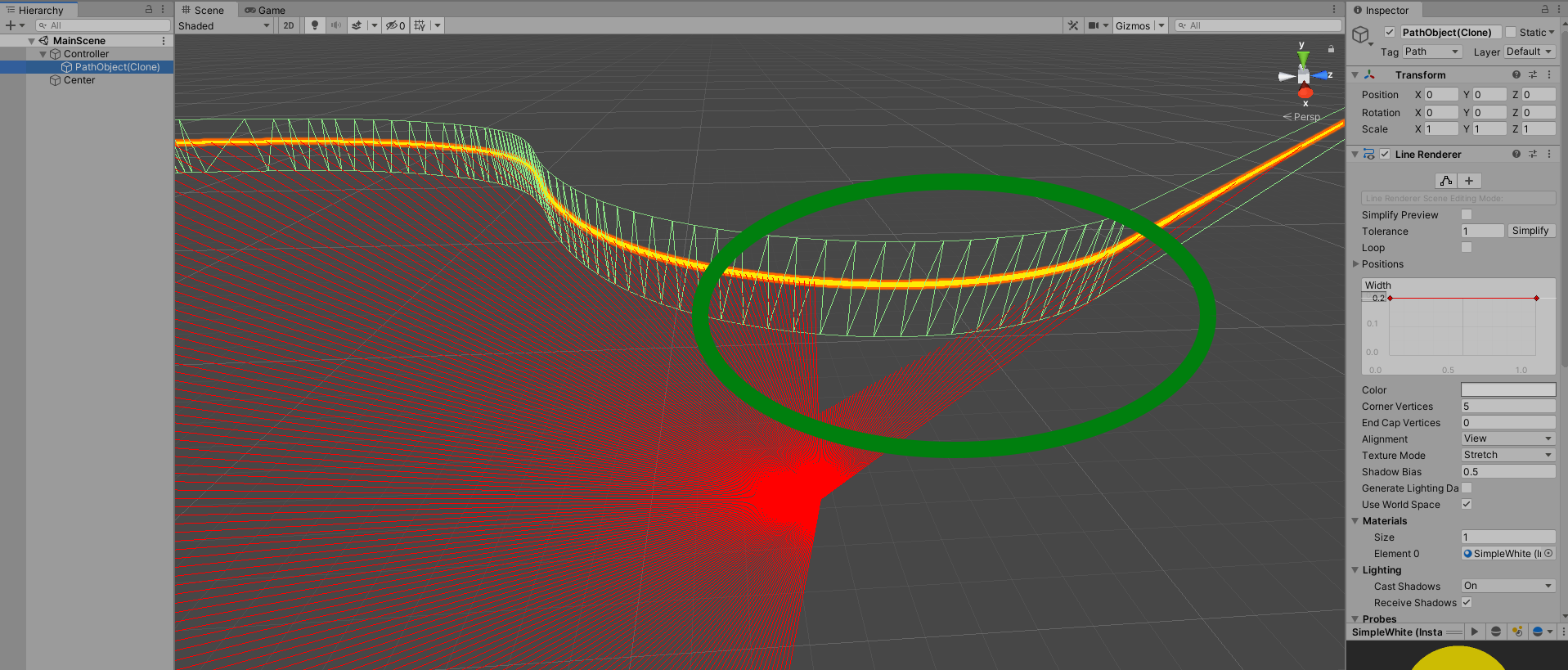
In the second image you can see that few rays are actually stopped in the middle of the distance to mesh collider which they "hit". I have removed from the scene all other objects than the center of rays and actual path - to do not interrupt the rays to hit a mesh collider. Code for sending rays:

 private float GetDistanceFromRefLine () {
     Vector3 currPos = getLinePosition (vehicle.GetFrontAxlePosition ());
     float dist = Mathf.Infinity;
     RaycastHit hit;

     Physics.queriesHitBackfaces = true;
     foreach (Vector3 dir in raysDirections) {
         if (Physics.Raycast (currPos, dir, out hit, 100)) {
             if (hit.collider.tag != "Path")
                 continue;

             Debug.DrawLine (currPos, hit.point, Color.red, 1);
             if (hit.distance < dist) {
                 dist = hit.distance;
             }
         }
     }
     return dist;
 }


Generating LineRendered mesh procedure:

  private void CreateLineMesh () {
     int count = line.positionCount;
     if (count < 2) {
         return;
     }

     Vector3[] points = new Vector3[count];
     line.GetPositions (points);

     Vector3[] verticsArray = new Vector3[(count * 2 - 2) * 3];
     int[] trianglesArray = new int[(count * 2 - 2) * 3];

     int j = 0;
     for (int i = 0; i < count - 1; i += 1, j += 6) {
         Vector3 point1 = new Vector3 (points[i].x, 2f, points[i].z);
         Vector3 point2 = new Vector3 (points[i].x, -2f, points[i].z);
         Vector3 point3 = new Vector3 (points[i + 1].x, 2f, points[i + 1].z);
         Vector3 point4 = new Vector3 (points[i + 1].x, -2f, points[i + 1].z);

         verticsArray[j] = point1;
         verticsArray[j + 1] = point2;
         verticsArray[j + 2] = point3;

         verticsArray[j + 3] = point3;
         verticsArray[j + 4] = point2;
         verticsArray[j + 5] = point4;

         trianglesArray[j] = j;
         trianglesArray[j + 1] = j + 1;
         trianglesArray[j + 2] = j + 2;
         trianglesArray[j + 3] = j + 3;
         trianglesArray[j + 4] = j + 4;
         trianglesArray[j + 5] = j + 5;
     }

     mesh.Clear ();
     mesh.vertices = verticsArray;
     mesh.triangles = trianglesArray;
     mesh.RecalculateNormals ();
     mesh.RecalculateBounds ();

     Destroy (meshCollider.sharedMesh);
     meshCollider.sharedMesh = mesh;
 }


The same behavior is existing in Unity 2019.4.22f1 (LTS) and 2020.1.0f1. I am working on Linux (maybe this is something relevant).


More screenshots:

image1, image2, image3, image4, image5


Do you think that it is maybe actual Unity bug?

unity-bug7.png (190.2 kB)
unity-bug6.png (281.8 kB)
Comment
Add comment · Show 1
10 |3000 characters needed characters left characters exceeded
▼
  • Viewable by all users
  • Viewable by moderators
  • Viewable by moderators and the original poster
  • Advanced visibility
Viewable by all users
avatar image CodesCove · Mar 11, 2021 at 07:31 PM 0
Share

I have no deeper understanding of this but here's Just few things to check..

It seems the actual collision mesh continues straight line even if it seems to bend.

So, is the linerender moving or morphing? How often / when are you generating the mesh?

If the mesh is moving or morphing (vertex values are changing while tris order can remain same) I have found a need to update also the meshcollider by setting the istrigger and convex values again.. otherwise the mesh data don't match the actual collider anymore.. However if you generate the mesh from scratch all the time this probably has nothing to do with it... but anyway might be worth checking.

0 Replies

· Add your reply
  • Sort: 

Your answer

Hint: You can notify a user about this post by typing @username

Up to 2 attachments (including images) can be used with a maximum of 524.3 kB each and 1.0 MB total.

Follow this Question

Answers Answers and Comments

224 People are following this question.

avatar image avatar image avatar image avatar image avatar image avatar image avatar image avatar image avatar image avatar image avatar image avatar image avatar image avatar image avatar image avatar image avatar image avatar image avatar image avatar image avatar image avatar image avatar image avatar image avatar image avatar image avatar image avatar image avatar image avatar image avatar image avatar image avatar image avatar image avatar image avatar image avatar image avatar image avatar image avatar image avatar image avatar image avatar image avatar image avatar image avatar image avatar image avatar image avatar image avatar image avatar image avatar image avatar image avatar image avatar image avatar image avatar image avatar image avatar image avatar image avatar image avatar image avatar image avatar image avatar image avatar image avatar image avatar image avatar image avatar image avatar image avatar image avatar image avatar image avatar image avatar image avatar image avatar image avatar image avatar image avatar image avatar image avatar image avatar image avatar image avatar image avatar image avatar image avatar image avatar image avatar image avatar image avatar image avatar image avatar image avatar image avatar image avatar image avatar image avatar image avatar image avatar image avatar image avatar image avatar image avatar image avatar image avatar image avatar image avatar image avatar image avatar image avatar image avatar image avatar image avatar image avatar image avatar image avatar image avatar image avatar image avatar image avatar image avatar image avatar image avatar image avatar image avatar image avatar image avatar image avatar image avatar image avatar image avatar image avatar image avatar image avatar image avatar image avatar image avatar image avatar image avatar image avatar image avatar image avatar image avatar image avatar image avatar image avatar image avatar image avatar image avatar image avatar image avatar image avatar image avatar image avatar image avatar image avatar image avatar image avatar image avatar image avatar image avatar image avatar image avatar image avatar image avatar image avatar image avatar image avatar image avatar image avatar image avatar image avatar image avatar image avatar image avatar image avatar image avatar image avatar image avatar image avatar image avatar image avatar image avatar image avatar image avatar image avatar image avatar image avatar image avatar image avatar image avatar image avatar image avatar image avatar image avatar image avatar image avatar image avatar image avatar image avatar image avatar image avatar image avatar image avatar image avatar image avatar image avatar image avatar image avatar image avatar image avatar image avatar image avatar image avatar image avatar image avatar image avatar image avatar image avatar image avatar image avatar image

Related Questions

when my player touch the obstacle then going inside obstacle 0 Answers

Need help with Raycasting 1 Answer

Passing values from Shader to C# script 0 Answers

Raycast problems in my AI 1 Answer

Can you gradually slow an fbx animation on raycast hit, then speed it up again after a certain amount of time? 1 Answer


Enterprise
Social Q&A

Social
Subscribe on YouTube social-youtube Follow on LinkedIn social-linkedin Follow on Twitter social-twitter Follow on Facebook social-facebook Follow on Instagram social-instagram

Footer

  • Purchase
    • Products
    • Subscription
    • Asset Store
    • Unity Gear
    • Resellers
  • Education
    • Students
    • Educators
    • Certification
    • Learn
    • Center of Excellence
  • Download
    • Unity
    • Beta Program
  • Unity Labs
    • Labs
    • Publications
  • Resources
    • Learn platform
    • Community
    • Documentation
    • Unity QA
    • FAQ
    • Services Status
    • Connect
  • About Unity
    • About Us
    • Blog
    • Events
    • Careers
    • Contact
    • Press
    • Partners
    • Affiliates
    • Security
Copyright © 2020 Unity Technologies
  • Legal
  • Privacy Policy
  • Cookies
  • Do Not Sell My Personal Information
  • Cookies Settings
"Unity", Unity logos, and other Unity trademarks are trademarks or registered trademarks of Unity Technologies or its affiliates in the U.S. and elsewhere (more info here). Other names or brands are trademarks of their respective owners.
  • Anonymous
  • Sign in
  • Create
  • Ask a question
  • Spaces
  • Default
  • Help Room
  • META
  • Moderators
  • Explore
  • Topics
  • Questions
  • Users
  • Badges