
Wayback Machinekoobas.hobune.stream
May JUN Jul
Previous capture 13 Next capture
2021 2022 2023
1 capture
13 Jun 22 - 13 Jun 22
sparklines
Close Help
  • Products
  • Solutions
  • Made with Unity
  • Learning
  • Support & Services
  • Community
  • Asset Store
  • Get Unity

UNITY ACCOUNT

You need a Unity Account to shop in the Online and Asset Stores, participate in the Unity Community and manage your license portfolio. Login Create account
  • Blog
  • Forums
  • Answers
  • Evangelists
  • User Groups
  • Beta Program
  • Advisory Panel

Navigation

  • Home
  • Products
  • Solutions
  • Made with Unity
  • Learning
  • Support & Services
  • Community
    • Blog
    • Forums
    • Answers
    • Evangelists
    • User Groups
    • Beta Program
    • Advisory Panel

Unity account

You need a Unity Account to shop in the Online and Asset Stores, participate in the Unity Community and manage your license portfolio. Login Create account

Language

  • Chinese
  • Spanish
  • Japanese
  • Korean
  • Portuguese
  • Ask a question
  • Spaces
    • Default
    • Help Room
    • META
    • Moderators
    • Topics
    • Questions
    • Users
    • Badges
  • Home /
avatar image
0
Question by HansK · Aug 14, 2012 at 12:06 PM · lightingilluminationself

Self-illuminated bumped specular + rim lighting

Hey, I would really like to mix self-illuminated bumped specular and rim lighting shaders into one. But unfortunately I have almost 0 knowledge about shaders :( I would be so grateful if someone could help me out. Rim shader is here:

Shader "Example/Rim" {
    Properties {
      _MainTex ("Texture", 2D) = "white" {}
      _BumpMap ("Bumpmap", 2D) = "bump" {}
      _RimColor ("Rim Color", Color) = (0.26,0.19,0.16,0.0)
      _RimPower ("Rim Power", Range(0.5,8.0)) = 3.0
    }
    SubShader {
      Tags { "RenderType" = "Opaque" }
      CGPROGRAM
      #pragma surface surf Lambert
      struct Input {
          float2 uv_MainTex;
          float2 uv_BumpMap;
          float3 viewDir;
      };
      sampler2D _MainTex;
      sampler2D _BumpMap;
      float4 _RimColor;
      float _RimPower;
      void surf (Input IN, inout SurfaceOutput o) {
          o.Albedo = tex2D (_MainTex, IN.uv_MainTex).rgb;
          o.Normal = UnpackNormal (tex2D (_BumpMap, IN.uv_BumpMap));
          half rim = 1.0 - saturate(dot (normalize(IN.viewDir), o.Normal));
          o.Emission = _RimColor.rgb * pow (rim, _RimPower);
      }
      ENDCG
    } 
    Fallback "Diffuse"
  }

Comment
Add comment · Show 2
10 |3000 characters needed characters left characters exceeded
▼
  • Viewable by all users
  • Viewable by moderators
  • Viewable by moderators and the original poster
  • Advanced visibility
Viewable by all users
avatar image ScroodgeM · Aug 14, 2012 at 06:54 PM 0
Share

'bump' A$$anonymous$$A 'normal' map makes a surface not flat, so light power is greater or lower based on this map.

'self-illum' effect ignores light at all cause it makes his own light.

so, i don't clearly imagine how do you want to combine bump and self-illum.

show an example (any pic) of effect you want to achieve

if you mean something like car headlamp bumped self-illu$$anonymous$$ated, then this effect simply can achieved using self-illu$$anonymous$$ation mask. to make a light effect of these headlamps - simply spotlight with cookie.

avatar image Loius · Aug 15, 2012 at 12:26 AM 0
Share

In your Edit > Render Settings, does it help you to brighten the Ambient Light color? I'm horrific with shaders, but that might be the solution if I"m seeing the problem right.

2 Replies

· Add your reply
  • Sort: 
avatar image
1
Best Answer

Answer by ScroodgeM · Aug 15, 2012 at 08:41 PM

Shader "Self-Illumin/Bumped Specular with Rim" { Properties { _Color ("Main Color", Color) = (1,1,1,1) _SpecColor ("Specular Color", Color) = (0.5, 0.5, 0.5, 1) _Shininess ("Shininess", Range (0.01, 1)) = 0.078125 _MainTex ("Base (RGB) Gloss (A)", 2D) = "white" {} _Illum ("Illumin (A)", 2D) = "white" {} _BumpMap ("Normalmap", 2D) = "bump" {} _EmissionLM ("Emission (Lightmapper)", Float) = 0 _RimColor ("Rim Color", Color) = (0.26,0.19,0.16,0.0) _RimPower ("Rim Power", Range(0.5,8.0)) = 3.0 } SubShader { Tags { "RenderType"="Opaque" } LOD 400 CGPROGRAM #pragma surface surf BlinnPhong

sampler2D _MainTex; sampler2D _BumpMap; sampler2D _Illum; fixed4 _Color; half _Shininess; float4 _RimColor; float _RimPower;

struct Input { float2 uv_MainTex; float2 uv_Illum; float2 uv_BumpMap; float3 viewDir; };

void surf (Input IN, inout SurfaceOutput o) { fixed4 tex = tex2D(_MainTex, IN.uv_MainTex); fixed4 c = tex _Color; o.Albedo = c.rgb; o.Gloss = tex.a; o.Alpha = c.a; o.Specular = _Shininess; o.Normal = UnpackNormal(tex2D(_BumpMap, IN.uv_BumpMap)); half rim = 1.0 - saturate(dot(normalize(IN.viewDir), o.Normal)); o.Emission = c.rgb tex2D(_Illum, IN.uv_Illum).a + _RimColor.rgb * pow (rim, _RimPower); } ENDCG } FallBack "Self-Illumin/Bumped Specular" }
Comment
Add comment · Share
10 |3000 characters needed characters left characters exceeded
▼
  • Viewable by all users
  • Viewable by moderators
  • Viewable by moderators and the original poster
  • Advanced visibility
Viewable by all users
avatar image
0

Answer by HansK · Aug 14, 2012 at 11:09 PM

alt text

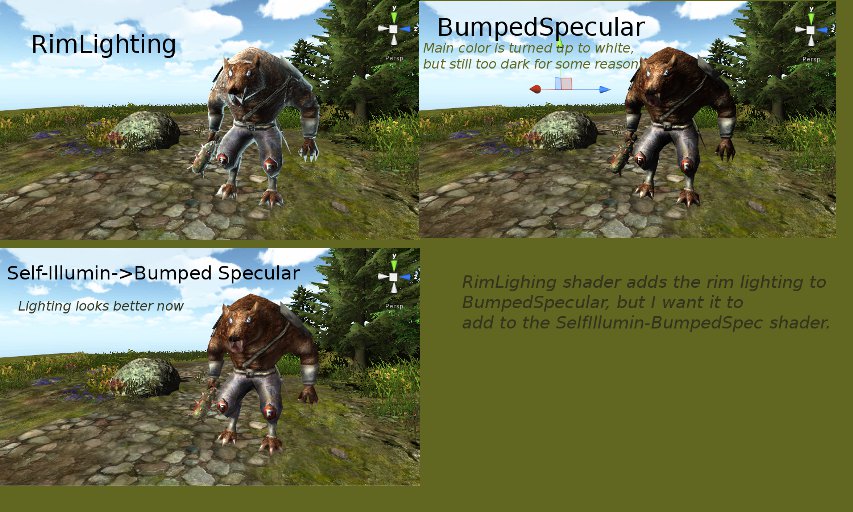
The reason I want to add RimLighting is because a script will later smoothly change the color of rimlight on mouse hover (so it's basically like highlighting something). But the problem is just that the default BumpedSpecular looks way too dark, and Self-Illumin is just about right..

Hope I made it clear enough :D


rimlighting.jpg (116.6 kB)
Comment
Add comment · Show 1 · Share
10 |3000 characters needed characters left characters exceeded
▼
  • Viewable by all users
  • Viewable by moderators
  • Viewable by moderators and the original poster
  • Advanced visibility
Viewable by all users
avatar image Loius · Aug 15, 2012 at 12:24 AM 0
Share

This is a comment, not an answer - takes a bit of getting used to all the buttons around here, I know. :)

Your answer

Hint: You can notify a user about this post by typing @username

Up to 2 attachments (including images) can be used with a maximum of 524.3 kB each and 1.0 MB total.

Follow this Question

Answers Answers and Comments

9 People are following this question.

avatar image avatar image avatar image avatar image avatar image avatar image avatar image avatar image avatar image

Related Questions

illuminate all the objects in the scene 1 Answer

How to access Hex Color of HDR Color and Brightness by script 1 Answer

Ambient Intensity not working 2 Answers

Realtime light goes through mesh (did research, not helping) 1 Answer

Why does my bumped diffuse material get lit in a weird way? 1 Answer


Enterprise
Social Q&A

Social
Subscribe on YouTube social-youtube Follow on LinkedIn social-linkedin Follow on Twitter social-twitter Follow on Facebook social-facebook Follow on Instagram social-instagram

Footer

  • Purchase
    • Products
    • Subscription
    • Asset Store
    • Unity Gear
    • Resellers
  • Education
    • Students
    • Educators
    • Certification
    • Learn
    • Center of Excellence
  • Download
    • Unity
    • Beta Program
  • Unity Labs
    • Labs
    • Publications
  • Resources
    • Learn platform
    • Community
    • Documentation
    • Unity QA
    • FAQ
    • Services Status
    • Connect
  • About Unity
    • About Us
    • Blog
    • Events
    • Careers
    • Contact
    • Press
    • Partners
    • Affiliates
    • Security
Copyright © 2020 Unity Technologies
  • Legal
  • Privacy Policy
  • Cookies
  • Do Not Sell My Personal Information
  • Cookies Settings
"Unity", Unity logos, and other Unity trademarks are trademarks or registered trademarks of Unity Technologies or its affiliates in the U.S. and elsewhere (more info here). Other names or brands are trademarks of their respective owners.
  • Anonymous
  • Sign in
  • Create
  • Ask a question
  • Spaces
  • Default
  • Help Room
  • META
  • Moderators
  • Explore
  • Topics
  • Questions
  • Users
  • Badges
