
Wayback Machinekoobas.hobune.stream
May JUN Jul
Previous capture 12 Next capture
2021 2022 2023
1 capture
12 Jun 22 - 12 Jun 22
sparklines
Close Help
  • Products
  • Solutions
  • Made with Unity
  • Learning
  • Support & Services
  • Community
  • Asset Store
  • Get Unity

UNITY ACCOUNT

You need a Unity Account to shop in the Online and Asset Stores, participate in the Unity Community and manage your license portfolio. Login Create account
  • Blog
  • Forums
  • Answers
  • Evangelists
  • User Groups
  • Beta Program
  • Advisory Panel

Navigation

  • Home
  • Products
  • Solutions
  • Made with Unity
  • Learning
  • Support & Services
  • Community
    • Blog
    • Forums
    • Answers
    • Evangelists
    • User Groups
    • Beta Program
    • Advisory Panel

Unity account

You need a Unity Account to shop in the Online and Asset Stores, participate in the Unity Community and manage your license portfolio. Login Create account

Language

  • Chinese
  • Spanish
  • Japanese
  • Korean
  • Portuguese
  • Ask a question
  • Spaces
    • Default
    • Help Room
    • META
    • Moderators
    • Topics
    • Questions
    • Users
    • Badges
  • Home /
  • Help Room /
avatar image
0
Question by 2dgame · Nov 07, 2015 at 04:06 AM · rotationnormal

Match surface rotation on all axes

So, I'm trying to spawn objects on different surfaces when I click on them and match the rotation of that surface in all axes. What I have done so far is:

Instantiate(obj, hit.point, Quaternion.FromToRotation(Vector3.up,hit.normal));

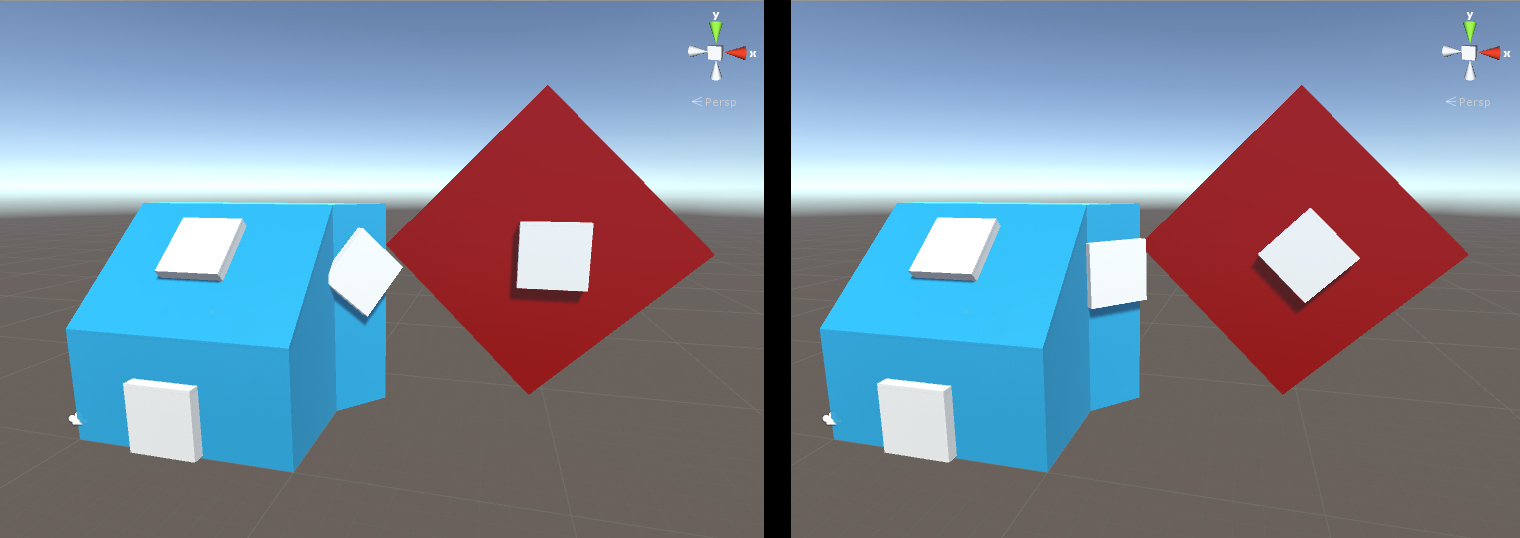
However this only takes into account the Y-Axis of the object. Have a look.
alt text

The white cubes are the spawned objects. What I have is the left side. What I want to achive is the right side (rotated the cubes by hand). One thing that might be noteworthy is, the blue object has no rotation while the red plane is rotated. How would I go about doing this?

example2.jpg (270.1 kB)
Comment
Add comment · Show 3
10 |3000 characters needed characters left characters exceeded
▼
  • Viewable by all users
  • Viewable by moderators
  • Viewable by moderators and the original poster
  • Advanced visibility
Viewable by all users
avatar image toromano · Nov 07, 2015 at 01:34 PM 0
Share

Changing Vector3.up to hit.rigidbody.transform.up could help.

avatar image 2dgame · Nov 07, 2015 at 03:09 PM 0
Share

Thanks, I tried Quaternion.FromToRotation(hit.transform.up, hit.normal), however this only makes things worse. See picture alt text I also tried Quaternion.FromToRotation(obj.transform.up, hit.normal). This gives the same result as using Vector3.up.
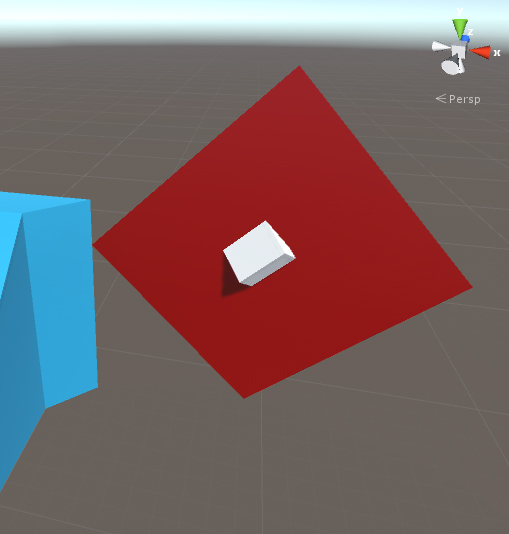
$$anonymous$$y guess is rather, that I need to look up the world rotation of the individual surface(triangle even?) that got hit if that is somehow possible, since like in the blue example surfaces might have an angle without the surfaces gameobject being rotated but rather due to the shape of the mesh. Anyone got any experience with that?

example3.jpg (101.5 kB)
avatar image toromano 2dgame · Nov 09, 2015 at 08:59 AM 0
Share

Did you check your model's pivot? Are they aligned with the model?

0 Replies

· Add your reply
  • Sort: 

Your answer

Hint: You can notify a user about this post by typing @username

Up to 2 attachments (including images) can be used with a maximum of 524.3 kB each and 1.0 MB total.

Follow this Question

Answers Answers and Comments

35 People are following this question.

avatar image avatar image avatar image avatar image avatar image avatar image avatar image avatar image avatar image avatar image avatar image avatar image avatar image avatar image avatar image avatar image avatar image avatar image avatar image avatar image avatar image avatar image avatar image avatar image avatar image avatar image avatar image avatar image avatar image avatar image avatar image avatar image avatar image avatar image avatar image

Related Questions

Can someone please help me out? thank you in advance! 0 Answers

DESPERATE How to align transform.up with another vector3 (direction) ? 1 Answer

Find Normal Vector to BoxCollider 0 Answers

Rotate the point around the normal from two points (flip point) 2 Answers

Wrong normals when object is rotated and using custom world aligned shader? 4 Answers


Enterprise
Social Q&A

Social
Subscribe on YouTube social-youtube Follow on LinkedIn social-linkedin Follow on Twitter social-twitter Follow on Facebook social-facebook Follow on Instagram social-instagram

Footer

  • Purchase
    • Products
    • Subscription
    • Asset Store
    • Unity Gear
    • Resellers
  • Education
    • Students
    • Educators
    • Certification
    • Learn
    • Center of Excellence
  • Download
    • Unity
    • Beta Program
  • Unity Labs
    • Labs
    • Publications
  • Resources
    • Learn platform
    • Community
    • Documentation
    • Unity QA
    • FAQ
    • Services Status
    • Connect
  • About Unity
    • About Us
    • Blog
    • Events
    • Careers
    • Contact
    • Press
    • Partners
    • Affiliates
    • Security
Copyright © 2020 Unity Technologies
  • Legal
  • Privacy Policy
  • Cookies
  • Do Not Sell My Personal Information
  • Cookies Settings
"Unity", Unity logos, and other Unity trademarks are trademarks or registered trademarks of Unity Technologies or its affiliates in the U.S. and elsewhere (more info here). Other names or brands are trademarks of their respective owners.
  • Anonymous
  • Sign in
  • Create
  • Ask a question
  • Spaces
  • Default
  • Help Room
  • META
  • Moderators
  • Explore
  • Topics
  • Questions
  • Users
  • Badges
