Wayback Machinekoobas.hobune.stream
May JUN Jul
Previous capture 13 Next capture
2021 2022 2023
1 capture
13 Jun 22 - 13 Jun 22
sparklines
Close Help
  • Products
  • Solutions
  • Made with Unity
  • Learning
  • Support & Services
  • Community
  • Asset Store
  • Get Unity

UNITY ACCOUNT

You need a Unity Account to shop in the Online and Asset Stores, participate in the Unity Community and manage your license portfolio. Login Create account
  • Blog
  • Forums
  • Answers
  • Evangelists
  • User Groups
  • Beta Program
  • Advisory Panel

Navigation

  • Home
  • Products
  • Solutions
  • Made with Unity
  • Learning
  • Support & Services
  • Community
    • Blog
    • Forums
    • Answers
    • Evangelists
    • User Groups
    • Beta Program
    • Advisory Panel

Unity account

You need a Unity Account to shop in the Online and Asset Stores, participate in the Unity Community and manage your license portfolio. Login Create account

Language

  • Chinese
  • Spanish
  • Japanese
  • Korean
  • Portuguese
  • Ask a question
  • Spaces
    • Default
    • Help Room
    • META
    • Moderators
    • Topics
    • Questions
    • Users
    • Badges
  • Home /
avatar image
0
Question by devcor · Feb 19, 2014 at 12:55 PM · terraintoolsterrain generation

Terrain generation solution? see inside

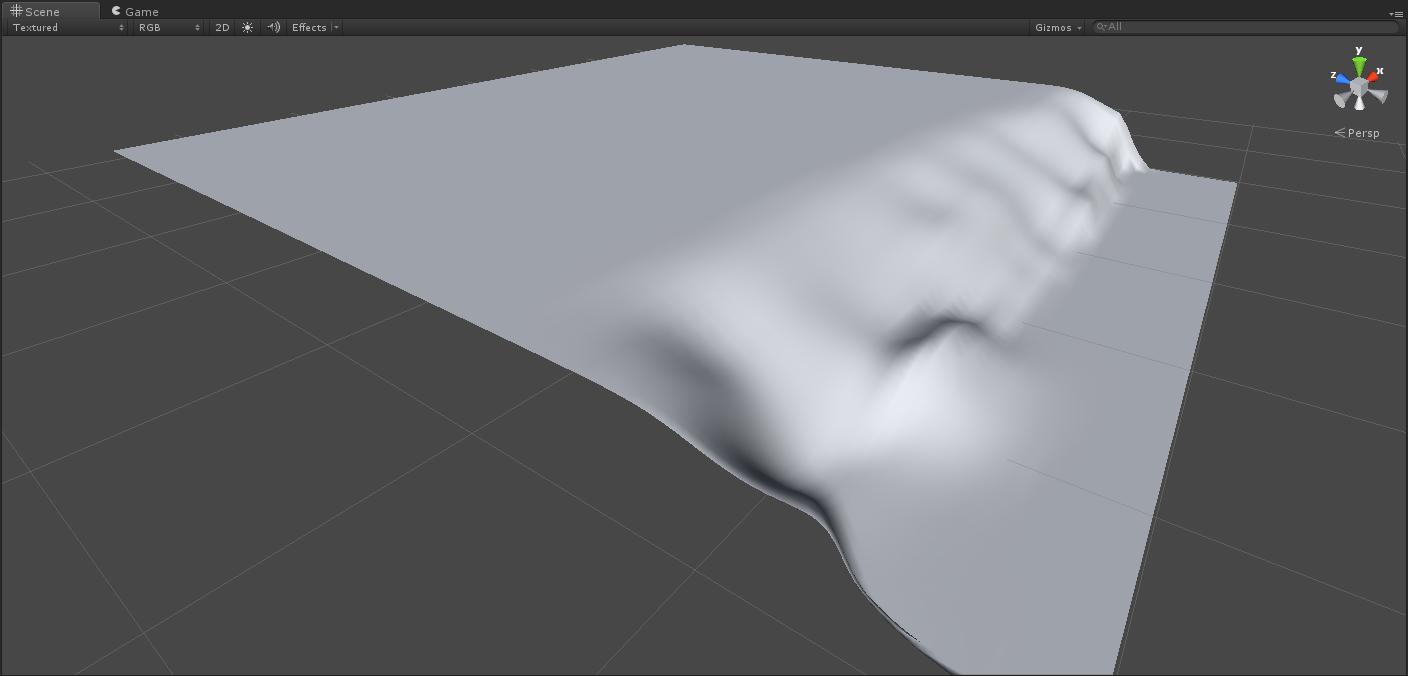
Hello, guys. I'm kinda stuck here. Problem: I'm making a fishing village, and the map is 'divided' into two parts: ground with houses, trees, etc, and the other one is beach, descending under water. I don't want to edit it manually, like, lowering one part and hightening other, 'cause it looks dull - I'm no good as terrain designer. Can I make Terrain Toolkit somehow generate terrain, one part of which will be lower (below sea level, so to say), and the other one will be above? Or can you suggest any other terrain generation tool for making this?!

I attach the image of how it should look like (just for you to have an idea), but you know, more detailed and live :D alt text

unity 2014-02-19 15-10-51-91.jpg (42.9 kB)
Comment
Add comment
10 |3000 characters needed characters left characters exceeded
▼
  • Viewable by all users
  • Viewable by moderators
  • Viewable by moderators and the original poster
  • Advanced visibility
Viewable by all users

2 Replies

· Add your reply
  • Sort: 
avatar image
0

Answer by MakeCodeNow · Feb 19, 2014 at 04:16 PM

USGS has a huge library of real world elevation files. Probably no one will mind if you import a section of their beach.

Note that it's probably also worth investing some time in learning how to use terrain painting tools. They aren't so bad and you can get good results directly in unity with a few hours of practice.

Comment
Add comment · Show 3 · Share
10 |3000 characters needed characters left characters exceeded
▼
  • Viewable by all users
  • Viewable by moderators
  • Viewable by moderators and the original poster
  • Advanced visibility
Viewable by all users
avatar image devcor · Feb 19, 2014 at 08:20 PM 0
Share

Why, surely, it is worth investing time in unity overall :) Thank you for your sugestion, thou!

avatar image devcor · Feb 19, 2014 at 08:39 PM 0
Share

I can't quite seem to understand how to correctly export their data and how to make use of them. Can you give me a tip on that?

avatar image MakeCodeNow · Feb 20, 2014 at 02:47 AM 0
Share

I'm not an expert on the export (you'll have to learn that yourself), but to import them you should look for a program that converts DE$$anonymous$$S into 16bit RAW and then you can import that RAW file straight into the TerrainData of your terrain.

avatar image
0

Answer by devcor · Feb 20, 2014 at 06:28 PM

The only thought I carried out after trying out few terrain generators:

It's better to spend some time with unity's default terrain tool, than learning how to use other terragens

Comment
Add comment · Share
10 |3000 characters needed characters left characters exceeded
▼
  • Viewable by all users
  • Viewable by moderators
  • Viewable by moderators and the original poster
  • Advanced visibility
Viewable by all users

Your answer

Hint: You can notify a user about this post by typing @username

Up to 2 attachments (including images) can be used with a maximum of 524.3 kB each and 1.0 MB total.

Follow this Question

Answers Answers and Comments

19 People are following this question.

avatar image avatar image avatar image avatar image avatar image avatar image avatar image avatar image avatar image avatar image avatar image avatar image avatar image avatar image avatar image avatar image avatar image avatar image avatar image

Related Questions

Blend edges between multi terrains 0 Answers

SetAlphaMaps Opacity Gradient 0 Answers

Problems changing terrain editing tool. 3 Answers

Dont have some tools at terrain tools in inspector! 0 Answers

Unity Terrain Details does not match neighbors 1 Answer


Enterprise
Social Q&A

Social
Subscribe on YouTube social-youtube Follow on LinkedIn social-linkedin Follow on Twitter social-twitter Follow on Facebook social-facebook Follow on Instagram social-instagram

Footer

  • Purchase
    • Products
    • Subscription
    • Asset Store
    • Unity Gear
    • Resellers
  • Education
    • Students
    • Educators
    • Certification
    • Learn
    • Center of Excellence
  • Download
    • Unity
    • Beta Program
  • Unity Labs
    • Labs
    • Publications
  • Resources
    • Learn platform
    • Community
    • Documentation
    • Unity QA
    • FAQ
    • Services Status
    • Connect
  • About Unity
    • About Us
    • Blog
    • Events
    • Careers
    • Contact
    • Press
    • Partners
    • Affiliates
    • Security
Copyright © 2020 Unity Technologies
  • Legal
  • Privacy Policy
  • Cookies
  • Do Not Sell My Personal Information
  • Cookies Settings
"Unity", Unity logos, and other Unity trademarks are trademarks or registered trademarks of Unity Technologies or its affiliates in the U.S. and elsewhere (more info here). Other names or brands are trademarks of their respective owners.
  • Anonymous
  • Sign in
  • Create
  • Ask a question
  • Spaces
  • Default
  • Help Room
  • META
  • Moderators
  • Explore
  • Topics
  • Questions
  • Users
  • Badges