
Wayback Machinekoobas.hobune.stream
May JUN Jul
Previous capture 12 Next capture
2021 2022 2023
1 capture
12 Jun 22 - 12 Jun 22
sparklines
Close Help
  • Products
  • Solutions
  • Made with Unity
  • Learning
  • Support & Services
  • Community
  • Asset Store
  • Get Unity

UNITY ACCOUNT

You need a Unity Account to shop in the Online and Asset Stores, participate in the Unity Community and manage your license portfolio. Login Create account
  • Blog
  • Forums
  • Answers
  • Evangelists
  • User Groups
  • Beta Program
  • Advisory Panel

Navigation

  • Home
  • Products
  • Solutions
  • Made with Unity
  • Learning
  • Support & Services
  • Community
    • Blog
    • Forums
    • Answers
    • Evangelists
    • User Groups
    • Beta Program
    • Advisory Panel

Unity account

You need a Unity Account to shop in the Online and Asset Stores, participate in the Unity Community and manage your license portfolio. Login Create account

Language

  • Chinese
  • Spanish
  • Japanese
  • Korean
  • Portuguese
  • Ask a question
  • Spaces
    • Default
    • Help Room
    • META
    • Moderators
    • Topics
    • Questions
    • Users
    • Badges
  • Home /
  • Help Room /
avatar image
0
Question by Vid-Maddness · Mar 13, 2016 at 09:36 PM · javascriptcounteraddenemieshealth

Killed enemies counter

I have an enemy health script and i counter script. I want to make it so when the enemy's health gets to 0, the counter will add 1 to it.

Here is the health script #pragma strict

 var Health = 100;
 var ObjectCounter : ObjectCounter;
 ObjectCounter = gameObject.GetComponent("ObjectCounter");
 
 function ApplyDammage (TheDammage : int)
 {
     Health -= TheDammage;
     
     if(Health <= 0)
     {
         Dead();
     }
 }
 
 function Dead()
 {
     ObjectCounter.Paper+= 1;
     Destroy (gameObject);
 }


Here is the counter script

      var Paper : int = 0;
      var paperToWin : int = 30;        //number to win!
      var sfxHit: AudioClip;
     
      function OnTriggerEnter( other : Collider )
       {
             if (other.gameObject.tag == "Paper")
             {
                      Paper += 1;
                      Debug.Log("A paper was picked up. Total papers = " + Paper);
                      Destroy(other.gameObject);
                      GetComponent.<AudioSource>().PlayOneShot(sfxHit);
              }
       }
      
      function OnGUI()
      {
          if (Paper < paperToWin)
          {
              GUI.Box(Rect((Screen.width/2)-100, 10, 200, 35), "" + Paper + " Paper(s)");
          }
          else
          {
              GUI.Box(Rect((Screen.width/2)-100, 10, 200, 35), "All Papers Collected!");
              Application.LoadLevel("Game ending");
          }
      }

it just doesn't work, how can i make it work?

Comment
Add comment
10 |3000 characters needed characters left characters exceeded
▼
  • Viewable by all users
  • Viewable by moderators
  • Viewable by moderators and the original poster
  • Advanced visibility
Viewable by all users

4 Replies

· Add your reply
  • Sort: 
avatar image
1

Answer by ZefanS · Mar 14, 2016 at 03:30 AM

The problem is that, in the health script, when you do:

 ObjectCounter = gameObject.GetComponent("ObjectCounter");

you are getting a reference to the counter script that is attached to the (I'm assuming) enemy GameObject. The problem is that when the enemy's health gets to zero you do:

 Destroy (gameObject);

The fact that you are using gameObject (lowercase 'g') means that you are referring to the GameObject that the script is attached to. In other words, when the enemy dies you increase the counter but then destroy the GameObject that has the script that contains the counter. What you'll need is a GameObject that is separate from your enemies that can keep track of the count and not be destroyed when an enemy dies.

Make a new GameObject, name it something like PaperCounter and add the counter script to it.

Then in your enemy script you can do something like this:

  #pragma strict

  var health = 100;
  var objectCounter : ObjectCounter;
 
 //Here's the important part:
  function Start()
  {
      objectCounter = GameObject.Find("PaperCounter").GetComponent("ObjectCounter");
  }
  
  function ApplyDamage (theDamage : int)
  {
      health -= theDamage;
      
      if (health <= 0)
      {
          Dead();
      }
  }
  
  function Dead()
  {
      objectCounter.Paper += 1;
      Destroy (gameObject);
  }

Keep in mind that using GameObject.Find() is only one way of achieving this, but will work well if you are instantiating enemies at runtime.

Another problem I see is in the counter script. I assume that the counter should increase when the player collides with a paper. In that case you should move the following code to a script attached to the player (along with relevant components):

   #pragma strict

   var sfxHit: AudioClip;
   var objectCounter : ObjectCounter;

   function Start()
   {
       objectCounter = GameObject.Find("PaperCounter").GetComponent("ObjectCounter");
   }

   function OnTriggerEnter( other : Collider )
   {
       if (other.gameObject.tag == "Paper")
       {
           objectCounter.Paper += 1;
           Debug.Log("A paper was picked up. Total papers = " + Paper);
           Destroy(other.gameObject);
           GetComponent.<AudioSource>().PlayOneShot(sfxHit);
       }
   }

Some other general notes: Variables should be named in likeThis while functions should be named LikeThis. It's a style thing, but makes it clearer what you're referring to when accessing things in other scripts. I changed some of the names in the above code, but not all of them (eg. Paper). I'll leave changing the rest up to you.

Hope this helps!

Comment
Add comment · Show 4 · Share
10 |3000 characters needed characters left characters exceeded
▼
  • Viewable by all users
  • Viewable by moderators
  • Viewable by moderators and the original poster
  • Advanced visibility
Viewable by all users
avatar image Vid-Maddness · Mar 29, 2016 at 08:26 PM 0
Share

@ZefanS Thank you for your response. When i start the game i get the error saying,

"NullReferenceException: Object reference not set to an instance of an object EnemyHealth.Start () (at Assets/Tutorial 5/Tutorial 5/EnemyHealth.js:8)" for the health script.

What happened?

avatar image ZefanS Vid-Maddness · Mar 30, 2016 at 01:43 AM 0
Share

This and this might help you.

avatar image Vid-Maddness ZefanS · Apr 15, 2016 at 10:10 PM 0
Share

@ZefanS I made sure everything was assigned and everything is. What am i doing wrong?

Here's a screenshot
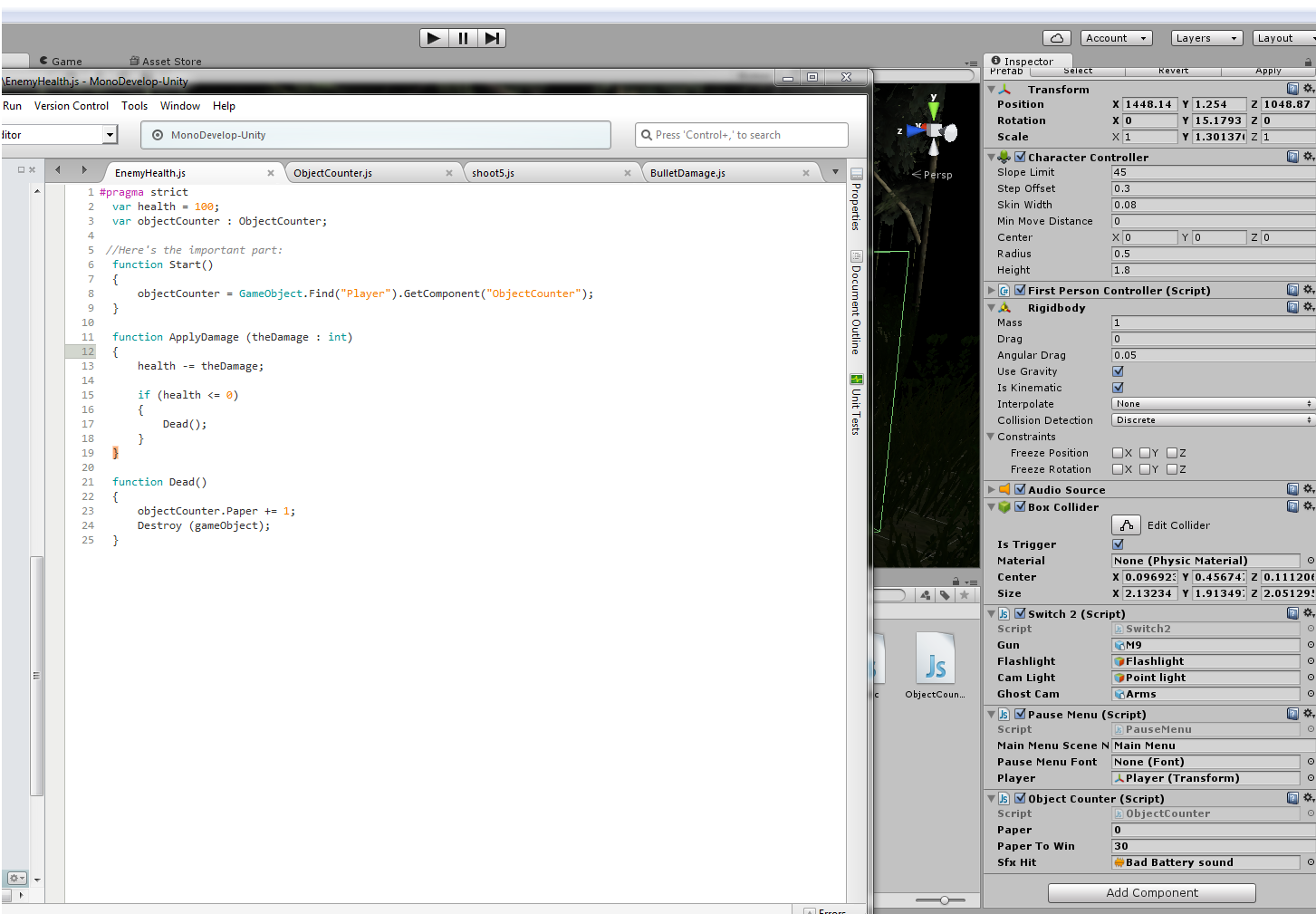
alt text

capture.png (212.0 kB)
Show more comments
avatar image
0

Answer by Orthrinicus · Apr 15, 2016 at 10:50 PM

i think you would need the counter on a seperate script. Like this: Enemy health.js(placed on your instantiated enemy) EnemyManager.js(placed on an empty game object)

So on the enemy manager you have your counter and then each enemy references to that script and increments that variable within the enemy manager script

I think ur problem is that each enemy has a "personal" counter and it's incrementing that "personal" variable rather than incrementing a public variable that is related to all of them

If you want me to explain further just ask. I'm not at home atm so I'll try help further once I get home

Good luck

Comment
Add comment · Show 1 · Share
10 |3000 characters needed characters left characters exceeded
▼
  • Viewable by all users
  • Viewable by moderators
  • Viewable by moderators and the original poster
  • Advanced visibility
Viewable by all users
avatar image Orthrinicus · Apr 15, 2016 at 10:53 PM 1
Share

Actually nvm, I think you have already done this. I'll have another look once I am home

avatar image
0

Answer by Vid-Maddness · Apr 24, 2016 at 03:40 AM

@ZefanS Both the Player and and the enemies spawn at the same time, and yes the Player is named "Player" @Orthrinicus Yeah i already do have a separate script for the counter, but when i put the player in the variable, i get the error that i reported earlier. Any ideas?

Comment
Add comment · Share
10 |3000 characters needed characters left characters exceeded
▼
  • Viewable by all users
  • Viewable by moderators
  • Viewable by moderators and the original poster
  • Advanced visibility
Viewable by all users
avatar image
0

Answer by Disturbed-Ant · Aug 25, 2016 at 09:48 AM

You could do it with a message:

GameObject.FindWithTag("TheObjectName").gameObject.BroadcastMessage("KillPoint");

just need a receiver on the message receiving side - other object

var receiver : Boolean = false;

function KillPoint(){ if(!received){ killpoint+=1; } }

Don't know if that helps :)

Comment
Add comment · Share
10 |3000 characters needed characters left characters exceeded
▼
  • Viewable by all users
  • Viewable by moderators
  • Viewable by moderators and the original poster
  • Advanced visibility
Viewable by all users

Your answer

Hint: You can notify a user about this post by typing @username

Up to 2 attachments (including images) can be used with a maximum of 524.3 kB each and 1.0 MB total.

Follow this Question

Answers Answers and Comments

63 People are following this question.

avatar image avatar image avatar image avatar image avatar image avatar image avatar image avatar image avatar image avatar image avatar image avatar image avatar image avatar image avatar image avatar image avatar image avatar image avatar image avatar image avatar image avatar image avatar image avatar image avatar image avatar image avatar image avatar image avatar image avatar image avatar image avatar image avatar image avatar image avatar image avatar image avatar image avatar image avatar image avatar image avatar image avatar image avatar image avatar image avatar image avatar image avatar image avatar image avatar image avatar image avatar image avatar image avatar image avatar image avatar image avatar image avatar image avatar image avatar image avatar image avatar image avatar image avatar image

Related Questions

Health Script 2 Answers

Having Trouble Incrementing an Integer 1 Answer

How add(create) a new gameobject on scene on mouse button click. 2 Answers

How to add hearts as I pick up healths? 0 Answers

How can i reset the count down timer when my player collides with an object 2 Answers


Enterprise
Social Q&A

Social
Subscribe on YouTube social-youtube Follow on LinkedIn social-linkedin Follow on Twitter social-twitter Follow on Facebook social-facebook Follow on Instagram social-instagram

Footer

  • Purchase
    • Products
    • Subscription
    • Asset Store
    • Unity Gear
    • Resellers
  • Education
    • Students
    • Educators
    • Certification
    • Learn
    • Center of Excellence
  • Download
    • Unity
    • Beta Program
  • Unity Labs
    • Labs
    • Publications
  • Resources
    • Learn platform
    • Community
    • Documentation
    • Unity QA
    • FAQ
    • Services Status
    • Connect
  • About Unity
    • About Us
    • Blog
    • Events
    • Careers
    • Contact
    • Press
    • Partners
    • Affiliates
    • Security
Copyright © 2020 Unity Technologies
  • Legal
  • Privacy Policy
  • Cookies
  • Do Not Sell My Personal Information
  • Cookies Settings
"Unity", Unity logos, and other Unity trademarks are trademarks or registered trademarks of Unity Technologies or its affiliates in the U.S. and elsewhere (more info here). Other names or brands are trademarks of their respective owners.
  • Anonymous
  • Sign in
  • Create
  • Ask a question
  • Spaces
  • Default
  • Help Room
  • META
  • Moderators
  • Explore
  • Topics
  • Questions
  • Users
  • Badges
