
Wayback Machinekoobas.hobune.stream
May JUN Jul
Previous capture 12 Next capture
2021 2022 2023
1 capture
12 Jun 22 - 12 Jun 22
sparklines
Close Help
  • Products
  • Solutions
  • Made with Unity
  • Learning
  • Support & Services
  • Community
  • Asset Store
  • Get Unity

UNITY ACCOUNT

You need a Unity Account to shop in the Online and Asset Stores, participate in the Unity Community and manage your license portfolio. Login Create account
  • Blog
  • Forums
  • Answers
  • Evangelists
  • User Groups
  • Beta Program
  • Advisory Panel

Navigation

  • Home
  • Products
  • Solutions
  • Made with Unity
  • Learning
  • Support & Services
  • Community
    • Blog
    • Forums
    • Answers
    • Evangelists
    • User Groups
    • Beta Program
    • Advisory Panel

Unity account

You need a Unity Account to shop in the Online and Asset Stores, participate in the Unity Community and manage your license portfolio. Login Create account

Language

  • Chinese
  • Spanish
  • Japanese
  • Korean
  • Portuguese
  • Ask a question
  • Spaces
    • Default
    • Help Room
    • META
    • Moderators
    • Topics
    • Questions
    • Users
    • Badges
  • Home /
  • Help Room /
avatar image
3
Question by Berzeger · Sep 20, 2015 at 02:12 PM · sliderevents

Slider onValueChanged sending only 0 (or other defined value)

I'm trying to attach an onValueChanged event to my GUI Slider, but for some reason it gives me a mandatory option to put a value in (it's the fourth box in the "On Value Change (Single)" section). Then it only sends the forementioned value, not the actual value of the slider. alt text
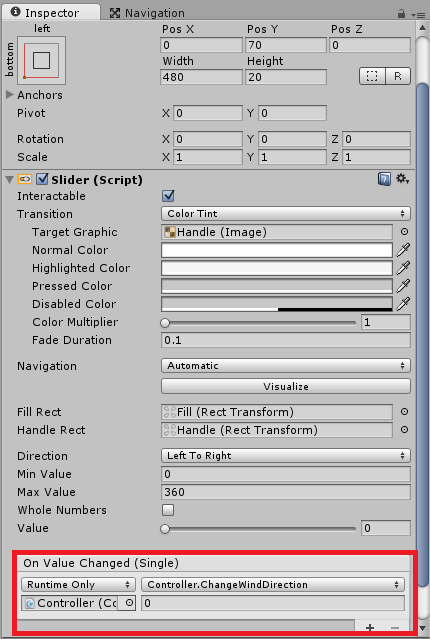
The code for the event is as follows:

 public void ChangeWindDirection(float value)
 {
     Debug.Log("New wind direction: " + value);
 }
 

I tried restarting both Unity and Visual Studio 2013 to no avail. Now it even puts the box with a value to every new event I try to create.

ss-2015-09-20-at-040414.png (39.4 kB)
Comment
Add comment
10 |3000 characters needed characters left characters exceeded
▼
  • Viewable by all users
  • Viewable by moderators
  • Viewable by moderators and the original poster
  • Advanced visibility
Viewable by all users

2 Replies

· Add your reply
  • Sort: 
avatar image
2
Best Answer

Answer by Berzeger · Sep 20, 2015 at 02:57 PM

Someone at Stackoverflow found a solution:

You can do this

 public void ChangeWindDirection(Slider slider)
 {
     Debug.Log("New wind direction: " + slider.value);
 }

Then assign the slider.

That way you can get the slider value, or other things the slider has :-) Hope that's what you wanted :-)

Comment
Add comment · Share
10 |3000 characters needed characters left characters exceeded
▼
  • Viewable by all users
  • Viewable by moderators
  • Viewable by moderators and the original poster
  • Advanced visibility
Viewable by all users
avatar image
12

Answer by EyePD · May 19, 2016 at 07:28 PM

I was having a similar problem. I found the Stackoverflow and realized that my function that receives the float was listed twice and I was selecting the wrong one; I had to select the one under "Dynamic". See this image from the stack: http://imgur.com/5325W7m

Comment
Add comment · Show 2 · Share
10 |3000 characters needed characters left characters exceeded
▼
  • Viewable by all users
  • Viewable by moderators
  • Viewable by moderators and the original poster
  • Advanced visibility
Viewable by all users
avatar image UnityCoach · Dec 29, 2016 at 01:04 PM 0
Share

I just had the same issue. I realised that even when you set the Slider to use whole numbers, it will only map to float values. $$anonymous$$apping to an int will result in this extra value field and will never pass the value. I just created a function that takes a float and cast it to an int. It would be nice to have IntSliders..

avatar image huulong · May 30, 2017 at 07:46 PM 0
Share

Phew, finally! This looks like the solution Unity intended. I solved it some time ago, then forgot about it. Bookmarking.

Your answer

Hint: You can notify a user about this post by typing @username

Up to 2 attachments (including images) can be used with a maximum of 524.3 kB each and 1.0 MB total.

Follow this Question

Answers Answers and Comments

34 People are following this question.

avatar image avatar image avatar image avatar image avatar image avatar image avatar image avatar image avatar image avatar image avatar image avatar image avatar image avatar image avatar image avatar image avatar image avatar image avatar image avatar image avatar image avatar image avatar image avatar image avatar image avatar image avatar image avatar image avatar image avatar image avatar image avatar image avatar image avatar image

Related Questions

How to tell when a user is done interacting with UI.Slider? 0 Answers

Why does animation event calls twice if put it on certain frames? 1 Answer

Count and find NON-PERSISTENT UnityEvent listeners: How? 1 Answer

Script variables being reset after calling UnityEvent 1 Answer

Why Does Prefab Loose UI elements on Scene Change 0 Answers


Enterprise
Social Q&A

Social
Subscribe on YouTube social-youtube Follow on LinkedIn social-linkedin Follow on Twitter social-twitter Follow on Facebook social-facebook Follow on Instagram social-instagram

Footer

  • Purchase
    • Products
    • Subscription
    • Asset Store
    • Unity Gear
    • Resellers
  • Education
    • Students
    • Educators
    • Certification
    • Learn
    • Center of Excellence
  • Download
    • Unity
    • Beta Program
  • Unity Labs
    • Labs
    • Publications
  • Resources
    • Learn platform
    • Community
    • Documentation
    • Unity QA
    • FAQ
    • Services Status
    • Connect
  • About Unity
    • About Us
    • Blog
    • Events
    • Careers
    • Contact
    • Press
    • Partners
    • Affiliates
    • Security
Copyright © 2020 Unity Technologies
  • Legal
  • Privacy Policy
  • Cookies
  • Do Not Sell My Personal Information
  • Cookies Settings
"Unity", Unity logos, and other Unity trademarks are trademarks or registered trademarks of Unity Technologies or its affiliates in the U.S. and elsewhere (more info here). Other names or brands are trademarks of their respective owners.
  • Anonymous
  • Sign in
  • Create
  • Ask a question
  • Spaces
  • Default
  • Help Room
  • META
  • Moderators
  • Explore
  • Topics
  • Questions
  • Users
  • Badges
