
Wayback Machinekoobas.hobune.stream
May JUN Jul
Previous capture 12 Next capture
2021 2022 2023
1 capture
12 Jun 22 - 12 Jun 22
sparklines
Close Help
  • Products
  • Solutions
  • Made with Unity
  • Learning
  • Support & Services
  • Community
  • Asset Store
  • Get Unity

UNITY ACCOUNT

You need a Unity Account to shop in the Online and Asset Stores, participate in the Unity Community and manage your license portfolio. Login Create account
  • Blog
  • Forums
  • Answers
  • Evangelists
  • User Groups
  • Beta Program
  • Advisory Panel

Navigation

  • Home
  • Products
  • Solutions
  • Made with Unity
  • Learning
  • Support & Services
  • Community
    • Blog
    • Forums
    • Answers
    • Evangelists
    • User Groups
    • Beta Program
    • Advisory Panel

Unity account

You need a Unity Account to shop in the Online and Asset Stores, participate in the Unity Community and manage your license portfolio. Login Create account

Language

  • Chinese
  • Spanish
  • Japanese
  • Korean
  • Portuguese
  • Ask a question
  • Spaces
    • Default
    • Help Room
    • META
    • Moderators
    • Topics
    • Questions
    • Users
    • Badges
  • Home /
  • Help Room /
avatar image
1
Question by dotfortun3 · Jan 13, 2016 at 02:40 AM · scene-loadingscene-switchingscene-changepublish

SceneManager.LoadScene freezes in published build

Hi there!

I am having a weird issue. I have a scene that I use for loading levels. When my game loads, it plays a little intro video, then starts the loading scene which loads the level.

However, if I try to load a new level, the game just freezes and the level never loads. Even weirder, it works fine in the editor and crashes in published builds. It doesn't matter if the published build is development or release, it still crashes. I can't figure it out.

I also have an issue where if I try to load the scene asynchronously, it breaks, but again only in published builds. It works fine in the editor.

Any ideas?

Relevant Code:

loading scene

 IEnumerator LoadLevel()
     {
         SceneManager.LoadScene(ApplicationModel.SceneToLoad, LoadSceneMode.Single);
 
         Debug.Log("loading complete");
         yield return null;
     }

Update() in loaded level

 if(PlayerInput.GetButtonUp("next_level"))
         {
             if(SceneManager.GetActiveScene().name == "SurfaceProTest")
             {
                 ApplicationModel.SceneToLoad = "low_hanging_fruit";
             }
             else
             {
                 ApplicationModel.SceneToLoad = "SurfaceProTest";
             }
             SceneManager.LoadScene("InitialLoadingScreen",LoadSceneMode.Single);
         }


Comment
Add comment · Show 3
10 |3000 characters needed characters left characters exceeded
▼
  • Viewable by all users
  • Viewable by moderators
  • Viewable by moderators and the original poster
  • Advanced visibility
Viewable by all users
avatar image dotfortun3 · Jan 13, 2016 at 09:28 PM 0
Share

Some more details for anyone who might have insight:

When I connect the debugger to my build, when I attempt to load the new scene, it reaches the line of code that should load the new scene, but then it appears the Start() method is never called in the newly loaded scene, but it does get added to the Scene$$anonymous$$anager.GetAllScenes(). I tried creating a duplicate loading scene (IntitialLoadingScreenAlt) to see if maybe there was an issue unloading the original InitialLoadingScreen, but that did not work. It seems to fail at unloading my current scene. I am not sure what to make of it, but it is getting frustrating that it works in the editor and not in my player builds.

avatar image robdupre dotfortun3 · Feb 29, 2016 at 05:28 PM 0
Share

Hi there,

I think I am having similar issues. when you say your having issues in a published build are you referring to build and run? I am only having the issue when I download the game from the Google Play store. In editor and Build and run it works fine!

avatar image WILEz1975 · Mar 14, 2016 at 02:38 AM 0
Share

Same problem... do not use substance. Works in editor and crashes in build. It is a serious problem for me.

2 Replies

· Add your reply
  • Sort: 
avatar image
1
Best Answer

Answer by dotfortun3 · Jan 14, 2016 at 12:03 AM

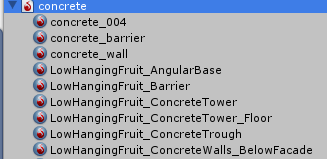
Ok, I figured it out. If you are using substances (ProceduralMaterials), you can only use the materials that it generates. You cannot use the textures it creates to create more materials.

So only used these: substance_mats
Do not create new materials with the textures: substance_textures
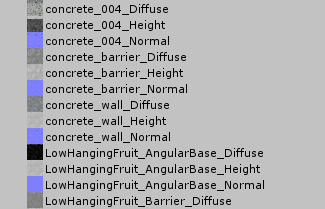
I am not sure if that is me misusing the concept, or a bug in the application but I have remade all of the materials using only the ones that are actually generated by the substance and the game works fine now.

I hope this helps anyone else with the issue.


capture.png (6.9 kB)
capture.png (14.8 kB)
Comment
Add comment · Show 1 · Share
10 |3000 characters needed characters left characters exceeded
▼
  • Viewable by all users
  • Viewable by moderators
  • Viewable by moderators and the original poster
  • Advanced visibility
Viewable by all users
avatar image TGKG · Feb 03, 2016 at 12:12 AM 0
Share

Great work, I $$anonymous$$AY be having this same problem. I also seem to be having a problem in the published game and during debug in Visual Studio 2015. When I press "Play" which should go to the next scene, my game freezes and the next level does not load.

Please explain more about substances (Procedural $$anonymous$$aterials) and how you made these, as I have noticed that when I import a material I also get a texture created automatically (or perhaps it is the other way around) and I never understood what is happening.

avatar image
0

Answer by laurabaker · Mar 12, 2017 at 02:59 PM

I know this problem has long been answered but I spent a lot of time trying to fix this problem in my own app, so for the sake of any one else facing this issue, the cause in my scenario was:

Having set the "default icon" in player settings to be an image of my choosing. After setting this "default icon" back to "none" the app started to load scenes again.

Comment
Add comment · Share
10 |3000 characters needed characters left characters exceeded
▼
  • Viewable by all users
  • Viewable by moderators
  • Viewable by moderators and the original poster
  • Advanced visibility
Viewable by all users

Your answer

Hint: You can notify a user about this post by typing @username

Up to 2 attachments (including images) can be used with a maximum of 524.3 kB each and 1.0 MB total.

Follow this Question

Answers Answers and Comments

41 People are following this question.

avatar image avatar image avatar image avatar image avatar image avatar image avatar image avatar image avatar image avatar image avatar image avatar image avatar image avatar image avatar image avatar image avatar image avatar image avatar image avatar image avatar image avatar image avatar image avatar image avatar image avatar image avatar image avatar image avatar image avatar image avatar image avatar image avatar image avatar image avatar image avatar image avatar image avatar image avatar image avatar image avatar image

Related Questions

How to move to next scene using scene manager? 3 Answers

Switching back and fourth between scenes help (script) 0 Answers

Why isn't my start screen loading? 0 Answers

When I load a scene a second time, some objects don't show up 0 Answers

multiple of same objects from DontDesroyOnLoad 0 Answers


Enterprise
Social Q&A

Social
Subscribe on YouTube social-youtube Follow on LinkedIn social-linkedin Follow on Twitter social-twitter Follow on Facebook social-facebook Follow on Instagram social-instagram

Footer

  • Purchase
    • Products
    • Subscription
    • Asset Store
    • Unity Gear
    • Resellers
  • Education
    • Students
    • Educators
    • Certification
    • Learn
    • Center of Excellence
  • Download
    • Unity
    • Beta Program
  • Unity Labs
    • Labs
    • Publications
  • Resources
    • Learn platform
    • Community
    • Documentation
    • Unity QA
    • FAQ
    • Services Status
    • Connect
  • About Unity
    • About Us
    • Blog
    • Events
    • Careers
    • Contact
    • Press
    • Partners
    • Affiliates
    • Security
Copyright © 2020 Unity Technologies
  • Legal
  • Privacy Policy
  • Cookies
  • Do Not Sell My Personal Information
  • Cookies Settings
"Unity", Unity logos, and other Unity trademarks are trademarks or registered trademarks of Unity Technologies or its affiliates in the U.S. and elsewhere (more info here). Other names or brands are trademarks of their respective owners.
  • Anonymous
  • Sign in
  • Create
  • Ask a question
  • Spaces
  • Default
  • Help Room
  • META
  • Moderators
  • Explore
  • Topics
  • Questions
  • Users
  • Badges