
Wayback Machinekoobas.hobune.stream
May JUN Jul
Previous capture 12 Next capture
2021 2022 2023
1 capture
12 Jun 22 - 12 Jun 22
sparklines
Close Help
  • Products
  • Solutions
  • Made with Unity
  • Learning
  • Support & Services
  • Community
  • Asset Store
  • Get Unity

UNITY ACCOUNT

You need a Unity Account to shop in the Online and Asset Stores, participate in the Unity Community and manage your license portfolio. Login Create account
  • Blog
  • Forums
  • Answers
  • Evangelists
  • User Groups
  • Beta Program
  • Advisory Panel

Navigation

  • Home
  • Products
  • Solutions
  • Made with Unity
  • Learning
  • Support & Services
  • Community
    • Blog
    • Forums
    • Answers
    • Evangelists
    • User Groups
    • Beta Program
    • Advisory Panel

Unity account

You need a Unity Account to shop in the Online and Asset Stores, participate in the Unity Community and manage your license portfolio. Login Create account

Language

  • Chinese
  • Spanish
  • Japanese
  • Korean
  • Portuguese
  • Ask a question
  • Spaces
    • Default
    • Help Room
    • META
    • Moderators
    • Topics
    • Questions
    • Users
    • Badges
  • Home /
This question was closed Aug 27, 2016 at 11:52 PM by Zitoox for the following reason:

No one knows the answer '-'

avatar image
0
Question by Zitoox · Aug 25, 2016 at 09:48 PM · errorlightgrassbrightness

Too much light on grass

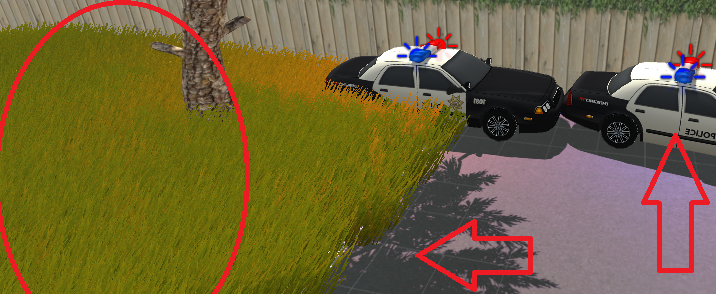
Hi! I am making a fps game, and i put some police vehicles in the scene. Unfortunelly, they had no flash\siren so i made 3 lights for each vehicle. The lights are blue,red,and white. But i have a problem! The grass near the vehicles are TOO BRIGHT! It's making it "unconfortable to see". How can i stop the lights from brightening the grass whitout changing it's appearence (the lights appearence) ? I need the lights to be seen, but i also need the shadows on the grass and they are SO BRIGHT =C
alt text

brightgrassproblem.png (440.6 kB)
Comment
Add comment · Show 5
10 |3000 characters needed characters left characters exceeded
▼
  • Viewable by all users
  • Viewable by moderators
  • Viewable by moderators and the original poster
  • Advanced visibility
Viewable by all users
avatar image Rajeesh_AR · Aug 26, 2016 at 09:39 AM 2
Share

Hi @Zitoox

In the point light option, you have the "intensity" and "bounce Intensity" (not supported currently) option. Decrease those values. Also you may decrease the range of the light.

avatar image 2dt · Aug 26, 2016 at 01:15 PM 0
Share

You can put your grass in a specific layer, and in the light option, go in "Culling $$anonymous$$ask" and uncheck the layer of your grass. Your light won't affect the grass anymore !

avatar image Zitoox · Aug 26, 2016 at 03:31 PM 0
Share

None of the answers helped =\

avatar image b1gry4n Zitoox · Aug 26, 2016 at 10:04 PM 0
Share

If you are in gamma color space you will notice that things seem to get "blown out" when too many lights are affecting a single piece of geometry. Linear space is the way to go

avatar image Zitoox b1gry4n · Aug 27, 2016 at 02:53 AM 0
Share

So... There is NO option? Like... "fuck this, there is no way"? Goddamit '-'

0 Replies

  • Sort: 

Follow this Question

Answers Answers and Comments

70 People are following this question.

avatar image avatar image avatar image avatar image avatar image avatar image avatar image avatar image avatar image avatar image avatar image avatar image avatar image avatar image avatar image avatar image avatar image avatar image avatar image avatar image avatar image avatar image avatar image avatar image avatar image avatar image avatar image avatar image avatar image avatar image avatar image avatar image avatar image avatar image avatar image avatar image avatar image avatar image avatar image avatar image avatar image avatar image avatar image avatar image avatar image avatar image avatar image avatar image avatar image avatar image avatar image avatar image avatar image avatar image avatar image avatar image avatar image avatar image avatar image avatar image avatar image avatar image avatar image avatar image avatar image avatar image avatar image avatar image avatar image avatar image

Related Questions

Directional Lights STILL affecting shadowed objects! 1 Answer

Unity face lighting face issue: Making lit faces darker and unlit faces brighter 0 Answers

Lighting after update does not look glossy. 0 Answers

,Auto generated scrip does not work 0 Answers

Animating Light Intensity with Animation Curve 1 Answer


Enterprise
Social Q&A

Social
Subscribe on YouTube social-youtube Follow on LinkedIn social-linkedin Follow on Twitter social-twitter Follow on Facebook social-facebook Follow on Instagram social-instagram

Footer

  • Purchase
    • Products
    • Subscription
    • Asset Store
    • Unity Gear
    • Resellers
  • Education
    • Students
    • Educators
    • Certification
    • Learn
    • Center of Excellence
  • Download
    • Unity
    • Beta Program
  • Unity Labs
    • Labs
    • Publications
  • Resources
    • Learn platform
    • Community
    • Documentation
    • Unity QA
    • FAQ
    • Services Status
    • Connect
  • About Unity
    • About Us
    • Blog
    • Events
    • Careers
    • Contact
    • Press
    • Partners
    • Affiliates
    • Security
Copyright © 2020 Unity Technologies
  • Legal
  • Privacy Policy
  • Cookies
  • Do Not Sell My Personal Information
  • Cookies Settings
"Unity", Unity logos, and other Unity trademarks are trademarks or registered trademarks of Unity Technologies or its affiliates in the U.S. and elsewhere (more info here). Other names or brands are trademarks of their respective owners.
  • Anonymous
  • Sign in
  • Create
  • Ask a question
  • Spaces
  • Default
  • Help Room
  • META
  • Moderators
  • Explore
  • Topics
  • Questions
  • Users
  • Badges
