
Wayback Machinekoobas.hobune.stream
May JUN Jul
Previous capture 13 Next capture
2021 2022 2023
1 capture
13 Jun 22 - 13 Jun 22
sparklines
Close Help
  • Products
  • Solutions
  • Made with Unity
  • Learning
  • Support & Services
  • Community
  • Asset Store
  • Get Unity

UNITY ACCOUNT

You need a Unity Account to shop in the Online and Asset Stores, participate in the Unity Community and manage your license portfolio. Login Create account
  • Blog
  • Forums
  • Answers
  • Evangelists
  • User Groups
  • Beta Program
  • Advisory Panel

Navigation

  • Home
  • Products
  • Solutions
  • Made with Unity
  • Learning
  • Support & Services
  • Community
    • Blog
    • Forums
    • Answers
    • Evangelists
    • User Groups
    • Beta Program
    • Advisory Panel

Unity account

You need a Unity Account to shop in the Online and Asset Stores, participate in the Unity Community and manage your license portfolio. Login Create account

Language

  • Chinese
  • Spanish
  • Japanese
  • Korean
  • Portuguese
  • Ask a question
  • Spaces
    • Default
    • Help Room
    • META
    • Moderators
    • Topics
    • Questions
    • Users
    • Badges
  • Home /
avatar image
0
Question by Wisearn · Oct 27, 2014 at 02:36 PM · spriteruntimeclipdecal

Clip decal/texture onto (2d) mesh plane

Hello!

I'm trying to figure out how to put any number of textures or decals on top of my flat circle mesh for a 2d game.

The texture cannot go outside of the edges of the 2d mesh, so I need to find a way to cut or clip my texture correctly depending on where you place it on my 2d mesh.

Here's an illustration:
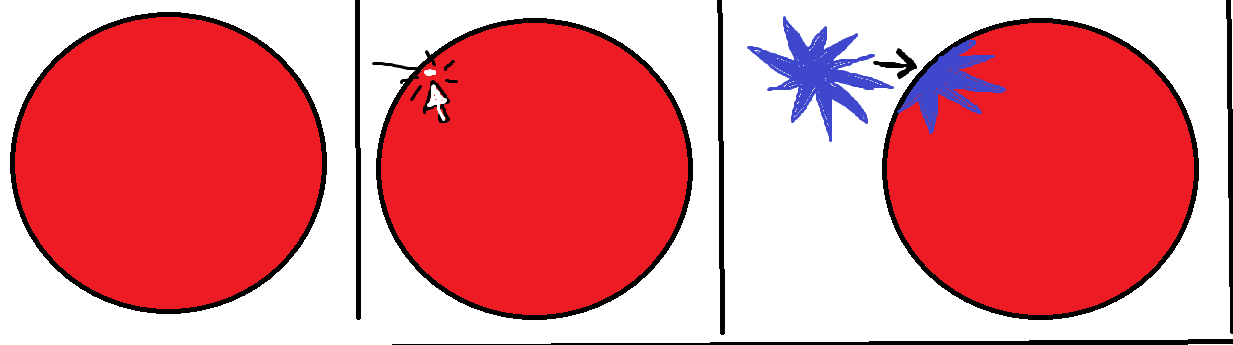
illustration

The circle is a flat disc 3d mesh used in my 2d game, and I need to be able to work with any number of decals/textures.

What should I be looking at to create something like this? Maybe some sort of projection or?

Thanks a lot in advance for any hints/pointers!

Comment
Add comment · Show 3
10 |3000 characters needed characters left characters exceeded
▼
  • Viewable by all users
  • Viewable by moderators
  • Viewable by moderators and the original poster
  • Advanced visibility
Viewable by all users
avatar image Wisearn · Oct 27, 2014 at 03:19 PM 0
Share

I've so far looked at the Unity3D bootcamp project that has a decal system but as far as I can tell it only clips against a Vector4 plane and not a complex 2d mesh.

"static public DecalPolygon ClipPolygonAgainstPlane (DecalPolygon polygon, Vector4 plane)"

But maybe the code in the bootcamp project will run this against every polygon on the mesh you put the decal on, I'm having trouble figuring out exactly what all the code does in the project.

avatar image MrSoad · Oct 27, 2014 at 03:56 PM 0
Share

If your circle mesh was a true sphere rather than a flat disc rendered to look flat then the Decal/projector method would definitely work. I'm unsure how to do this with the way you have it set up at the moment. :S

avatar image Wisearn · Oct 28, 2014 at 08:14 AM 0
Share

Yeah the solution I can think of is to use Projector with "ignoreLayers" where each object is its own layer.

1 Reply

· Add your reply
  • Sort: 
avatar image
0
Best Answer

Answer by Wisearn · Oct 30, 2014 at 02:41 PM

Projector with ignoreLayers and http://effectronica.com/?p=462 as shader (modified for the "straight alpha blending as written below the shader code in the article) solved my issue.

Thanks everyone who contributed!

Comment
Add comment · Share
10 |3000 characters needed characters left characters exceeded
▼
  • Viewable by all users
  • Viewable by moderators
  • Viewable by moderators and the original poster
  • Advanced visibility
Viewable by all users

Your answer

Hint: You can notify a user about this post by typing @username

Up to 2 attachments (including images) can be used with a maximum of 524.3 kB each and 1.0 MB total.

Follow this Question

Answers Answers and Comments

28 People are following this question.

avatar image avatar image avatar image avatar image avatar image avatar image avatar image avatar image avatar image avatar image avatar image avatar image avatar image avatar image avatar image avatar image avatar image avatar image avatar image avatar image avatar image avatar image avatar image avatar image avatar image avatar image avatar image avatar image

Related Questions

Loading and creating Sprites at runtime 0 Answers

Changing sprite at runtime causes it to stop resizing 1 Answer

Is it possible to update a Sprite runtime 0 Answers

Sprite.Create() with outline tolerance? 1 Answer

runtime: script variable not processed as demanded 1 Answer


Enterprise
Social Q&A

Social
Subscribe on YouTube social-youtube Follow on LinkedIn social-linkedin Follow on Twitter social-twitter Follow on Facebook social-facebook Follow on Instagram social-instagram

Footer

  • Purchase
    • Products
    • Subscription
    • Asset Store
    • Unity Gear
    • Resellers
  • Education
    • Students
    • Educators
    • Certification
    • Learn
    • Center of Excellence
  • Download
    • Unity
    • Beta Program
  • Unity Labs
    • Labs
    • Publications
  • Resources
    • Learn platform
    • Community
    • Documentation
    • Unity QA
    • FAQ
    • Services Status
    • Connect
  • About Unity
    • About Us
    • Blog
    • Events
    • Careers
    • Contact
    • Press
    • Partners
    • Affiliates
    • Security
Copyright © 2020 Unity Technologies
  • Legal
  • Privacy Policy
  • Cookies
  • Do Not Sell My Personal Information
  • Cookies Settings
"Unity", Unity logos, and other Unity trademarks are trademarks or registered trademarks of Unity Technologies or its affiliates in the U.S. and elsewhere (more info here). Other names or brands are trademarks of their respective owners.
  • Anonymous
  • Sign in
  • Create
  • Ask a question
  • Spaces
  • Default
  • Help Room
  • META
  • Moderators
  • Explore
  • Topics
  • Questions
  • Users
  • Badges
