
Wayback Machinekoobas.hobune.stream
May JUN Jul
Previous capture 12 Next capture
2021 2022 2023
1 capture
12 Jun 22 - 12 Jun 22
sparklines
Close Help
  • Products
  • Solutions
  • Made with Unity
  • Learning
  • Support & Services
  • Community
  • Asset Store
  • Get Unity

UNITY ACCOUNT

You need a Unity Account to shop in the Online and Asset Stores, participate in the Unity Community and manage your license portfolio. Login Create account
  • Blog
  • Forums
  • Answers
  • Evangelists
  • User Groups
  • Beta Program
  • Advisory Panel

Navigation

  • Home
  • Products
  • Solutions
  • Made with Unity
  • Learning
  • Support & Services
  • Community
    • Blog
    • Forums
    • Answers
    • Evangelists
    • User Groups
    • Beta Program
    • Advisory Panel

Unity account

You need a Unity Account to shop in the Online and Asset Stores, participate in the Unity Community and manage your license portfolio. Login Create account

Language

  • Chinese
  • Spanish
  • Japanese
  • Korean
  • Portuguese
  • Ask a question
  • Spaces
    • Default
    • Help Room
    • META
    • Moderators
    • Topics
    • Questions
    • Users
    • Badges
  • Home /
avatar image
0
Question by TSI25 · Nov 05, 2015 at 04:20 PM · google play gamesimportingleaderboard

Google Play Games Plugin causing errors on import

The ultimate goal here is to get leaderboards working in my android app. I'm working in the most up to date version of unity (5.2.2f1), and to get the plugin I essentially just went to the git site for Google's Play Games plugin (https://github.com/playgameservices/play-games-plugin-for-unity) and download the zip of the main project. Then I unzip that into my project and let it compile where I'm greeted by the following errors in the console...
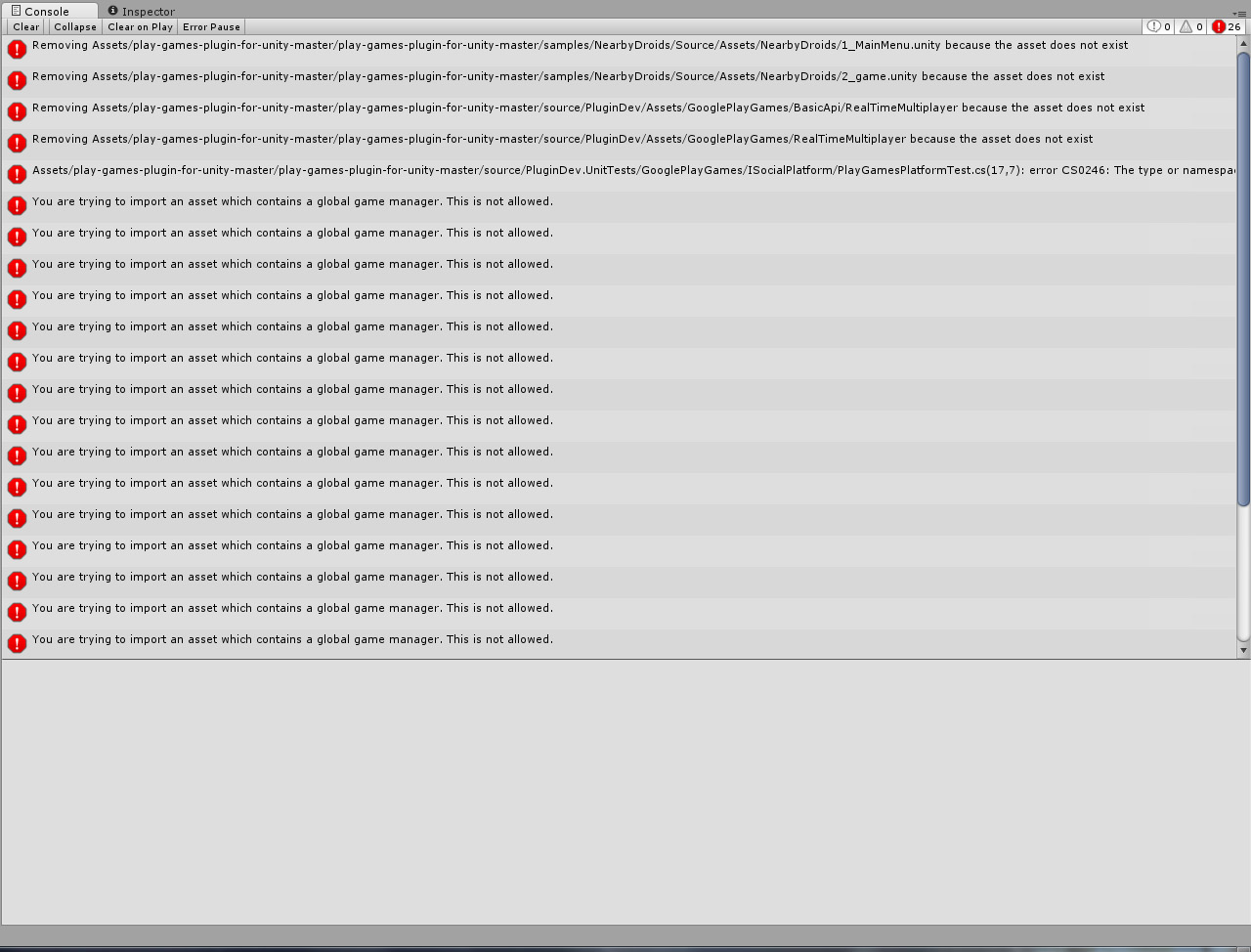
alt text

the only one that doesn't clear is "Assets/play-games-plugin-for-unity-master/play-games-plugin-for-unity-master/source/PluginDev.UnitTests/GooglePlayGames/ISocialPlatform/PlayGamesPlatformTest.cs(17,7): error CS0246: The type or namespace name `NUnit' could not be found. Are you missing a using directive or an assembly reference?"

Am I doing something wrong when I'm importing this plugin? Do I need to find the NUnity dll online and import that manually? I could use some pointers on this and I'm hoping that whatever I'm doing wrong is pretty simple.

console.jpg (266.9 kB)
Comment
Add comment
10 |3000 characters needed characters left characters exceeded
▼
  • Viewable by all users
  • Viewable by moderators
  • Viewable by moderators and the original poster
  • Advanced visibility
Viewable by all users

3 Replies

· Add your reply
  • Sort: 
avatar image
0

Answer by TSI25 · Nov 05, 2015 at 10:28 PM

I deleted the files causing issues, namely everything in the GooglePlayGames folder at source/PluginDev.UnitTest/GooglePlayGames . Everything compiles and i seem to have access to the plugin's functionality but I haven't gotten much further than that. I'll post again if I'm still having issues/if those files were important for some reason.

Comment
Add comment · Share
10 |3000 characters needed characters left characters exceeded
▼
  • Viewable by all users
  • Viewable by moderators
  • Viewable by moderators and the original poster
  • Advanced visibility
Viewable by all users
avatar image
0

Answer by Retruate · Jan 21, 2016 at 05:37 PM

I just wanted to note that I'm having the same error. Whenever I delete the trouble making files I continue to get more errors. I backed up my project before I imported the plug-in. I'll replace my current version with a copy of my backed up version and try again.

I hope someone is able to fix this because I'm not an expert on this subject.

Comment
Add comment · Show 2 · Share
10 |3000 characters needed characters left characters exceeded
▼
  • Viewable by all users
  • Viewable by moderators
  • Viewable by moderators and the original poster
  • Advanced visibility
Viewable by all users
avatar image Retruate · Jan 21, 2016 at 06:01 PM 0
Share

I just tried importing it another way. I was originally putting the .zip file in my project and extracting it from there. This time I copied the .unitypackage file to the desktop and used the import option inside the Assets menu in Unity to open the .unitypackage file. I get ResolutionException errors, but my game can play. I'll try and see how it works later on.

avatar image skrpeta Retruate · Nov 09, 2016 at 10:20 AM 0
Share

Same thing, problem was that I was importing whole zip folder in unity ins$$anonymous$$d of unity package inside current-build folder. So for anybody else who is experiencing this problem just import unity package and you are good to go.

avatar image
0

Answer by saadali211 · Dec 21, 2017 at 11:03 AM

" FIXED " OPEN YOUR PACKAGE IN THE EXPLORER AND FIND ALL FILES WITH .uNITYPACKAGE AND OPEN THE FILE WITH LATEST VERSION UNITY WILL IMPORT ALL THE FILES AND NO ERROR .

FOR VIDEO CHECK MY YOUTUBE CHANNEL

WWW.YOUTUBE.COM/C/FASTSOLUTION

Comment
Add comment · Share
10 |3000 characters needed characters left characters exceeded
▼
  • Viewable by all users
  • Viewable by moderators
  • Viewable by moderators and the original poster
  • Advanced visibility
Viewable by all users

Your answer

Hint: You can notify a user about this post by typing @username

Up to 2 attachments (including images) can be used with a maximum of 524.3 kB each and 1.0 MB total.

Follow this Question

Answers Answers and Comments

33 People are following this question.

avatar image avatar image avatar image avatar image avatar image avatar image avatar image avatar image avatar image avatar image avatar image avatar image avatar image avatar image avatar image avatar image avatar image avatar image avatar image avatar image avatar image avatar image avatar image avatar image avatar image avatar image avatar image avatar image avatar image avatar image avatar image avatar image avatar image

Related Questions

CommandInvokationFailure: Unable to convert classes into dex format. Admob, Google Play Services Plugins 3 Answers

Google play leaderboard broken 1 Answer

Google Play Leaderboard won't show up if game is downloaded from Google Play 0 Answers

Import Project from Asset store 6 Answers

Android Support for Google Play Games 0 Answers


Enterprise
Social Q&A

Social
Subscribe on YouTube social-youtube Follow on LinkedIn social-linkedin Follow on Twitter social-twitter Follow on Facebook social-facebook Follow on Instagram social-instagram

Footer

  • Purchase
    • Products
    • Subscription
    • Asset Store
    • Unity Gear
    • Resellers
  • Education
    • Students
    • Educators
    • Certification
    • Learn
    • Center of Excellence
  • Download
    • Unity
    • Beta Program
  • Unity Labs
    • Labs
    • Publications
  • Resources
    • Learn platform
    • Community
    • Documentation
    • Unity QA
    • FAQ
    • Services Status
    • Connect
  • About Unity
    • About Us
    • Blog
    • Events
    • Careers
    • Contact
    • Press
    • Partners
    • Affiliates
    • Security
Copyright © 2020 Unity Technologies
  • Legal
  • Privacy Policy
  • Cookies
  • Do Not Sell My Personal Information
  • Cookies Settings
"Unity", Unity logos, and other Unity trademarks are trademarks or registered trademarks of Unity Technologies or its affiliates in the U.S. and elsewhere (more info here). Other names or brands are trademarks of their respective owners.
  • Anonymous
  • Sign in
  • Create
  • Ask a question
  • Spaces
  • Default
  • Help Room
  • META
  • Moderators
  • Explore
  • Topics
  • Questions
  • Users
  • Badges
