 koobas.hobune.stream


StartCoroutine still runs 1 more second after using yield break
I tried using the StartCoroutine to make my pet smile for 1 second when clicked, but after 1 second more, the clicked bool returns several false value for 1 second more. I put yield break after the clicked is returned a false value to break it immediately but still it runs for 1 second more. How do i break it instantly?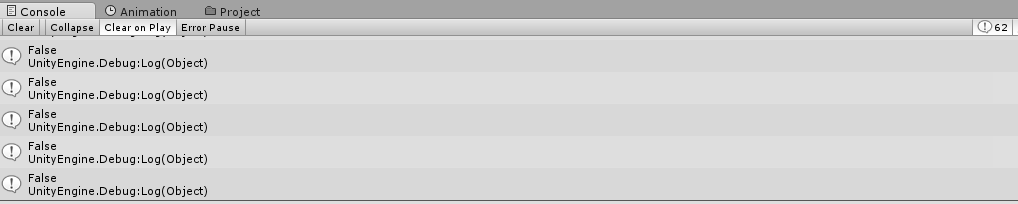
 IEnumerator PetTouch()
     {
         if (clicked)
         {
             emoteMats[1] = emoteMattouched;
             this.GetComponent<Renderer>().materials = emoteMats;
             yield return new WaitForSeconds(1);
             clicked = false;
             Debug.Log(clicked);
             yield break;
         }
     }

Hmm what happens if you yield from inside a statement then make that statement inaccessible?
Your answerers are correct.
You should aim to place a condition on the calling of the Coroutine rather than checking a condition whilst it is running.

From what i can see, Whats happening here is:
If you observe closely the mouse click is registered on each and every single frame. For example if you hold the mouse click down for a second and you game is running on 60 FPS then total number of clicks detected will be 60. Keep this in mind when you are making a call to your Enumerator. For every Fame your Co-routine will be called which in turn will result and extra second of output (in your case).
so if you are using Input.GetMouseButton(0), please don't, instead use Input.GetMouseButtonDown(0). It will solve your problem for sure.
:) :)

Im actually using the On$$anonymous$$ouseDown function and it's not the problem since it returns only 1 value per click. I really think it's in the coroutine i just don't know how.
 void On$$anonymous$$ouseDown()
         {
             changingEmote = true;
             if(!clicked)
             {
                 Debug.Log("You clicked on your pet");
                 clicked = true;
             }

             changingEmote = false;
         }


Its working absolutely fine for me.
See the code below:
     void On$$anonymous$$ouseDown()
     {
         StartCoroutine($$anonymous$$ouseClick());
     }

     IEnumerator $$anonymous$$ouseClick()
     {
         yield return new WaitForSeconds(1.0f);
         Debug.Log("I Am Here!!");
     }
Even your code is working fine for me :
     public bool clicked = true;

     void On$$anonymous$$ouseDown()
     {
         StartCoroutine($$anonymous$$ouseClick());
     }

     IEnumerator $$anonymous$$ouseClick()
     {
         if (clicked)
         {
             yield return new WaitForSeconds(1);
             clicked = false;
             Debug.Log(clicked);
             yield break;
         }
     }
There might be something else, its not the co-routine.
Yeah the problem was i executed/run the coroutine in the update function. Running it inside On$$anonymous$$ouseDown function worked but give me some other problems but i think i could work with those. These pet just got several emotion that i have to make several bools for them to work properly in different conditions. Anyways, your answer helped in this specific problem.
Thanks mate :D

Your IEnumerator method has only 1 Debug.Log call and no looping of any kind so the fact that you get many logs tells me you have many coroutines running.
You set clicked to true when you click and i guess you create coroutines in Update as long as clicked stays true. You should only create 1 coroutine in On$$anonymous$$ouseDown
You start many coroutines and when you set clicked to false in one of them, it doesn't do anything to the ones that are already past the if-check and in the state where they wait for 1 second. After they finish waiting, they print 'false'
The last yield break; in the method doesn't do anything because it's the last thing in the method. The execution will exit the method anyways even without the break
@Nose$$anonymous$$ills I know... its just the same code is working for me but not for him. So the only reason could be $$anonymous$$ultiple calls to the co-routine.




