
Wayback Machinekoobas.hobune.stream
May JUN Jul
Previous capture 12 Next capture
2021 2022 2023
1 capture
12 Jun 22 - 12 Jun 22
sparklines
Close Help
  • Products
  • Solutions
  • Made with Unity
  • Learning
  • Support & Services
  • Community
  • Asset Store
  • Get Unity

UNITY ACCOUNT

You need a Unity Account to shop in the Online and Asset Stores, participate in the Unity Community and manage your license portfolio. Login Create account
  • Blog
  • Forums
  • Answers
  • Evangelists
  • User Groups
  • Beta Program
  • Advisory Panel

Navigation

  • Home
  • Products
  • Solutions
  • Made with Unity
  • Learning
  • Support & Services
  • Community
    • Blog
    • Forums
    • Answers
    • Evangelists
    • User Groups
    • Beta Program
    • Advisory Panel

Unity account

You need a Unity Account to shop in the Online and Asset Stores, participate in the Unity Community and manage your license portfolio. Login Create account

Language

  • Chinese
  • Spanish
  • Japanese
  • Korean
  • Portuguese
  • Ask a question
  • Spaces
    • Default
    • Help Room
    • META
    • Moderators
    • Topics
    • Questions
    • Users
    • Badges
  • Home /
avatar image
5
Question by Kalpox · Jan 16, 2017 at 04:04 PM · sprite2d gamechildspriterenderermask

Sprite Mask that affects only the childrens of a GameObject

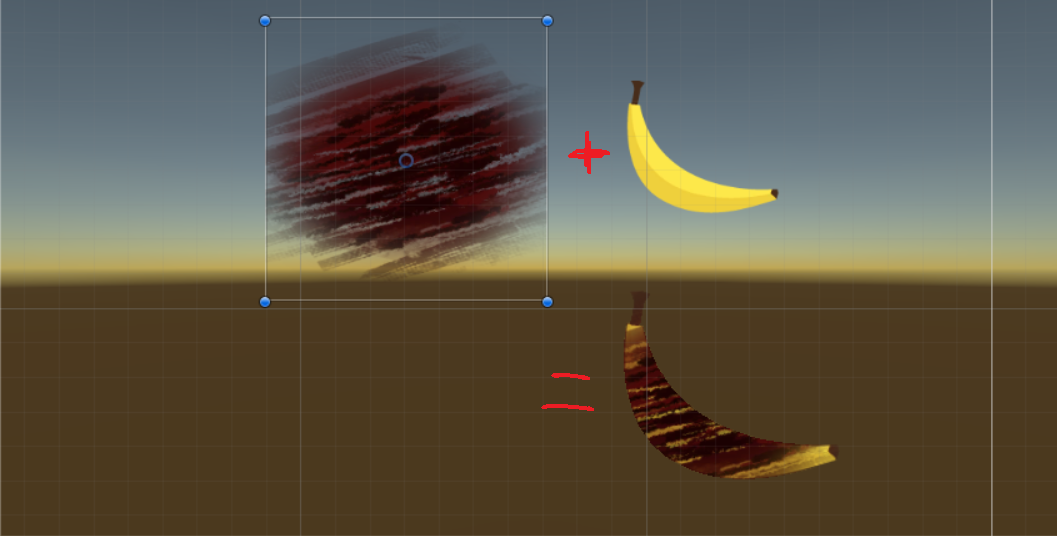
Hi everyone, I'm posting here because I want add a specific texture (A) on top of a sprite (B). To do this I modified a shader found on the internet, so that it takes the shape of my B sprite and shows only the parts of A that are inside B. alt text
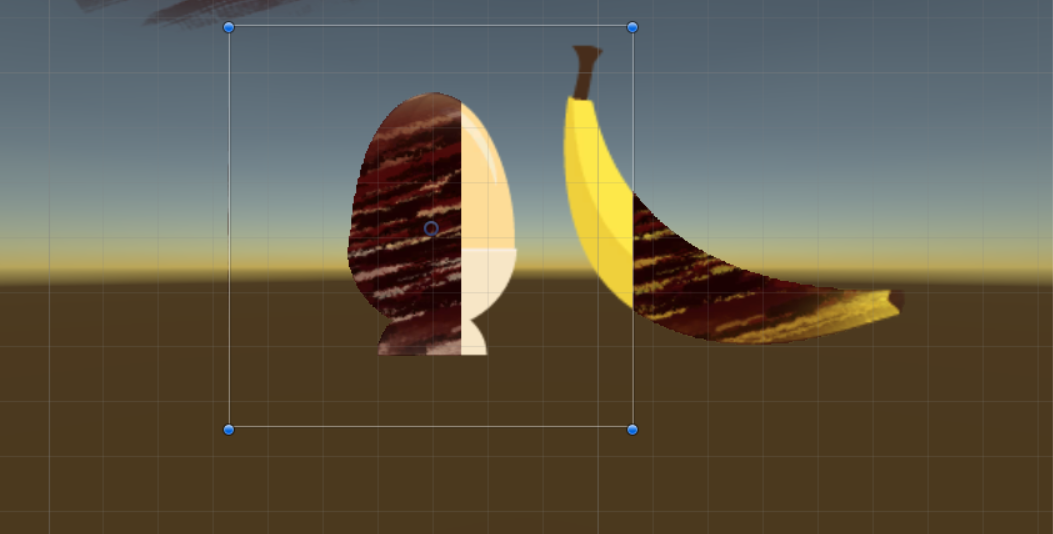
My problem is that if i have 2 sprites next to each other, their masks will afect the other sprite aswell. So I'm looking for a way to affect only 1 sprite with my mask, maybe on the childs of a same gameObject ?alt text
I would really appreciate it if someone could help me on this, here is the code of my shader :

Shader "Custom/MaskTest" {

  Properties
  {
      _MainTex ("Base (RGB) Alpha (A)", 2D) = "white" {}
      _Cutoff ("Base Alpha cutoff", Range (0,1)) = 0.5
  }
  
  SubShader {  
      Tags {"Queue" = "Transparent+1"}
       Offset 0, -1
      ColorMask 0 
      ZWrite On
      Pass
      {
          AlphaTest Less [_Cutoff]      
          SetTexture [_MainTex] {
              combine texture * primary, texture
          }
      }
  }

}

1.png (261.4 kB)
e.png (197.4 kB)
Comment
Add comment
10 |3000 characters needed characters left characters exceeded
▼
  • Viewable by all users
  • Viewable by moderators
  • Viewable by moderators and the original poster
  • Advanced visibility
Viewable by all users

5 Replies

· Add your reply
  • Sort: 
avatar image
12

Answer by IggyZuk · May 14, 2019 at 07:22 PM

Add Sorting Group component!

Sprite Masks

Sorting Group Component added to the Parent GameObject ensures the mask will affect only children of that Sorting Group

Comment
Add comment · Show 3 · Share
10 |3000 characters needed characters left characters exceeded
▼
  • Viewable by all users
  • Viewable by moderators
  • Viewable by moderators and the original poster
  • Advanced visibility
Viewable by all users
avatar image NGS99 · Jul 04, 2019 at 02:18 PM 0
Share

I would still be stuck, if it was not for the sorting group component!

avatar image CyRaid · Jul 09, 2019 at 10:33 PM 0
Share

Yes! Thank you. This solved my problem. Good to know they added this!

avatar image Funzo247 · Mar 12, 2021 at 06:07 PM 0
Share

Sorry to necro, but is there a way to achieve the exact opposite effect? I want a mask that only affects other objects and not the children.

Basically I'm making small water particles that merge together when they're close.I'm trying to use a mask to achieve this, using a slightly bigger sprite as a child, so basically when two water droplets are close, i want the masks being made visible to in effect create a basic merging affect.

avatar image
2

Answer by sam_nau · Aug 09, 2018 at 01:35 AM

Maybe I'm misunderstanding your problem but I think it can be solved very easily by using the new Sprite Mask component with a custom range. I had trouble understanding how to use the Sprite Mask on multiple objects at first. But the custom range option lets you isolate the masking of sprites to a sorting layer so that you can keep different masked sprites on different sorting layers and not have them interfere with each other. https://docs.unity3d.com/Manual/class-SpriteMask.html

It's not obvious right away that the custom range lets you have control over how the mask affects the sprites in your scene. Especially when you want multiple masks on different groups of sprites. But that's exactly what its for. You just pick a sort layer for the range after selecting that option and that's it.

Comment
Add comment · Show 1 · Share
10 |3000 characters needed characters left characters exceeded
▼
  • Viewable by all users
  • Viewable by moderators
  • Viewable by moderators and the original poster
  • Advanced visibility
Viewable by all users
avatar image Merrick20 · Aug 17, 2018 at 08:23 PM 0
Share

I stumbled across this answer by mistake and it solved something that had been driving me crazy LOL

avatar image
0

Answer by nikosurfing · Jul 04, 2017 at 08:52 AM

Got same problem, anyone?

Comment
Add comment · Share
10 |3000 characters needed characters left characters exceeded
▼
  • Viewable by all users
  • Viewable by moderators
  • Viewable by moderators and the original poster
  • Advanced visibility
Viewable by all users
avatar image
0

Answer by KazenoZ · Jul 04, 2017 at 09:03 AM

If I'm understanding the problem correctly, and if it suits your needs, you can use Unity's built in Alpha Mask UI component (https://unity3d.com/learn/tutorials/topics/user-interface-ui/ui-mask).

What you want to do with this is to add the Mask component on a child of the banana that has the banana sprite attached to it as well, and then child the blood splatter to that object.

The Mask component makes it so only pixels within the mask's sprite are displayed, while all others are omitted. This only affects children of the mask object.

Comment
Add comment · Share
10 |3000 characters needed characters left characters exceeded
▼
  • Viewable by all users
  • Viewable by moderators
  • Viewable by moderators and the original poster
  • Advanced visibility
Viewable by all users
avatar image
0

Answer by LazyKnight · Oct 10, 2018 at 09:07 AM

Specific masks only affect the specific renderers.

The solution I just figured out here, ugly, but it works.

 using UnityEngine;
 
 namespace DCGame.UnityFeaturePatch
 {
   public class SpriteMaskRangeFixer : MonoBehaviour
   {
     private static int index = 0;
     public SpriteRenderer[] renderers;
     public SpriteMask[] masks;
     public string sortingLayerName;
 
     private void Start()
     {
       index += 2;
 
       var sortingLayerID = SortingLayer.NameToID(sortingLayerName);
 
       foreach (var renderer in renderers)
       {
         renderer.sortingOrder = index;
         renderer.sortingLayerID = sortingLayerID;
       }
       foreach (var mask in masks)
       {
         mask.isCustomRangeActive = true;
         mask.backSortingLayerID = sortingLayerID;
         mask.backSortingOrder = index - 1;
         mask.frontSortingOrder = index;
         mask.frontSortingLayerID = sortingLayerID;
       }
 
       if (index >= 1000)
       {
         index = 0;
       }
     }
   }
 }

Related discussion: https://forum.unity.com/threads/sprite-mask-that-only-affects-child.538021/

Posted here as a note.

Comment
Add comment · Share
10 |3000 characters needed characters left characters exceeded
▼
  • Viewable by all users
  • Viewable by moderators
  • Viewable by moderators and the original poster
  • Advanced visibility
Viewable by all users

Your answer

Hint: You can notify a user about this post by typing @username

Up to 2 attachments (including images) can be used with a maximum of 524.3 kB each and 1.0 MB total.

Follow this Question

Answers Answers and Comments

13 People are following this question.

avatar image avatar image avatar image avatar image avatar image avatar image avatar image avatar image avatar image avatar image avatar image avatar image avatar image

Related Questions

Issue with swapping Player sprite when health lowers - Not sure how to fix 1 Answer

Mask Interaction outside of a Sorting Group 0 Answers

How come setting sprite tint/alpha does not increase draw calls? 0 Answers

2d sprite Animation - Fire at frame 2 Answers

Sprite doesn't show on Canvas, can't change to Image because I need Sprite Renderer component 0 Answers


Enterprise
Social Q&A

Social
Subscribe on YouTube social-youtube Follow on LinkedIn social-linkedin Follow on Twitter social-twitter Follow on Facebook social-facebook Follow on Instagram social-instagram

Footer

  • Purchase
    • Products
    • Subscription
    • Asset Store
    • Unity Gear
    • Resellers
  • Education
    • Students
    • Educators
    • Certification
    • Learn
    • Center of Excellence
  • Download
    • Unity
    • Beta Program
  • Unity Labs
    • Labs
    • Publications
  • Resources
    • Learn platform
    • Community
    • Documentation
    • Unity QA
    • FAQ
    • Services Status
    • Connect
  • About Unity
    • About Us
    • Blog
    • Events
    • Careers
    • Contact
    • Press
    • Partners
    • Affiliates
    • Security
Copyright © 2020 Unity Technologies
  • Legal
  • Privacy Policy
  • Cookies
  • Do Not Sell My Personal Information
  • Cookies Settings
"Unity", Unity logos, and other Unity trademarks are trademarks or registered trademarks of Unity Technologies or its affiliates in the U.S. and elsewhere (more info here). Other names or brands are trademarks of their respective owners.
  • Anonymous
  • Sign in
  • Create
  • Ask a question
  • Spaces
  • Default
  • Help Room
  • META
  • Moderators
  • Explore
  • Topics
  • Questions
  • Users
  • Badges
