 koobas.hobune.stream


Lighting/Shadows: my cube did not cast nor receive any shadows
I'm struggling with shadows in unity for some time, and tried everything I could find, but still my cube(used as floor in this case) didn't seem to receive shadows. Neither in scene view nor game view. I can't figure out what is the problem 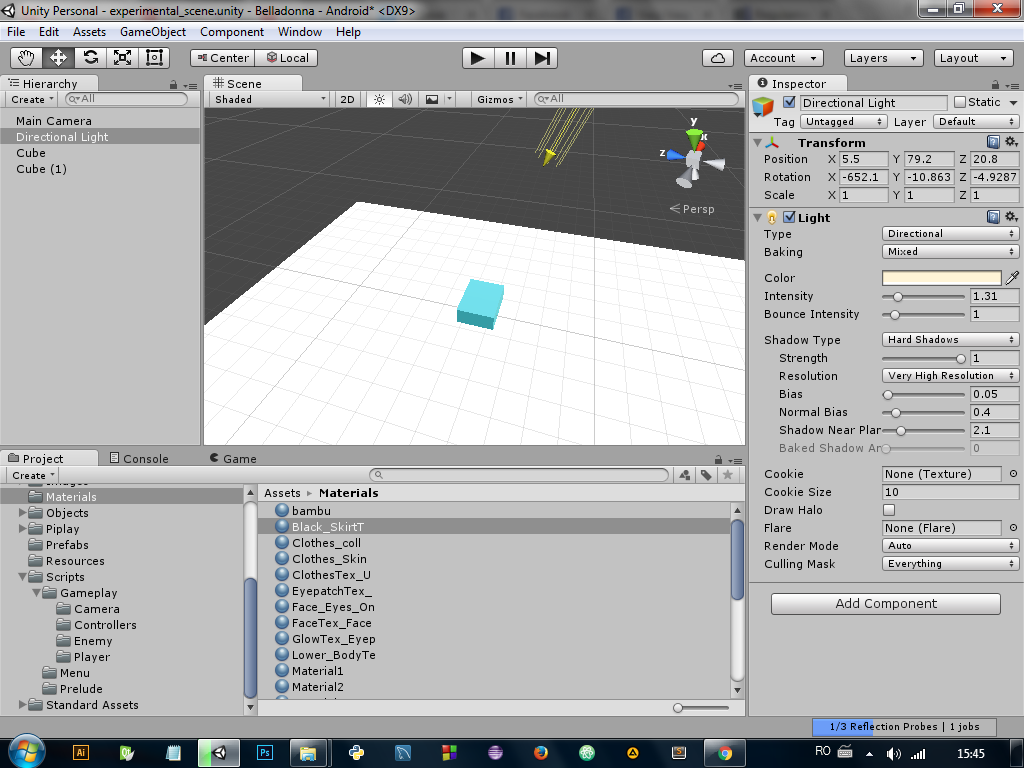

Select the objects that you want to cast and/or receive shadows and make sure cast shadows and receive shadows are selected in the MeshRenderer components.
Also check the Shadows Settings in the Quality panel. [ Edit> Project Settings > Quality ].
Make sure Shadows is not set to Disable Shadows and that the Shadow Distance has a reasonable value (try to increase it).
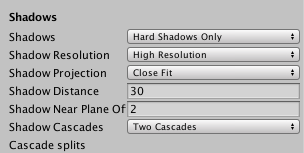

$$anonymous$$ake sure you are setting the Quality Level that you are actually using. It helps to remove all quality levels and only keep one while testing.


And change the baking to realtime rather than mixed.
Can you put the project online and share it so we can get a look?
Here , I put the project into an archive, take a look. https://drive.google.com/open?id=0B2eF3YXmA9z3VDNyT19fRncyRUU

in the mesh render (of the cube used as floor) is receive shadows ON? (I know It's a stupid answer but sometimes it's that)
Yes, 'Receive shadows' is on, same is 'Cast shadows' in the cube above floor.





