
Wayback Machinekoobas.hobune.stream
May JUN Jul
Previous capture 13 Next capture
2021 2022 2023
1 capture
13 Jun 22 - 13 Jun 22
sparklines
Close Help
  • Products
  • Solutions
  • Made with Unity
  • Learning
  • Support & Services
  • Community
  • Asset Store
  • Get Unity

UNITY ACCOUNT

You need a Unity Account to shop in the Online and Asset Stores, participate in the Unity Community and manage your license portfolio. Login Create account
  • Blog
  • Forums
  • Answers
  • Evangelists
  • User Groups
  • Beta Program
  • Advisory Panel

Navigation

  • Home
  • Products
  • Solutions
  • Made with Unity
  • Learning
  • Support & Services
  • Community
    • Blog
    • Forums
    • Answers
    • Evangelists
    • User Groups
    • Beta Program
    • Advisory Panel

Unity account

You need a Unity Account to shop in the Online and Asset Stores, participate in the Unity Community and manage your license portfolio. Login Create account

Language

  • Chinese
  • Spanish
  • Japanese
  • Korean
  • Portuguese
  • Ask a question
  • Spaces
    • Default
    • Help Room
    • META
    • Moderators
    • Topics
    • Questions
    • Users
    • Badges
  • Home /
avatar image
1
Question by AntLewis · Oct 20, 2013 at 03:49 PM · mecanim

Mecanim Anim screwing up character

Hi guys, I'm a newbie Mecanim user and could use a litle advice. I've a human character up and running and I've just dragged a death animation into my project (the one the teddy bear plays in the tutorial project).

When try to play the anim on my character, it effectively breaks his legs (see screenshot). I notice that this anim uses a specific avatar file and screws up when it uses the UnityDefaultAvatar (which is what I'm using). Is there anything I can do to fix this? Is it the fact that there's a different hierarchy in the bones?

Not expecting a solution here - but if you could point me in the right direction (I've watch the tutorial vids) that would be great.

Thanks!
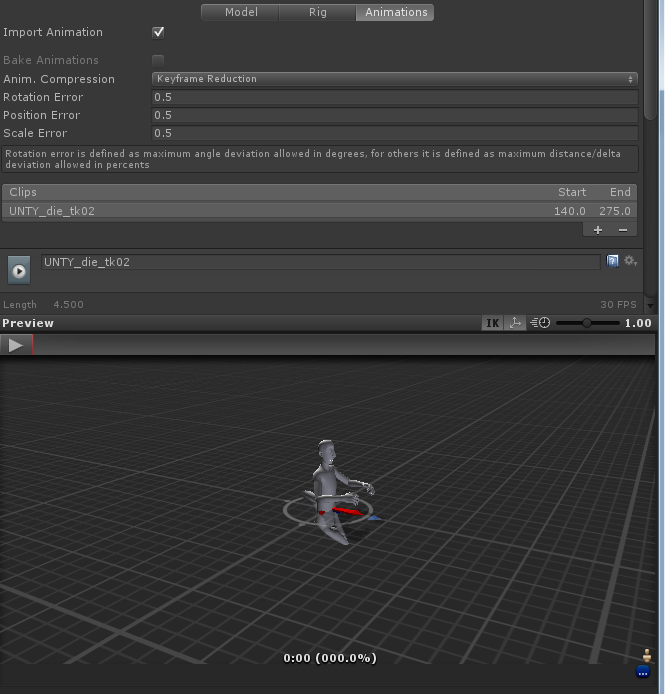
alt text

capture.png (157.5 kB)
Comment
Add comment · Show 5
10 |3000 characters needed characters left characters exceeded
▼
  • Viewable by all users
  • Viewable by moderators
  • Viewable by moderators and the original poster
  • Advanced visibility
Viewable by all users
avatar image infinitypbr · Oct 20, 2013 at 05:39 PM 0
Share

Is your character rigged properly, set as "Humanoid" and all that? Also, are you sure the animation for the bear is something that can be retargeted?

avatar image AntLewis · Oct 20, 2013 at 05:54 PM 0
Share

Yip - set up as a humanoid. The bear in the tutorial project uses the DudeAvatar and I am using a different avatar - the rig looks similar (though $$anonymous$$e has more bones). Could that be the issue?

avatar image infinitypbr · Oct 20, 2013 at 06:02 PM 0
Share

I don't know . Why not create a new avatar from your model to find out?

avatar image AntLewis · Oct 20, 2013 at 06:11 PM 0
Share

Ah right...my bones are named differently to those in the animation, so I'm guessing this is the issue.

avatar image AntLewis · Oct 20, 2013 at 07:03 PM 0
Share

Right I've no idea if this is the correct way to do this but here goes. So I've selected the animation (called Dying), selected 'Configure' to view the rig. I've then dragged the character that I want to use for the animation into the scene (called Ninja$$anonymous$$ecanim), and I've dragged the characters bones onto the animation hierarchy. The problem is it's saying :

$$anonymous$$uscleClip 'Dying' conversion failed: Transform 'mixamorig:Hips' for human bone 'Hips' not found UnityEditor.DockArea:OnGUI()

Am I going about this the right way? alt text
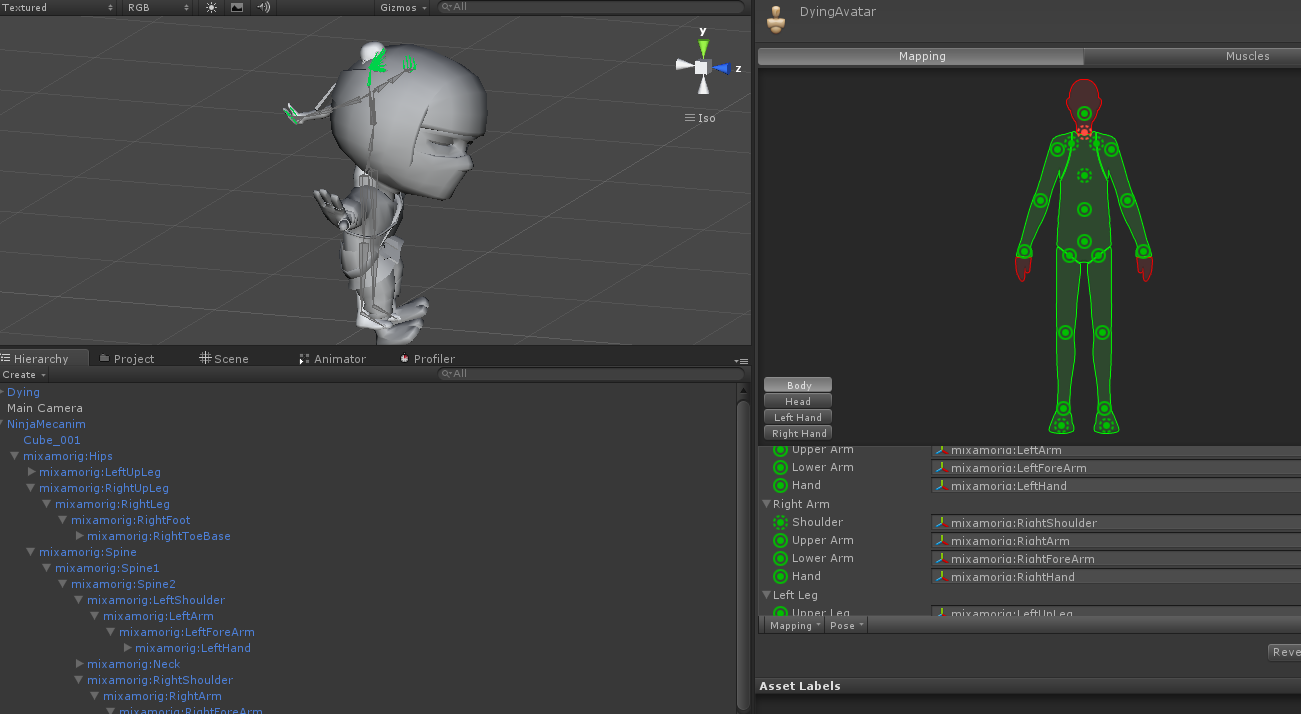
capture.png (145.9 kB)

2 Replies

· Add your reply
  • Sort: 
avatar image
1

Answer by jfa257 · Nov 10, 2015 at 05:36 PM

If you have characters with the correct humanoid setting(meaning a similar rig to the mapping layout of the unity avatar interface) then you just put it create avatar from this model and you can play correctly the animations from another similar avatar. As long as everything is green, its all right. Doesn't matter if you have extra bones, but the base humanoid hierarchy must be as the avatar layout.

Comment
Add comment · Share
10 |3000 characters needed characters left characters exceeded
▼
  • Viewable by all users
  • Viewable by moderators
  • Viewable by moderators and the original poster
  • Advanced visibility
Viewable by all users
avatar image
0

Answer by glennnn · Aug 21, 2014 at 06:26 AM

you have IK feet turned on .

Comment
Add comment · Share
10 |3000 characters needed characters left characters exceeded
▼
  • Viewable by all users
  • Viewable by moderators
  • Viewable by moderators and the original poster
  • Advanced visibility
Viewable by all users

Your answer

Hint: You can notify a user about this post by typing @username

Up to 2 attachments (including images) can be used with a maximum of 524.3 kB each and 1.0 MB total.

Follow this Question

Answers Answers and Comments

18 People are following this question.

avatar image avatar image avatar image avatar image avatar image avatar image avatar image avatar image avatar image avatar image avatar image avatar image avatar image avatar image avatar image avatar image avatar image avatar image

Related Questions

EvaluateBoneMatch and GetBestChildMatchChoices 0 Answers

is Mecanim Animator.Play(myState, level, myNormalizedTime) really a good alternative to Legacy animation normalizedTime? 0 Answers

Animator Skipping Frames 1 Answer

Run different animations at the same time with ONE animator only 0 Answers

How does the Animator drive Rigidbody with root motion (in detail)? 1 Answer


Enterprise
Social Q&A

Social
Subscribe on YouTube social-youtube Follow on LinkedIn social-linkedin Follow on Twitter social-twitter Follow on Facebook social-facebook Follow on Instagram social-instagram

Footer

  • Purchase
    • Products
    • Subscription
    • Asset Store
    • Unity Gear
    • Resellers
  • Education
    • Students
    • Educators
    • Certification
    • Learn
    • Center of Excellence
  • Download
    • Unity
    • Beta Program
  • Unity Labs
    • Labs
    • Publications
  • Resources
    • Learn platform
    • Community
    • Documentation
    • Unity QA
    • FAQ
    • Services Status
    • Connect
  • About Unity
    • About Us
    • Blog
    • Events
    • Careers
    • Contact
    • Press
    • Partners
    • Affiliates
    • Security
Copyright © 2020 Unity Technologies
  • Legal
  • Privacy Policy
  • Cookies
  • Do Not Sell My Personal Information
  • Cookies Settings
"Unity", Unity logos, and other Unity trademarks are trademarks or registered trademarks of Unity Technologies or its affiliates in the U.S. and elsewhere (more info here). Other names or brands are trademarks of their respective owners.
  • Anonymous
  • Sign in
  • Create
  • Ask a question
  • Spaces
  • Default
  • Help Room
  • META
  • Moderators
  • Explore
  • Topics
  • Questions
  • Users
  • Badges