
Wayback Machinekoobas.hobune.stream
May JUN Jul
Previous capture 13 Next capture
2021 2022 2023
1 capture
13 Jun 22 - 13 Jun 22
sparklines
Close Help
  • Products
  • Solutions
  • Made with Unity
  • Learning
  • Support & Services
  • Community
  • Asset Store
  • Get Unity

UNITY ACCOUNT

You need a Unity Account to shop in the Online and Asset Stores, participate in the Unity Community and manage your license portfolio. Login Create account
  • Blog
  • Forums
  • Answers
  • Evangelists
  • User Groups
  • Beta Program
  • Advisory Panel

Navigation

  • Home
  • Products
  • Solutions
  • Made with Unity
  • Learning
  • Support & Services
  • Community
    • Blog
    • Forums
    • Answers
    • Evangelists
    • User Groups
    • Beta Program
    • Advisory Panel

Unity account

You need a Unity Account to shop in the Online and Asset Stores, participate in the Unity Community and manage your license portfolio. Login Create account

Language

  • Chinese
  • Spanish
  • Japanese
  • Korean
  • Portuguese
  • Ask a question
  • Spaces
    • Default
    • Help Room
    • META
    • Moderators
    • Topics
    • Questions
    • Users
    • Badges
  • Home /
avatar image
0
Question by Nanako · Feb 16, 2015 at 08:11 PM · instantiatelayer

Why does this raycast keep hitting itself?

I'm using a script from the wiki which i've slightly modified only to add a debug message. The purpose of it is supposed to prevent objects passing through walls at high speeds (because continuous collision detection is broken). The script is here: http://www.pasteall.org/56737/c

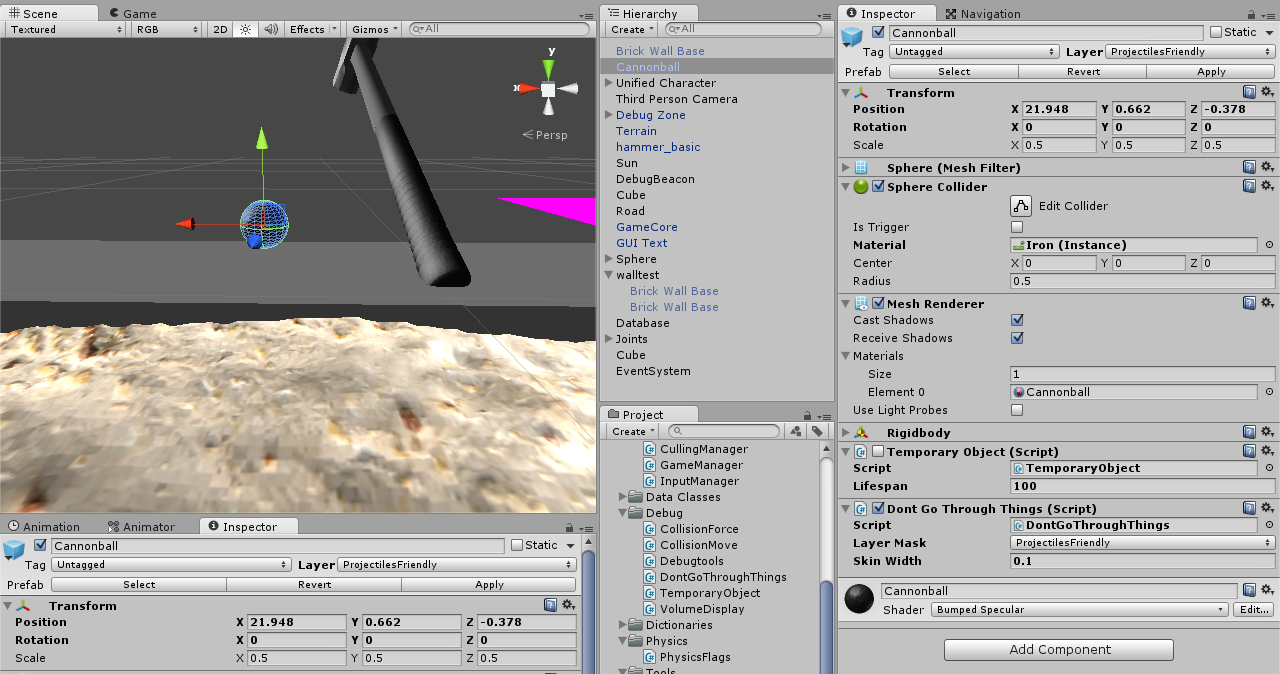
I've attached it to a cannonball. Here is a shot of it, and the inspector.

Important things to note here: 1. The cannonball is on layer ProjectilesFriendly 2. In the don't go through things script, Projectilesfriendly is set as the layer mask 3. the cannonball has no children or parents, its a lone object.
alt text

And finally, here's my Physics section of the project settings:

http://gyazo.com/6178982ddfd1c013d86ac81644f3704a alt text

What's important to note here is that the ProjectilesFriendly layer doesn't collide with itself.

So i'm confused, why wont this work ?

Also i have no idea what went wrong with embedding images in this post. Please click the links to see them

Comment
Add comment · Show 6
10 |3000 characters needed characters left characters exceeded
▼
  • Viewable by all users
  • Viewable by moderators
  • Viewable by moderators and the original poster
  • Advanced visibility
Viewable by all users
avatar image melkorinos · Feb 16, 2015 at 08:39 PM 0
Share

Take a look here. Also when u pass the direction to the raycast you should normalize it.

avatar image meat5000 ♦ · Feb 16, 2015 at 08:58 PM 0
Share

Why layer$$anonymous$$ask.value and not just layer$$anonymous$$ask?

And what actually is the number you've put in it? What are the actual layers of the things you specified, numerically?

Are you firing it from inside a collider?

avatar image Nanako · Feb 16, 2015 at 10:25 PM 0
Share

@melkorinos: Now done, but it didnt fix the problem.

@$$anonymous$$eat: I don't know, i didn't write it, i didnt make that decision.

The layer numbers: alt text

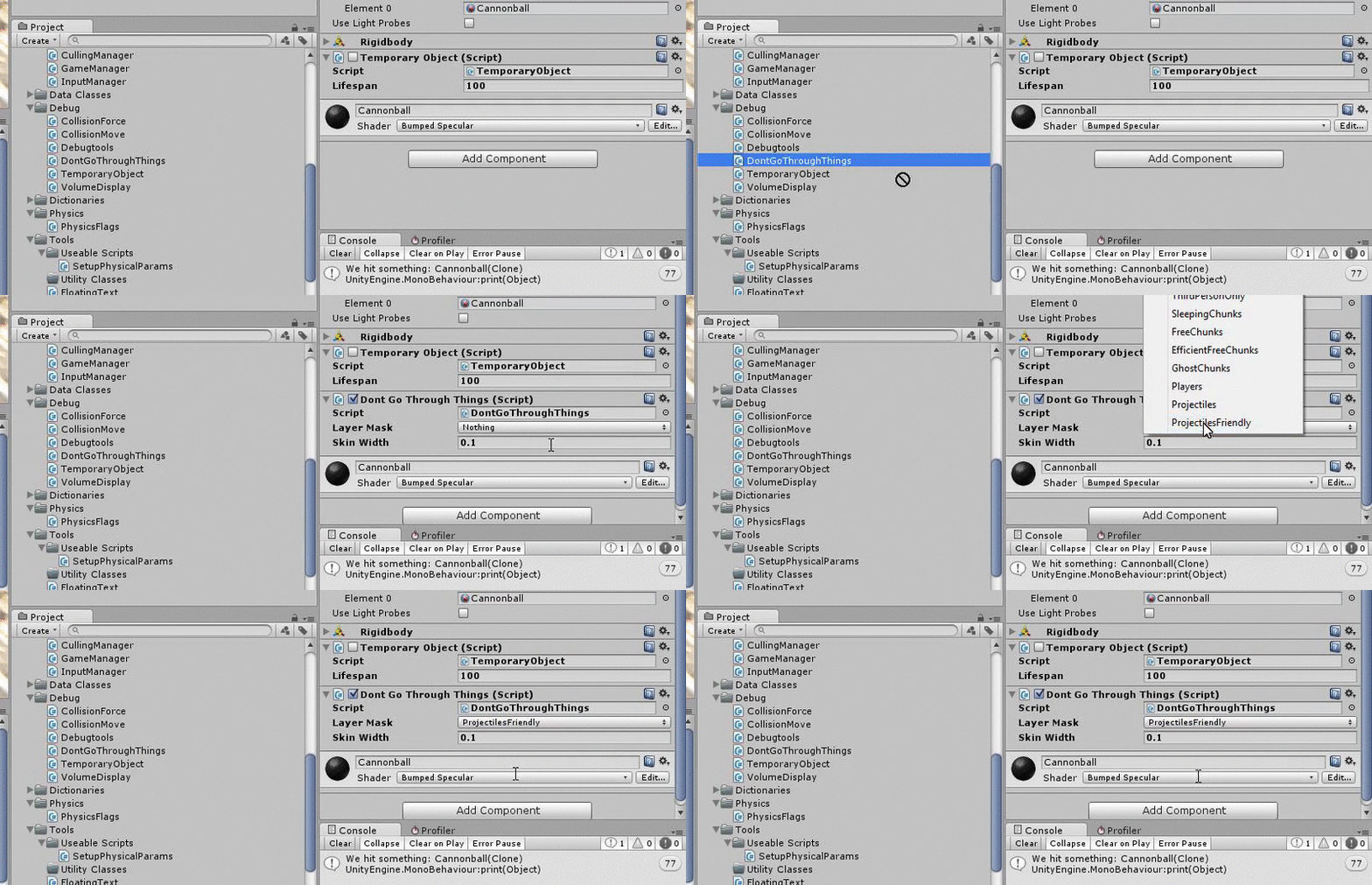
I believe it's NOT being fired from inside a collider. Because it's firing from the position the object was in last frame, to the position its in now. But the layermasking should stop it from hitting itself.
avatar image Nanako · Feb 16, 2015 at 11:32 PM 0
Share

http://gyazo.com/e641ad638bfe6a2f51ee4b4ae10453a5

avatar image Nanako · Feb 17, 2015 at 03:31 AM 1
Share

I love how you said "show". Your wish is my command

alt text

Show more comments

1 Reply

· Add your reply
  • Sort: 
avatar image
0
Best Answer

Answer by meat5000 · Feb 17, 2015 at 04:04 AM

I will say:

In the LayerMask field, place the layer of the object you dont want to go through; i.e the object you want to hit. The statement in the script comments is misleading and threw me off at first.

Comment
Add comment · Show 2 · Share
10 |3000 characters needed characters left characters exceeded
▼
  • Viewable by all users
  • Viewable by moderators
  • Viewable by moderators and the original poster
  • Advanced visibility
Viewable by all users
avatar image meat5000 ♦ · Feb 17, 2015 at 04:17 AM 0
Share

On a side note, Continuous Dynamic works well against mesh colliders for high speed collisions.

avatar image Nanako · Feb 17, 2015 at 05:38 AM 0
Share

i think this is the answer. I'm not choosing a layermask here, i'm creating one by choosing which layers to hit. doh >.<

Your answer

Hint: You can notify a user about this post by typing @username

Up to 2 attachments (including images) can be used with a maximum of 524.3 kB each and 1.0 MB total.

Follow this Question

Answers Answers and Comments

21 People are following this question.

avatar image avatar image avatar image avatar image avatar image avatar image avatar image avatar image avatar image avatar image avatar image avatar image avatar image avatar image avatar image avatar image avatar image avatar image avatar image avatar image avatar image

Related Questions

Is there an easy way to apply the same tag to all children of an object? 4 Answers

Checking if object intersects? 1 Answer

Instantiate GameObject at Random time is not working 1 Answer

Instantiated Bullet Force not being applied 0 Answers

Instatiating a prefab in a random position 0 Answers


Enterprise
Social Q&A

Social
Subscribe on YouTube social-youtube Follow on LinkedIn social-linkedin Follow on Twitter social-twitter Follow on Facebook social-facebook Follow on Instagram social-instagram

Footer

  • Purchase
    • Products
    • Subscription
    • Asset Store
    • Unity Gear
    • Resellers
  • Education
    • Students
    • Educators
    • Certification
    • Learn
    • Center of Excellence
  • Download
    • Unity
    • Beta Program
  • Unity Labs
    • Labs
    • Publications
  • Resources
    • Learn platform
    • Community
    • Documentation
    • Unity QA
    • FAQ
    • Services Status
    • Connect
  • About Unity
    • About Us
    • Blog
    • Events
    • Careers
    • Contact
    • Press
    • Partners
    • Affiliates
    • Security
Copyright © 2020 Unity Technologies
  • Legal
  • Privacy Policy
  • Cookies
  • Do Not Sell My Personal Information
  • Cookies Settings
"Unity", Unity logos, and other Unity trademarks are trademarks or registered trademarks of Unity Technologies or its affiliates in the U.S. and elsewhere (more info here). Other names or brands are trademarks of their respective owners.
  • Anonymous
  • Sign in
  • Create
  • Ask a question
  • Spaces
  • Default
  • Help Room
  • META
  • Moderators
  • Explore
  • Topics
  • Questions
  • Users
  • Badges
