
Wayback Machinekoobas.hobune.stream
May JUN Jul
Previous capture 12 Next capture
2021 2022 2023
1 capture
12 Jun 22 - 12 Jun 22
sparklines
Close Help
  • Products
  • Solutions
  • Made with Unity
  • Learning
  • Support & Services
  • Community
  • Asset Store
  • Get Unity

UNITY ACCOUNT

You need a Unity Account to shop in the Online and Asset Stores, participate in the Unity Community and manage your license portfolio. Login Create account
  • Blog
  • Forums
  • Answers
  • Evangelists
  • User Groups
  • Beta Program
  • Advisory Panel

Navigation

  • Home
  • Products
  • Solutions
  • Made with Unity
  • Learning
  • Support & Services
  • Community
    • Blog
    • Forums
    • Answers
    • Evangelists
    • User Groups
    • Beta Program
    • Advisory Panel

Unity account

You need a Unity Account to shop in the Online and Asset Stores, participate in the Unity Community and manage your license portfolio. Login Create account

Language

  • Chinese
  • Spanish
  • Japanese
  • Korean
  • Portuguese
  • Ask a question
  • Spaces
    • Default
    • Help Room
    • META
    • Moderators
    • Topics
    • Questions
    • Users
    • Badges
  • Home /
  • Help Room /
avatar image
1
Question by HeresJohnny123 · Jul 21, 2018 at 05:36 PM · randomareaplacement

Spawn random in area and then remove

Hi, I've recently begun trying to create a system for generating objects within given areas on a terrain. By default i would simply use random.range(value 1, value 2) to achieve this.

------------------------------------.

However since i do not want these objects to overlap each other. I want to give them areas to determine where and where not it should be. Also, these areas needs to be different since im using them in a way to create areas for placing other objects, basicly im randomly trying to create areas for cities and the subobjects being houses.
-------------------------------------. Heres a pic to show what im trying to achieve:alt text
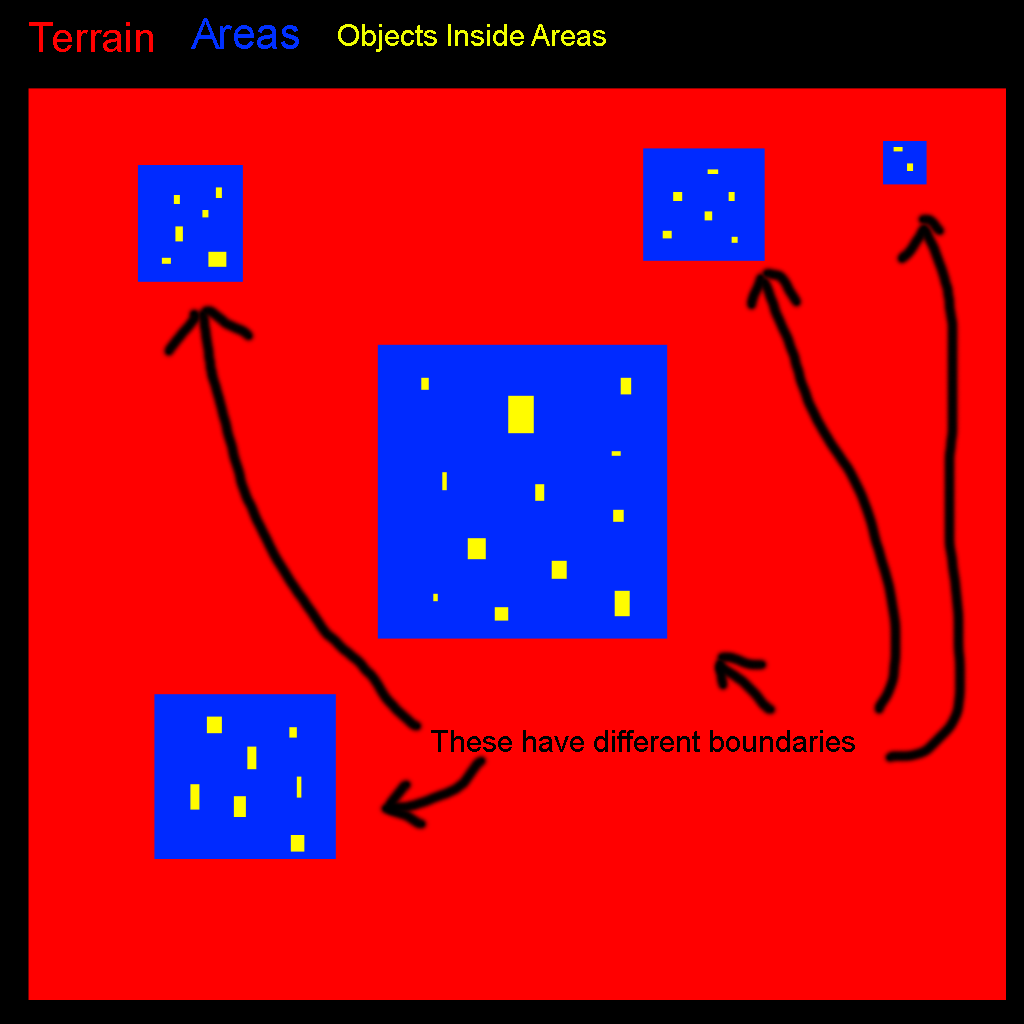
----------------------------------------.
Problem is i have no idea how i would go about spawning these areas in a manner so they do not go ontop of each other. They cannot be brought into a grid structure since i wanna keep the randomness they have and i prefer not to simply retry the spawn process if it happens to land onto a other area since that process could go about happening several times.
-----------------------------------------.

So the way I've figured out would work is if i could remove the areas from the spawn area...but i have no idea how to do that.

---------------------------------------.

(removing the blue spots from the red areas in the picture)

----------------------------------------.
any help or ideas are appriciated, thanks.

grej-copy.png (70.7 kB)
Comment
Add comment
10 |3000 characters needed characters left characters exceeded
▼
  • Viewable by all users
  • Viewable by moderators
  • Viewable by moderators and the original poster
  • Advanced visibility
Viewable by all users

1 Reply

· Add your reply
  • Sort: 
avatar image
0
Best Answer

Answer by thoxey · Jul 21, 2018 at 05:49 PM

There is a good link here if you look at the first section about room that'll explain this next part beter than I can,

But basically create a box collider of a pseudo random size, (i.e. in some bound you desire),

Then repeat that again but if the colliders overlap (see: here for how to do this) then try again.

Set a finite number of attempts and then leave the loop early if you have an amount of rooms you're happy with.

Comment
Add comment · Show 2 · Share
10 |3000 characters needed characters left characters exceeded
▼
  • Viewable by all users
  • Viewable by moderators
  • Viewable by moderators and the original poster
  • Advanced visibility
Viewable by all users
avatar image thoxey · Jul 21, 2018 at 05:51 PM 0
Share

Then obviously delete the collision objects when your done with them to address the "removing the blue spots from the red areas" if I've understood what you mean

avatar image HeresJohnny123 · Jul 21, 2018 at 05:54 PM 0
Share

Thanks pal, I've been trying to figure out strange algorithms all night i didn't consider using colliders to do it :P really owe you one

Your answer

Hint: You can notify a user about this post by typing @username

Up to 2 attachments (including images) can be used with a maximum of 524.3 kB each and 1.0 MB total.

Follow this Question

Answers Answers and Comments

152 People are following this question.

avatar image avatar image avatar image avatar image avatar image avatar image avatar image avatar image avatar image avatar image avatar image avatar image avatar image avatar image avatar image avatar image avatar image avatar image avatar image avatar image avatar image avatar image avatar image avatar image avatar image avatar image avatar image avatar image avatar image avatar image avatar image avatar image avatar image avatar image avatar image avatar image avatar image avatar image avatar image avatar image avatar image avatar image avatar image avatar image avatar image avatar image avatar image avatar image avatar image avatar image avatar image avatar image avatar image avatar image avatar image avatar image avatar image avatar image avatar image avatar image avatar image avatar image avatar image avatar image avatar image avatar image avatar image avatar image avatar image avatar image avatar image avatar image avatar image avatar image avatar image avatar image avatar image avatar image avatar image avatar image avatar image avatar image avatar image avatar image avatar image avatar image avatar image avatar image avatar image avatar image avatar image avatar image avatar image avatar image avatar image avatar image avatar image avatar image avatar image avatar image avatar image avatar image avatar image avatar image avatar image avatar image avatar image avatar image avatar image avatar image avatar image avatar image avatar image avatar image avatar image avatar image avatar image avatar image avatar image avatar image avatar image avatar image avatar image avatar image avatar image avatar image avatar image avatar image avatar image avatar image avatar image avatar image avatar image avatar image avatar image avatar image avatar image avatar image avatar image avatar image avatar image avatar image avatar image avatar image avatar image avatar image avatar image avatar image avatar image avatar image avatar image avatar image

Related Questions

AI placement of ships (battleship game) 1 Answer

Random Number every 5 seconds 2 Answers

Help with Randomized Sprite on GUI button click 0 Answers

Randomly generate blocks on a flat map 0 Answers

Generate Random sequence of color sprites 0 Answers


Enterprise
Social Q&A

Social
Subscribe on YouTube social-youtube Follow on LinkedIn social-linkedin Follow on Twitter social-twitter Follow on Facebook social-facebook Follow on Instagram social-instagram

Footer

  • Purchase
    • Products
    • Subscription
    • Asset Store
    • Unity Gear
    • Resellers
  • Education
    • Students
    • Educators
    • Certification
    • Learn
    • Center of Excellence
  • Download
    • Unity
    • Beta Program
  • Unity Labs
    • Labs
    • Publications
  • Resources
    • Learn platform
    • Community
    • Documentation
    • Unity QA
    • FAQ
    • Services Status
    • Connect
  • About Unity
    • About Us
    • Blog
    • Events
    • Careers
    • Contact
    • Press
    • Partners
    • Affiliates
    • Security
Copyright © 2020 Unity Technologies
  • Legal
  • Privacy Policy
  • Cookies
  • Do Not Sell My Personal Information
  • Cookies Settings
"Unity", Unity logos, and other Unity trademarks are trademarks or registered trademarks of Unity Technologies or its affiliates in the U.S. and elsewhere (more info here). Other names or brands are trademarks of their respective owners.
  • Anonymous
  • Sign in
  • Create
  • Ask a question
  • Spaces
  • Default
  • Help Room
  • META
  • Moderators
  • Explore
  • Topics
  • Questions
  • Users
  • Badges
