
Wayback Machinekoobas.hobune.stream
May JUN Jul
Previous capture 12 Next capture
2021 2022 2023
1 capture
12 Jun 22 - 12 Jun 22
sparklines
Close Help
  • Products
  • Solutions
  • Made with Unity
  • Learning
  • Support & Services
  • Community
  • Asset Store
  • Get Unity

UNITY ACCOUNT

You need a Unity Account to shop in the Online and Asset Stores, participate in the Unity Community and manage your license portfolio. Login Create account
  • Blog
  • Forums
  • Answers
  • Evangelists
  • User Groups
  • Beta Program
  • Advisory Panel

Navigation

  • Home
  • Products
  • Solutions
  • Made with Unity
  • Learning
  • Support & Services
  • Community
    • Blog
    • Forums
    • Answers
    • Evangelists
    • User Groups
    • Beta Program
    • Advisory Panel

Unity account

You need a Unity Account to shop in the Online and Asset Stores, participate in the Unity Community and manage your license portfolio. Login Create account

Language

  • Chinese
  • Spanish
  • Japanese
  • Korean
  • Portuguese
  • Ask a question
  • Spaces
    • Default
    • Help Room
    • META
    • Moderators
    • Topics
    • Questions
    • Users
    • Badges
  • Home /
  • Help Room /
avatar image
5
Question by jimmylaskowski · Jun 09, 2016 at 02:20 PM · unity 5scalingblender-exporting

Imported models from Blender 2.77 are scaled x100 in Unity 5.3

Using a completely new scene with the standard 2x2x2 cube. When I choose "Selected objects" .fbx export from Blender and open the model in Unity the X,Y,Z values are each scaled by a hundred. But the cube appears in Unity as if it was 2x2x2m. Trying to rescale in Unity from 100--->1 ends up with a ridiculously small cube.

How do I export a model from Blender to Unity and keep the scaling right?

Comment
Add comment · Show 1
10 |3000 characters needed characters left characters exceeded
▼
  • Viewable by all users
  • Viewable by moderators
  • Viewable by moderators and the original poster
  • Advanced visibility
Viewable by all users
avatar image melsov · Jul 31, 2021 at 05:59 PM 0
Share

As of 2021, the solution seems to be here. In short, export FBX Apply Scaling: FBX All.

12 Replies

· Add your reply
  • Sort: 
avatar image
23

Answer by nomadic · Mar 21, 2017 at 08:51 PM

This was bugging me for a while. I eventually found an option in the export options that solved the problem for me. alt text

After disabling this little button above, I no longer see the 100x scaled transforms and I can export & import at scales of 1.


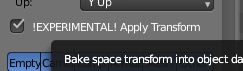
Update (May 2018): This option appears to be removed in the current version of Blender (v2.79). Instead you should check the box for "EXPERIMENTAL! Apply Transform". Unfortunately this only works for one generation in the hierarchy, i.e. don't expect grandchild transforms to work when imported to Unity. alt text

blenderapplytransforms.png (9.0 kB)
blender-export-scale.png (36.9 kB)
Comment
Add comment · Show 10 · Share
10 |3000 characters needed characters left characters exceeded
▼
  • Viewable by all users
  • Viewable by moderators
  • Viewable by moderators and the original poster
  • Advanced visibility
Viewable by all users
avatar image ressie · Mar 26, 2017 at 01:46 PM 0
Share

Can confirm this works for me.

avatar image FlightOfOne · Aug 03, 2017 at 10:45 PM 0
Share

If you have done everything correctly in Unity and blender, and you are having scaling issues, this is the correct answer. I too can confirm this works. Thank you!

avatar image martejpad · Oct 13, 2017 at 10:08 AM 0
Share

This works perfectly, thank you SO much!

avatar image ifurkend · Nov 04, 2017 at 02:30 PM 0
Share

This is the actual correct answer.

avatar image TheGabmeister · Dec 04, 2017 at 10:07 AM 2
Share

Hello. I tried this solution. It seems that it works for Unity 5, but does not work anymore in Unity 2017 for some reason. Have you guys found a workaround?

avatar image Glcomar TheGabmeister · Feb 25, 2018 at 03:46 AM 6
Share

I found solution for Unity 2017: Blender:

  1. Export -> fbx

  2. Button next to scale -> on

  3. Apply scale -> FBX Units scale

avatar image LeeJBaxter Glcomar · Feb 27, 2018 at 10:28 AM 1
Share

@Glcomar

Your answer is spot on, and is the method I've been using to get the correct scale from Blender to Unity!

Show more comments
Show more comments
avatar image
3

Answer by CiberX15 · Aug 17, 2019 at 10:13 PM

From my own experimentation, checking the !EXPERIMENTAL! Apply Transform button will work most of the time, however, if you have more then one layer of child objects (one child parented to another child that itself is parented to the root object), the rotation of all the child objects will be horribly maimed.

To solve this without checking Apply Transform, instead ensure that the scale button is unchecked, and the Apply Scalings drop down is set to FBX All.

Comment
Add comment · Show 1 · Share
10 |3000 characters needed characters left characters exceeded
▼
  • Viewable by all users
  • Viewable by moderators
  • Viewable by moderators and the original poster
  • Advanced visibility
Viewable by all users
avatar image alexxUID · Dec 14, 2020 at 03:12 PM 0
Share

For me this is the way, when you are exporting e.g. an Armature to Unity. The original answer is really only good for single level objects. (Unity 2019.4, Blender 2.8.3)

avatar image
2

Answer by dchakrabarty · Aug 25, 2019 at 07:34 AM

This is how I import models from Blender to Unity:

Export from Blender

  1. Select all models (also the rig if it is there) and make sure they are in object mode.

  2. Rotate all objects: X axis -90deg. Apply the rotations.

  3. Rotate all objects: X axis 90deg. DO NOT apply rotation.

  4. Export > FBX and set the following:

  5. Scale: 1, the button next to it should be active.

  6. Apply Scale: FBX Units Scale

  7. Uncheck !Experimental! Apply Transform (It does not work properly)

    Import in Unity

Make sure the "Preserve Hierarchy" is checked in the Model tab.

Comment
Add comment · Show 1 · Share
10 |3000 characters needed characters left characters exceeded
▼
  • Viewable by all users
  • Viewable by moderators
  • Viewable by moderators and the original poster
  • Advanced visibility
Viewable by all users
avatar image AppCity · Dec 31, 2020 at 10:07 PM 0
Share

Confir$$anonymous$$g this exact process works perfectly for me using Blender 2.9 & Unity 2020.2.1f1.

avatar image
1

Answer by wang37921 · Mar 07, 2019 at 08:09 AM

Apply Scale: FBX All

Comment
Add comment · Share
10 |3000 characters needed characters left characters exceeded
▼
  • Viewable by all users
  • Viewable by moderators
  • Viewable by moderators and the original poster
  • Advanced visibility
Viewable by all users
avatar image
0

Answer by cjdev · Jun 10, 2016 at 02:44 PM

I'm not actually sure if there's a way to do it with the import settings, Unity automatically changes the scale to compensate as you've seen. If you need to get rid of it or it just bugs you there's always the option of blowing it up in blender by 100x before export.

Comment
Add comment · Show 1 · Share
10 |3000 characters needed characters left characters exceeded
▼
  • Viewable by all users
  • Viewable by moderators
  • Viewable by moderators and the original poster
  • Advanced visibility
Viewable by all users
avatar image jimmylaskowski · Jun 11, 2016 at 11:00 AM 0
Share

Just scaled everything X,Y,Z x100 and used "Apply --> Scale". Works great

  • 1
  • 2
  • 3
  • ›

Your answer

Hint: You can notify a user about this post by typing @username

Up to 2 attachments (including images) can be used with a maximum of 524.3 kB each and 1.0 MB total.

Follow this Question

Answers Answers and Comments

118 People are following this question.

avatar image avatar image avatar image avatar image avatar image avatar image avatar image avatar image avatar image avatar image avatar image avatar image avatar image avatar image avatar image avatar image avatar image avatar image avatar image avatar image avatar image avatar image avatar image avatar image avatar image avatar image avatar image avatar image avatar image avatar image avatar image avatar image avatar image avatar image avatar image avatar image avatar image avatar image avatar image avatar image avatar image avatar image avatar image avatar image avatar image avatar image avatar image avatar image avatar image avatar image avatar image avatar image avatar image avatar image avatar image avatar image avatar image avatar image avatar image avatar image avatar image avatar image avatar image avatar image avatar image avatar image avatar image avatar image avatar image avatar image avatar image avatar image avatar image avatar image avatar image avatar image avatar image avatar image avatar image avatar image avatar image avatar image avatar image avatar image avatar image avatar image avatar image avatar image avatar image avatar image avatar image avatar image avatar image avatar image avatar image avatar image avatar image avatar image avatar image avatar image avatar image avatar image avatar image avatar image avatar image avatar image avatar image avatar image avatar image avatar image avatar image avatar image avatar image avatar image avatar image avatar image avatar image avatar image

Related Questions

Unity 5.0.2 UI Text - Best Fit isn't working correctly? 1 Answer

Importing blender model with rigid body 0 Answers

Unable to import Transparent object properly which was created on blender 1 Answer

How to scale an object so it fits perfectly inside a collider? 1 Answer

Animations changing due to scaling of character 2d. 0 Answers


Enterprise
Social Q&A

Social
Subscribe on YouTube social-youtube Follow on LinkedIn social-linkedin Follow on Twitter social-twitter Follow on Facebook social-facebook Follow on Instagram social-instagram

Footer

  • Purchase
    • Products
    • Subscription
    • Asset Store
    • Unity Gear
    • Resellers
  • Education
    • Students
    • Educators
    • Certification
    • Learn
    • Center of Excellence
  • Download
    • Unity
    • Beta Program
  • Unity Labs
    • Labs
    • Publications
  • Resources
    • Learn platform
    • Community
    • Documentation
    • Unity QA
    • FAQ
    • Services Status
    • Connect
  • About Unity
    • About Us
    • Blog
    • Events
    • Careers
    • Contact
    • Press
    • Partners
    • Affiliates
    • Security
Copyright © 2020 Unity Technologies
  • Legal
  • Privacy Policy
  • Cookies
  • Do Not Sell My Personal Information
  • Cookies Settings
"Unity", Unity logos, and other Unity trademarks are trademarks or registered trademarks of Unity Technologies or its affiliates in the U.S. and elsewhere (more info here). Other names or brands are trademarks of their respective owners.
  • Anonymous
  • Sign in
  • Create
  • Ask a question
  • Spaces
  • Default
  • Help Room
  • META
  • Moderators
  • Explore
  • Topics
  • Questions
  • Users
  • Badges
