
Wayback Machinekoobas.hobune.stream
May JUN Jul
Previous capture 12 Next capture
2021 2022 2023
1 capture
12 Jun 22 - 12 Jun 22
sparklines
Close Help
  • Products
  • Solutions
  • Made with Unity
  • Learning
  • Support & Services
  • Community
  • Asset Store
  • Get Unity

UNITY ACCOUNT

You need a Unity Account to shop in the Online and Asset Stores, participate in the Unity Community and manage your license portfolio. Login Create account
  • Blog
  • Forums
  • Answers
  • Evangelists
  • User Groups
  • Beta Program
  • Advisory Panel

Navigation

  • Home
  • Products
  • Solutions
  • Made with Unity
  • Learning
  • Support & Services
  • Community
    • Blog
    • Forums
    • Answers
    • Evangelists
    • User Groups
    • Beta Program
    • Advisory Panel

Unity account

You need a Unity Account to shop in the Online and Asset Stores, participate in the Unity Community and manage your license portfolio. Login Create account

Language

  • Chinese
  • Spanish
  • Japanese
  • Korean
  • Portuguese
  • Ask a question
  • Spaces
    • Default
    • Help Room
    • META
    • Moderators
    • Topics
    • Questions
    • Users
    • Badges
  • Home /
  • Help Room /
avatar image
0
Question by Carlz · Jun 20, 2017 at 07:57 AM · texturecolliderdistanceobjectsrange

How to paint on objects around an object?

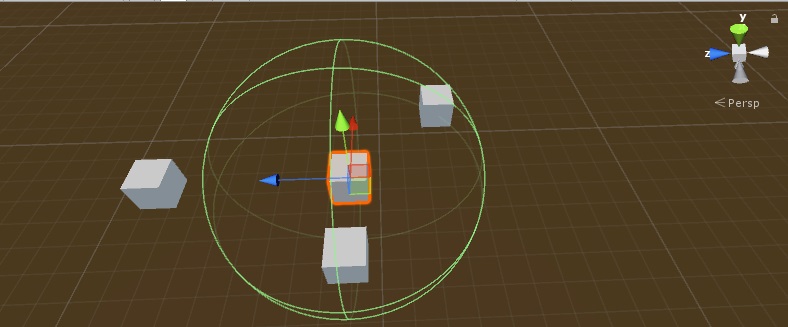
So what I want to do is to highlight all objects surfaces within a radius around a central object. I considered using Collider[] hitColliders = Physics.OverlapSphere(center, radius); to access all objets within a certain range.

The problem is, that I don't want to change the whole texture but only its pixels within the given range, so that just some parts of the objects texture is changed. I am allready familiar with the SetPixels() function, but I don't know how to access only the pixels in the given distance.

Take a look at the following picture: The cube on the left is not within the radius and should therefore not be effected. The cube in the front is inside the sphere and its whole surface should be highlighted in some way. The third cube is only partly inside the sphere, so some of its surface should be highlighted and the outside should remain as it is.
alt text

Please note, that I allready considered using spot lights, but it does not give me the results I am looking for.

paintonobjects.jpg (55.5 kB)
Comment
Add comment
10 |3000 characters needed characters left characters exceeded
▼
  • Viewable by all users
  • Viewable by moderators
  • Viewable by moderators and the original poster
  • Advanced visibility
Viewable by all users

1 Reply

· Add your reply
  • Sort: 
avatar image
0

Answer by Carlz · Jun 21, 2017 at 08:32 AM

I found a solution to my problem. A very cost efficient way is to use decals for this. There is no build in solution to do this, but you can choose between some solutions in the asset store.

This one is free and you can set an angle, so the decal is wrapped all around the object. The downside is, that it can not be applied dynamically at runtime.

I ended up using this approach from the Unity documentation. It is not perfect, but a good and free start point. here is what you have to do in order to see a boundary painted on the surrounding objects.:

  • Download the RenderingCommandBuffers.zip file and copy the deferredDecals folder in your project.

  • create a new material and select an appropriate Shader (Decal/DecalShader)

  • Set the rendering path of your main camera to Deferred

  • assign the DeferredDecalRenderer.cs script to any visible object in the scene and apply the standart cube mesh

  • create an empty gameobject and assign the decal.cs script to it, then choose your previously created material

I created a red circle as a texture for my material and get this result: alt text
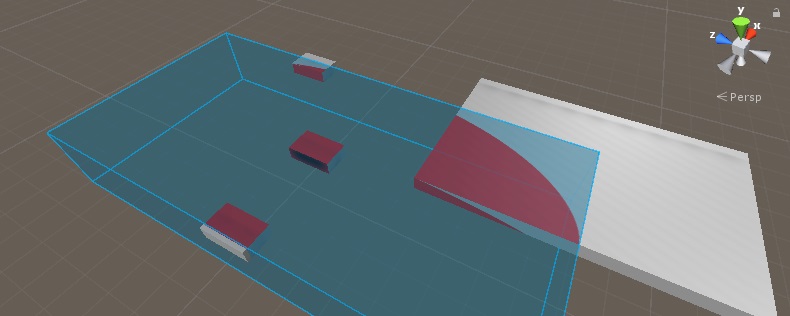
You have to experiment with adding more decals and rotating them so cover all edges in this solution. But it works great so far.


decal.jpg (44.8 kB)
Comment
Add comment · Share
10 |3000 characters needed characters left characters exceeded
▼
  • Viewable by all users
  • Viewable by moderators
  • Viewable by moderators and the original poster
  • Advanced visibility
Viewable by all users

Your answer

Hint: You can notify a user about this post by typing @username

Up to 2 attachments (including images) can be used with a maximum of 524.3 kB each and 1.0 MB total.

Follow this Question

Answers Answers and Comments

134 People are following this question.

avatar image avatar image avatar image avatar image avatar image avatar image avatar image avatar image avatar image avatar image avatar image avatar image avatar image avatar image avatar image avatar image avatar image avatar image avatar image avatar image avatar image avatar image avatar image avatar image avatar image avatar image avatar image avatar image avatar image avatar image avatar image avatar image avatar image avatar image avatar image avatar image avatar image avatar image avatar image avatar image avatar image avatar image avatar image avatar image avatar image avatar image avatar image avatar image avatar image avatar image avatar image avatar image avatar image avatar image avatar image avatar image avatar image avatar image avatar image avatar image avatar image avatar image avatar image avatar image avatar image avatar image avatar image avatar image avatar image avatar image avatar image avatar image avatar image avatar image avatar image avatar image avatar image avatar image avatar image avatar image avatar image avatar image avatar image avatar image avatar image avatar image avatar image avatar image avatar image avatar image avatar image avatar image avatar image avatar image avatar image avatar image avatar image avatar image avatar image avatar image avatar image avatar image avatar image avatar image avatar image avatar image avatar image avatar image avatar image avatar image avatar image avatar image avatar image avatar image avatar image avatar image avatar image avatar image avatar image avatar image avatar image avatar image avatar image avatar image avatar image avatar image avatar image avatar image avatar image avatar image avatar image avatar image avatar image avatar image

Related Questions

How to find the distance between unknown object and player 1 Answer

Colliders generation with texture 0 Answers

Hey guys so I'm new to C# and our professor just assigned us homework, and I'm trying to figure out how to get the object to drop randomly within a certain range but I don't know so can someone help me he gave us this code: 1 Answer

turn values around 1 Answer

How to drag an object does not pass the camera's range in Unity C#. Pls Help Me. 0 Answers


Enterprise
Social Q&A

Social
Subscribe on YouTube social-youtube Follow on LinkedIn social-linkedin Follow on Twitter social-twitter Follow on Facebook social-facebook Follow on Instagram social-instagram

Footer

  • Purchase
    • Products
    • Subscription
    • Asset Store
    • Unity Gear
    • Resellers
  • Education
    • Students
    • Educators
    • Certification
    • Learn
    • Center of Excellence
  • Download
    • Unity
    • Beta Program
  • Unity Labs
    • Labs
    • Publications
  • Resources
    • Learn platform
    • Community
    • Documentation
    • Unity QA
    • FAQ
    • Services Status
    • Connect
  • About Unity
    • About Us
    • Blog
    • Events
    • Careers
    • Contact
    • Press
    • Partners
    • Affiliates
    • Security
Copyright © 2020 Unity Technologies
  • Legal
  • Privacy Policy
  • Cookies
  • Do Not Sell My Personal Information
  • Cookies Settings
"Unity", Unity logos, and other Unity trademarks are trademarks or registered trademarks of Unity Technologies or its affiliates in the U.S. and elsewhere (more info here). Other names or brands are trademarks of their respective owners.
  • Anonymous
  • Sign in
  • Create
  • Ask a question
  • Spaces
  • Default
  • Help Room
  • META
  • Moderators
  • Explore
  • Topics
  • Questions
  • Users
  • Badges