
Wayback Machinekoobas.hobune.stream
May JUN Jul
Previous capture 13 Next capture
2021 2022 2023
1 capture
13 Jun 22 - 13 Jun 22
sparklines
Close Help
  • Products
  • Solutions
  • Made with Unity
  • Learning
  • Support & Services
  • Community
  • Asset Store
  • Get Unity

UNITY ACCOUNT

You need a Unity Account to shop in the Online and Asset Stores, participate in the Unity Community and manage your license portfolio. Login Create account
  • Blog
  • Forums
  • Answers
  • Evangelists
  • User Groups
  • Beta Program
  • Advisory Panel

Navigation

  • Home
  • Products
  • Solutions
  • Made with Unity
  • Learning
  • Support & Services
  • Community
    • Blog
    • Forums
    • Answers
    • Evangelists
    • User Groups
    • Beta Program
    • Advisory Panel

Unity account

You need a Unity Account to shop in the Online and Asset Stores, participate in the Unity Community and manage your license portfolio. Login Create account

Language

  • Chinese
  • Spanish
  • Japanese
  • Korean
  • Portuguese
  • Ask a question
  • Spaces
    • Default
    • Help Room
    • META
    • Moderators
    • Topics
    • Questions
    • Users
    • Badges
  • Home /
avatar image
2
Question by Sugar Mommy · Jun 19, 2015 at 09:41 PM · platformercollision2d

[2D] Rigidbody trips when walking

Hi

I'm creating a small 2D playformer game in Unity, and in this game I want to have a few moving enemies. I've managed to get the scripts and everything just right, but now the problem is, that it looks like the zombie (the enemy I'm using) seems to fall over at random points during his walk.

I've tried moving the ground tiles to flatten it more, making the zombie's collider box be horizontally flat at its feet, I even tried making an invisible collider box just above the ground for it to walk on, but it still does the same thing every time.

Here's screenshots on how I have its box collider set up (I took off the trigger collider just for testing purposes):
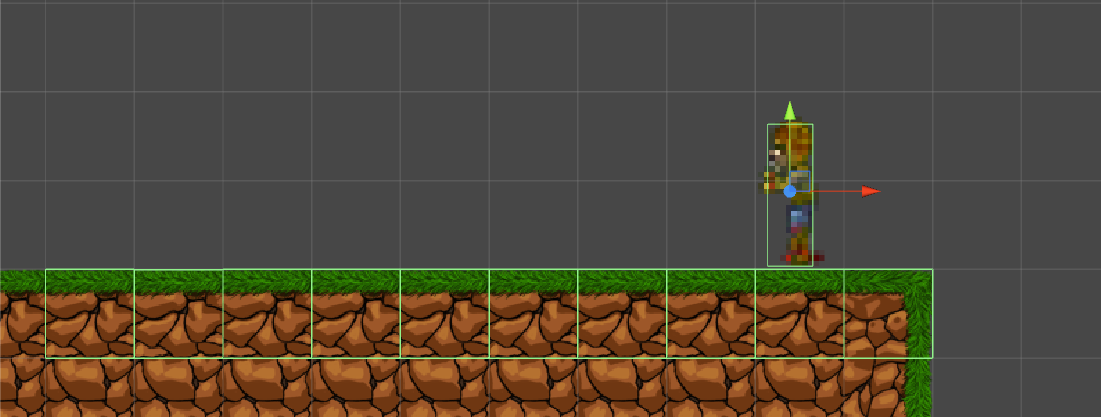
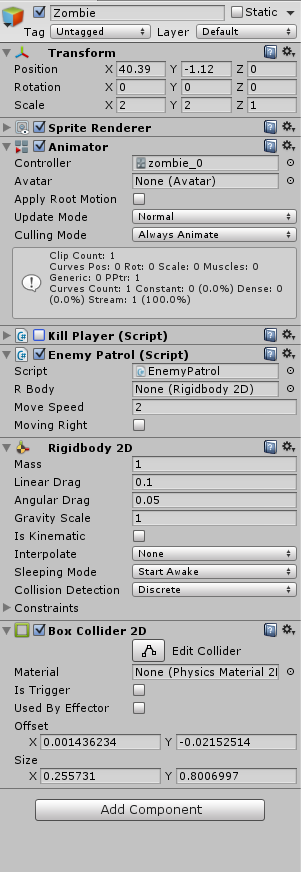
alt textalt text

I'm completely clueless on what might be causing this problem and would very much appreciate advice from someone more experienced than me.

Comment
Add comment · Show 3
10 |3000 characters needed characters left characters exceeded
▼
  • Viewable by all users
  • Viewable by moderators
  • Viewable by moderators and the original poster
  • Advanced visibility
Viewable by all users
avatar image GregoryNeal · Jun 19, 2015 at 11:01 PM 1
Share

When I had similar issues I learned that using edge colliders for your terrain eli$$anonymous$$ates the issue.

avatar image Pflobus · Jun 20, 2015 at 12:30 AM 0
Share

Can I just say that, for the record, that looks really good.

avatar image Sugar Mommy · Jun 20, 2015 at 01:57 PM 0
Share

@GregoryNeal That seems to have been the issue, I've had a few test runs and he hasn't tripped over his own feet anymore, thank you!

@Pflobus Thank you very much, it's my first project I'm doing by myself, I appreciate it a lot!:)

4 Replies

· Add your reply
  • Sort: 
avatar image
1
Best Answer

Answer by zach-r-d · Jun 20, 2015 at 12:08 AM

This is being caused by several adjacent colliders being used for a single contiguous surface (i.e. one box collider per tile); it's a known limitation of Box2D, the engine that Unity's 2D physics is based on. The "Why does the character get stuck" section of this article might give a better understanding of what's happening. While the article goes on to suggest some solutions for Box2D, the fix in Unity is to use an edge collider that runs along the border between solid and non-solid tiles.

As an aside, if you don't want the zombie to fall over, you can enable the Freeze Rotation option in the Constraints section of the Rigidbody 2D component in the inspector.

Comment
Add comment · Show 1 · Share
10 |3000 characters needed characters left characters exceeded
▼
  • Viewable by all users
  • Viewable by moderators
  • Viewable by moderators and the original poster
  • Advanced visibility
Viewable by all users
avatar image Sugar Mommy · Jun 20, 2015 at 01:57 PM 1
Share

Thank you so much for your answer! You've been very clear and thorough, and my zombie hasn't fallen over in the test runs I did, I'm pretty sure this fixed it!

avatar image
0

Answer by tyxman · Jun 20, 2015 at 05:27 PM

This problem from what I can see can't be fixed. I had a similar issue, but from my research you can't use BoxColliders 2D, use 4 edge colliders. Also If your player is falling and you don't want it to in the Rigidbody check off FixedAngle. That might fix the other issue as well but he may start to stop randomly instead.

This is the explaination to why it does that. http://www.iforce2d.net/b2dtut/ghost-vertices

Comment
Add comment · Share
10 |3000 characters needed characters left characters exceeded
▼
  • Viewable by all users
  • Viewable by moderators
  • Viewable by moderators and the original poster
  • Advanced visibility
Viewable by all users
avatar image
0

Answer by kavanavak · Dec 23, 2017 at 01:18 AM

This can be solved now using the "Composite Collider 2D"

Comment
Add comment · Share
10 |3000 characters needed characters left characters exceeded
▼
  • Viewable by all users
  • Viewable by moderators
  • Viewable by moderators and the original poster
  • Advanced visibility
Viewable by all users
avatar image
0

Answer by nguyenlamlll · Jan 31, 2018 at 02:40 PM

As @kavanavak answered, Composite saves us! In case people still come here for the same problem. Here's a tutorial video.

In short, on the object which has tilemap collider 2D component, add Composite collider 2D (also, RigidBody 2D will be automatically added if there is none attached already.) Next, in tilemap collider, check the box "Used by Composite". Now instead of having a collider for each square, we have a big collider for the whole shape.

Comment
Add comment · Share
10 |3000 characters needed characters left characters exceeded
▼
  • Viewable by all users
  • Viewable by moderators
  • Viewable by moderators and the original poster
  • Advanced visibility
Viewable by all users

Your answer

Hint: You can notify a user about this post by typing @username

Up to 2 attachments (including images) can be used with a maximum of 524.3 kB each and 1.0 MB total.

Follow this Question

Answers Answers and Comments

27 People are following this question.

avatar image avatar image avatar image avatar image avatar image avatar image avatar image avatar image avatar image avatar image avatar image avatar image avatar image avatar image avatar image avatar image avatar image avatar image avatar image avatar image avatar image avatar image avatar image avatar image avatar image avatar image avatar image

Related Questions

Character on a moving platform slows down 1 Answer

Trigger not being activated? 1 Answer

How to check from which side a gameobject collide? 0 Answers

Detecting when player isn't grounded when the ground disappears? 1 Answer

2D 360 degress platformer example needed 0 Answers


Enterprise
Social Q&A

Social
Subscribe on YouTube social-youtube Follow on LinkedIn social-linkedin Follow on Twitter social-twitter Follow on Facebook social-facebook Follow on Instagram social-instagram

Footer

  • Purchase
    • Products
    • Subscription
    • Asset Store
    • Unity Gear
    • Resellers
  • Education
    • Students
    • Educators
    • Certification
    • Learn
    • Center of Excellence
  • Download
    • Unity
    • Beta Program
  • Unity Labs
    • Labs
    • Publications
  • Resources
    • Learn platform
    • Community
    • Documentation
    • Unity QA
    • FAQ
    • Services Status
    • Connect
  • About Unity
    • About Us
    • Blog
    • Events
    • Careers
    • Contact
    • Press
    • Partners
    • Affiliates
    • Security
Copyright © 2020 Unity Technologies
  • Legal
  • Privacy Policy
  • Cookies
  • Do Not Sell My Personal Information
  • Cookies Settings
"Unity", Unity logos, and other Unity trademarks are trademarks or registered trademarks of Unity Technologies or its affiliates in the U.S. and elsewhere (more info here). Other names or brands are trademarks of their respective owners.
  • Anonymous
  • Sign in
  • Create
  • Ask a question
  • Spaces
  • Default
  • Help Room
  • META
  • Moderators
  • Explore
  • Topics
  • Questions
  • Users
  • Badges
