
Wayback Machinekoobas.hobune.stream
May JUN Jul
Previous capture 13 Next capture
2021 2022 2023
1 capture
13 Jun 22 - 13 Jun 22
sparklines
Close Help
  • Products
  • Solutions
  • Made with Unity
  • Learning
  • Support & Services
  • Community
  • Asset Store
  • Get Unity

UNITY ACCOUNT

You need a Unity Account to shop in the Online and Asset Stores, participate in the Unity Community and manage your license portfolio. Login Create account
  • Blog
  • Forums
  • Answers
  • Evangelists
  • User Groups
  • Beta Program
  • Advisory Panel

Navigation

  • Home
  • Products
  • Solutions
  • Made with Unity
  • Learning
  • Support & Services
  • Community
    • Blog
    • Forums
    • Answers
    • Evangelists
    • User Groups
    • Beta Program
    • Advisory Panel

Unity account

You need a Unity Account to shop in the Online and Asset Stores, participate in the Unity Community and manage your license portfolio. Login Create account

Language

  • Chinese
  • Spanish
  • Japanese
  • Korean
  • Portuguese
  • Ask a question
  • Spaces
    • Default
    • Help Room
    • META
    • Moderators
    • Topics
    • Questions
    • Users
    • Badges
  • Home /
avatar image
0
Question by clynamen · May 25, 2013 at 09:12 AM · alphatransparentblending

Strange alpha result

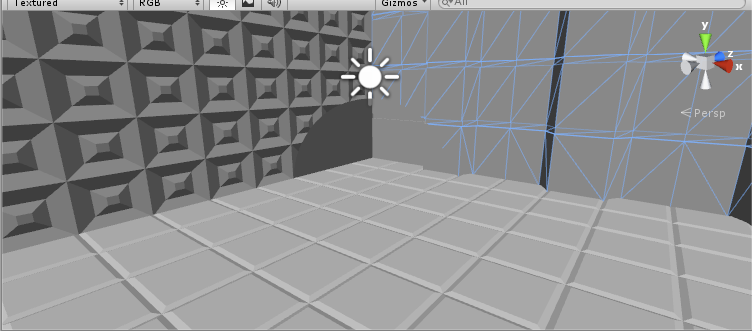
I'm having a strange result with a shader that uses blending:
alt text

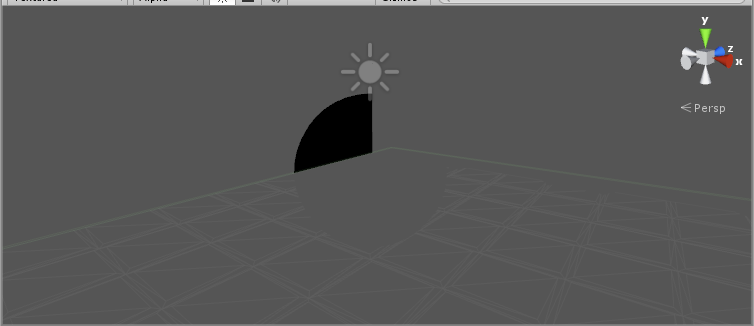
The sphere at center should be invisible (I need it to write on the Z-buffer, see shader at the end). I can't understand why the pixel that are intersected by the sphere and the left wall are grey. The wall and the floor have the same shader (default/diffuse) This is most probably due to alpha, as you can see in here (Editor camera set to alpha) alt text
This is the shader applied to the sphere:

     Shader "Subtractive"
     {
         SubShader
         {
             Pass
             {
                 // use a pixel blend that takes from the buffer before
                 Blend SrcAlpha OneMinusSrcAlpha
                  
                 // pixel blending only works with lighting
                 Lighting On
                  
                 // make sure the depth gets written in
                 ZWrite On
                  
                 // set the material color to invisible
                 Material
                 {
                     Diffuse (0,0,0,0)
                 }
             }
        }
untitled.png (69.4 kB)
untitled.png (37.6 kB)
Comment
Add comment · Show 3
10 |3000 characters needed characters left characters exceeded
▼
  • Viewable by all users
  • Viewable by moderators
  • Viewable by moderators and the original poster
  • Advanced visibility
Viewable by all users
avatar image ricardo_arango ♦♦ · May 25, 2013 at 12:09 PM 0
Share

It could be that you have z-write on and the objects behind fail the z-test, so their fragments are discarded.

Try moving the shader to a higher render queue so that objects behind are rendered first: http://docs.unity3d.com/Documentation/Components/SL-SubshaderTags.html

avatar image clynamen · May 25, 2013 at 12:25 PM 0
Share

You are indeed right, now the shaders works fine, thank for your answer.

However I don't understand why it works. The wall and the floor have the same shader (so the same render queue). Why do they behave differently?. Second: I thought that the object to be drawn were z-tested first, and that the rendering queue was applied at the end. Is this right? In this graph, where is the rendering queue applied? http://docs.unity3d.com/Documentation/Images/manual/SL-CullAndDepth-0.jpg

avatar image ricardo_arango ♦♦ · May 27, 2013 at 08:33 PM 0
Share

Ordering is done in the CPU first to group objects by queues and then by distance to the camera using the bounding box, for objects in the same queues. Then when rendered z-test is done the GPU/shader.

In your example, the wall and floor are in the same rendering queue, so they are sorted by distance. The wall is behind the circle farther away from the camera and the floor in front of the circle closer to the camera.

0 Replies

· Add your reply
  • Sort: 

Your answer

Hint: You can notify a user about this post by typing @username

Up to 2 attachments (including images) can be used with a maximum of 524.3 kB each and 1.0 MB total.

Follow this Question

Answers Answers and Comments

14 People are following this question.

avatar image avatar image avatar image avatar image avatar image avatar image avatar image avatar image avatar image avatar image avatar image avatar image avatar image avatar image

Related Questions

Transparency with correct culling 2 Answers

Blending and Decaying Alphas 0 Answers

Is it possible to change blend mode in shader at runtime? 1 Answer

Z-priming alpha-per-vertex 0 Answers

Remove white edges on texture help 2 Answers


Enterprise
Social Q&A

Social
Subscribe on YouTube social-youtube Follow on LinkedIn social-linkedin Follow on Twitter social-twitter Follow on Facebook social-facebook Follow on Instagram social-instagram

Footer

  • Purchase
    • Products
    • Subscription
    • Asset Store
    • Unity Gear
    • Resellers
  • Education
    • Students
    • Educators
    • Certification
    • Learn
    • Center of Excellence
  • Download
    • Unity
    • Beta Program
  • Unity Labs
    • Labs
    • Publications
  • Resources
    • Learn platform
    • Community
    • Documentation
    • Unity QA
    • FAQ
    • Services Status
    • Connect
  • About Unity
    • About Us
    • Blog
    • Events
    • Careers
    • Contact
    • Press
    • Partners
    • Affiliates
    • Security
Copyright © 2020 Unity Technologies
  • Legal
  • Privacy Policy
  • Cookies
  • Do Not Sell My Personal Information
  • Cookies Settings
"Unity", Unity logos, and other Unity trademarks are trademarks or registered trademarks of Unity Technologies or its affiliates in the U.S. and elsewhere (more info here). Other names or brands are trademarks of their respective owners.
  • Anonymous
  • Sign in
  • Create
  • Ask a question
  • Spaces
  • Default
  • Help Room
  • META
  • Moderators
  • Explore
  • Topics
  • Questions
  • Users
  • Badges
