
Wayback Machinekoobas.hobune.stream
May JUN Jul
Previous capture 13 Next capture
2021 2022 2023
1 capture
13 Jun 22 - 13 Jun 22
sparklines
Close Help
  • Products
  • Solutions
  • Made with Unity
  • Learning
  • Support & Services
  • Community
  • Asset Store
  • Get Unity

UNITY ACCOUNT

You need a Unity Account to shop in the Online and Asset Stores, participate in the Unity Community and manage your license portfolio. Login Create account
  • Blog
  • Forums
  • Answers
  • Evangelists
  • User Groups
  • Beta Program
  • Advisory Panel

Navigation

  • Home
  • Products
  • Solutions
  • Made with Unity
  • Learning
  • Support & Services
  • Community
    • Blog
    • Forums
    • Answers
    • Evangelists
    • User Groups
    • Beta Program
    • Advisory Panel

Unity account

You need a Unity Account to shop in the Online and Asset Stores, participate in the Unity Community and manage your license portfolio. Login Create account

Language

  • Chinese
  • Spanish
  • Japanese
  • Korean
  • Portuguese
  • Ask a question
  • Spaces
    • Default
    • Help Room
    • META
    • Moderators
    • Topics
    • Questions
    • Users
    • Badges
  • Home /
avatar image
5
Question by Horz · Mar 04, 2015 at 09:48 AM · unity 5movie texture

MovieTexture doesn't work in Unity 5 Free

I have .mov file and it worked in Unity 4 Pro as a Movie Texture. But now in Unity 5 it doesn't work and moreover I just can't drag and drop the movie file to the texture field in the shader and I can't watch the movie file in the preview window.... so, it seems its not supported? or API changed?

FIXED: it actually works but you have to reimport the videos after updating from u4 to u5. my problem was that unity didnt recognize the video texture.

Comment
Add comment · Show 12
10 |3000 characters needed characters left characters exceeded
▼
  • Viewable by all users
  • Viewable by moderators
  • Viewable by moderators and the original poster
  • Advanced visibility
Viewable by all users
avatar image RendangAapi · Mar 16, 2015 at 04:23 PM 0
Share

Hey man, I got the same problem. I have tried to reimport it but still does not work. Do you know another sollution?

avatar image RendangAapi · Mar 16, 2015 at 04:50 PM 3
Share

Never$$anonymous$$d, I have managed to fix it:

It turns out that U5 editor has some trouble to read the "Strea$$anonymous$$gAssets" folder that needs to be created according to the Unity online documentation Strea$$anonymous$$gAssets. I accidently found this by creating a new material in the "Strea$$anonymous$$gAssets" folder and that could not even be recognized. The material icon in the project folder was replaced by an icon normally used for unrecognizable file types. You can fix this by re-na$$anonymous$$g the "Strea$$anonymous$$gAssets" folder by simply putting a space between the words > "Strea$$anonymous$$g Assets". This is quite odd since the documentation clearly says "Strea$$anonymous$$gAssets".

So this might be a bug in the new Unity?

avatar image sdnj RendangAapi · Nov 09, 2015 at 09:22 AM 0
Share

That worked for me, thanks for sharing!

avatar image Vice_Versa · Aug 11, 2015 at 11:35 PM 1
Share

I have been having this exact same problem. Im trying to import a mp4 file into the project. it plays fine in quicktime, but it does not play in the preview window. I can add it as a texture for my material, however it just shows up as black. I know i need to call it from script to play it in game, but thats not working either. I dont know what this Strea$$anonymous$$g Assets folder is but from that page you linked it seems to only be necessary for mobile. which $$anonymous$$e is not. I am using unity 5 free edition, are movie textures only supported in pro or something?

avatar image Demonicdaron · Aug 15, 2015 at 11:40 AM 0
Share

Same problem here and still looking for a solution. I tried mp4, ogv, ogg, but none of them would work; they all show a black screen at best.

avatar image Vice_Versa · Aug 16, 2015 at 04:12 AM 0
Share

Has anybody found a solution to this yet???

Show more comments

2 Replies

· Add your reply
  • Sort: 
avatar image
1

Answer by npatch · Nov 04, 2015 at 07:47 AM

In case anyone else comes looking. Unity 5 uses OGG Theora so whenever you import video files it converts them to .ogv in order to play them at runtime. Moreover playback happens on the cpu so make sure you absolutely need it. @DemonicDaron, I have no idea why your .ogv didn't play but that's definitely the best asset filetype when using MovieTextures in Unity.

Comment
Add comment · Share
10 |3000 characters needed characters left characters exceeded
▼
  • Viewable by all users
  • Viewable by moderators
  • Viewable by moderators and the original poster
  • Advanced visibility
Viewable by all users
avatar image
0

Answer by Amoldadu · Nov 10, 2017 at 05:01 AM

@Horz Unity easily supports to ogg file format movie...and it gives option to import it into Movie Texture. So it will be easily used in unity Personal. See below image...alt text
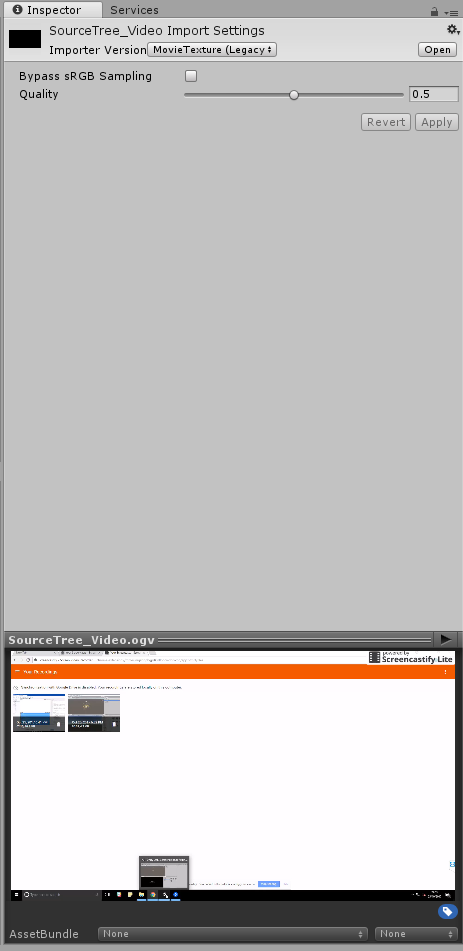

movietexture.png (43.0 kB)
Comment
Add comment · Share
10 |3000 characters needed characters left characters exceeded
▼
  • Viewable by all users
  • Viewable by moderators
  • Viewable by moderators and the original poster
  • Advanced visibility
Viewable by all users

Your answer

Hint: You can notify a user about this post by typing @username

Up to 2 attachments (including images) can be used with a maximum of 524.3 kB each and 1.0 MB total.

Follow this Question

Answers Answers and Comments

32 People are following this question.

avatar image avatar image avatar image avatar image avatar image avatar image avatar image avatar image avatar image avatar image avatar image avatar image avatar image avatar image avatar image avatar image avatar image avatar image avatar image avatar image avatar image avatar image avatar image avatar image avatar image avatar image avatar image avatar image avatar image avatar image avatar image avatar image

Related Questions

EasyMovieTexture: is possible to load movie files from Application.persistentDataPath ? 1 Answer

How do I get movie textures to play? 1 Answer

How to download 360 video to Android device's Streaming assets folder, before playback using Easy Movie Texture. 1 Answer

I have the following code, but when I try to open a level, it always tries to open level 25, which does not exist! Thanks in advance!, 1 Answer

unity and interfacing with a real hardware 0 Answers


Enterprise
Social Q&A

Social
Subscribe on YouTube social-youtube Follow on LinkedIn social-linkedin Follow on Twitter social-twitter Follow on Facebook social-facebook Follow on Instagram social-instagram

Footer

  • Purchase
    • Products
    • Subscription
    • Asset Store
    • Unity Gear
    • Resellers
  • Education
    • Students
    • Educators
    • Certification
    • Learn
    • Center of Excellence
  • Download
    • Unity
    • Beta Program
  • Unity Labs
    • Labs
    • Publications
  • Resources
    • Learn platform
    • Community
    • Documentation
    • Unity QA
    • FAQ
    • Services Status
    • Connect
  • About Unity
    • About Us
    • Blog
    • Events
    • Careers
    • Contact
    • Press
    • Partners
    • Affiliates
    • Security
Copyright © 2020 Unity Technologies
  • Legal
  • Privacy Policy
  • Cookies
  • Do Not Sell My Personal Information
  • Cookies Settings
"Unity", Unity logos, and other Unity trademarks are trademarks or registered trademarks of Unity Technologies or its affiliates in the U.S. and elsewhere (more info here). Other names or brands are trademarks of their respective owners.
  • Anonymous
  • Sign in
  • Create
  • Ask a question
  • Spaces
  • Default
  • Help Room
  • META
  • Moderators
  • Explore
  • Topics
  • Questions
  • Users
  • Badges