 koobas.hobune.stream


Enemy Knockback
Greetings!
How would I go about to create a knock-back from an enemy that sends the player flying in the correct direction?
I already figured out how to push the player in the correct x-direction:
     Vector2 myPosition = transform.position;
     Vector2 dir =  myPosition - enemyPos;
     dir.y = 0;

     rigidbody2D.AddForce(dir.normalized * force);
If I want to push the player a greater distance in the x-axis, I have to crank up the force variable to about 1500 which makes the player almost teleport, so I figured a bit of force in the y-axis would make the character fly further.
I'm kind of looking to create a knock-back like in this image
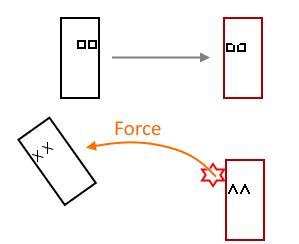
Thanks for your help!

You've pretty much said it already. You just need to add force in the Y direction. You're currently setting dir.y to 0, have you tried changing that to something higher than 0?

I tried to change the dir.y to a constant number. 0.5f is a decent number. When I inserted this line of code:
Debug.DrawRay(enemyPos, dir.normalized*force, Color.green);
The scene view showed a bright green line in a perfect angle.
But when adding the force, like above, the character goes almost straight up in the air, e.i far on the y-axis but nothing on almost nothing on the x-axis
Also when setting the force to a really high number the character moves in an L kind of way. What I mean by that is that the character is first moved in the x-axis, and then in the y-axis.
What am I doing wrong?

If you first change dir.y and then normalize, you might get wildly inconsistent results depending on what the dir.x value was. (The end result of normalizing (2f, 0.5f) and normalizing (0.1f, 0.5f) is very different)
It might help a little if you do it in different order.
     Vector2 dir =  (myPosition - enemyPos).normalized;
     dir.y = 0.5;

     rigidbody2D.AddForce(dir * force);
And then find a suitable dir.y
Still the root of the problem is deciding what you want to happen in each situation mathematically and what are all the possible use cases.
Since you are not using the magnitude of the dir distance vector for anything (you are normalizing it), you might as well type in some vector that gives you the desired trajectory and just flip the x-coordinate based on which side the enemy is on.
 Vector2 pushForce = new Vector2(100, 50);

 if (myPosition.x > enemyPos.x)
 {
    pushForce.x = -pushForce.x;
 }

 rigidbody2D.AddForce(pushForce);
Thank you so much Nose$$anonymous$$ill for your answer! I figured out what caused the querky L movement. Right after my character gets knock backed I set the velocity to the x and y velocity of the rigidbody (It's in the FixedUpdate so it's fine).

I'm sorry @Creative Inventory you need to provide more informations for us to be able to help you. I must also inform you that this code was part of a project that I worked on a year ago. I haven't touched Unity since then and lost the project files so I'm not sure how much of an asset I will be.
Post a little more information about your code and somone might be able to help you


