
Wayback Machinekoobas.hobune.stream
May JUN Jul
Previous capture 11 Next capture
2021 2022 2023
1 capture
11 Jun 22 - 11 Jun 22
sparklines
Close Help
  • Products
  • Solutions
  • Made with Unity
  • Learning
  • Support & Services
  • Community
  • Asset Store
  • Get Unity

UNITY ACCOUNT

You need a Unity Account to shop in the Online and Asset Stores, participate in the Unity Community and manage your license portfolio. Login Create account
  • Blog
  • Forums
  • Answers
  • Evangelists
  • User Groups
  • Beta Program
  • Advisory Panel

Navigation

  • Home
  • Products
  • Solutions
  • Made with Unity
  • Learning
  • Support & Services
  • Community
    • Blog
    • Forums
    • Answers
    • Evangelists
    • User Groups
    • Beta Program
    • Advisory Panel

Unity account

You need a Unity Account to shop in the Online and Asset Stores, participate in the Unity Community and manage your license portfolio. Login Create account

Language

  • Chinese
  • Spanish
  • Japanese
  • Korean
  • Portuguese
  • Ask a question
  • Spaces
    • Default
    • Help Room
    • META
    • Moderators
    • Topics
    • Questions
    • Users
    • Badges
  • Home /
avatar image
0
Question by ajbeattie · Jul 17, 2015 at 09:39 AM · 2ddynamictopdownwallexpand

2D Top-Down: Dynamically stretch wall to enclose rectangular area?

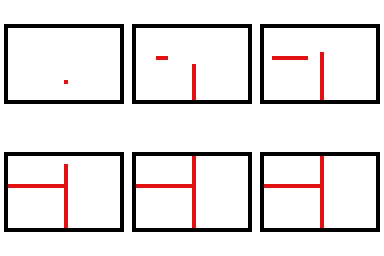
I'm working on a top-down mobile game in which a player can swipe either vertically or horizontally to spawn a wall that then grows automatically until it reaches the outer walls of the level or another, previously spawned wall. The level is a fixed, rectangular area (no scrolling or anything) enclosed by 4 walls.

As an example, here's what it should look like if a user swipes vertically in one location the horizontally in another before the first wall is built:
alt text

Additionally, certain objects within the game can destroy a wall if they collide with it while it is still expanding. Once the wall has fully expanded, however, it is invincible.

I'm new to unity and game development in general, and I'm having some difficulty implementing this system (which seems like it ought to be simple).

Currently, my solution is as follows:

  • When a user swipes, I determine the touch position and swipe direction.

  • Spawn a 'barrier' sprite at the initial touch location.

  • Stretch the sprite in the desired direction until both ends have reached another barrier (or outer wall), shifting the center of the sprite as needed to compensate for one end reaching a barrier before the other (as in the vertical barrier in the gif).

  • When both ends reach another barrier, the wall stops expanding.

However, the main problem with this method is that it relies on colliders and shifting positions/scales within 'Update,' so the walls will continue extending/moving for a few frames after the collision actually occurs. Of course, if the rate of expansion is too high, collisions won't be detected at all.

alt text

I've done quite a bit of googling and think that I may be able to use raycasting to help tidy things up, but I'm not entirely sure how to go about that, and I suspect I may be missing something that would make this much easier overall (maybe using a grid and adding multiple walls instead of stretching one?).

In summary, my question is whether this is an effective way to achieve what I want to do, and if so, could someone help get me started with how I could more precisely control the expansion with raycasts or another tool?

Comment
Add comment
10 |3000 characters needed characters left characters exceeded
▼
  • Viewable by all users
  • Viewable by moderators
  • Viewable by moderators and the original poster
  • Advanced visibility
Viewable by all users

1 Reply

· Add your reply
  • Sort: 
avatar image
1
Best Answer

Answer by Bluk · Jul 17, 2015 at 10:33 AM

Yous seem to have it pretty figured out, so I'm not sure what you need help for. I will just say though, that raycast have the significant advantage to return (among other things) the distance origin -> raycasthit, so you can predict exactly how much you need to increase your barrier.

That would mean something like

 //2 times if still expanding from both ends
 //raycast doesn't have to start from barrierEnd, you just need to be able to compute the distance between the end of the barrier and the wall
 RaycastHit2D hit = Physics2D.Raycast(barrierEndPosition, direction);
 if (hit.distance < minimum) {
   barrierIncrease = distance;
 }
 else {
   barrierIncrease = barrierIncreaseSpeed;
 }

Not sure that helps you much, but like I said, you have it pretty much figured out.

Comment
Add comment · Show 1 · Share
10 |3000 characters needed characters left characters exceeded
▼
  • Viewable by all users
  • Viewable by moderators
  • Viewable by moderators and the original poster
  • Advanced visibility
Viewable by all users
avatar image ajbeattie · Jul 17, 2015 at 03:28 PM 0
Share

This is actually pretty helpful - I mainly was trying to figure out if there was a better way to do this with the 2D engine, and if not, get a little help with the raycasting. Going to try to set this up now. Thanks!

Your answer

Hint: You can notify a user about this post by typing @username

Up to 2 attachments (including images) can be used with a maximum of 524.3 kB each and 1.0 MB total.

Follow this Question

Answers Answers and Comments

3 People are following this question.

avatar image avatar image avatar image

Related Questions

Unity 2d Dynamic UI text not rendering on Canvas 0 Answers

Problem with dynamic wall 1 Answer

2D Top down shooter, gun is shaking while moving and Cursor solutions 0 Answers

Touch Buttons 0 Answers

How to make Enemy shoot at Player Top Down 1 Answer


Enterprise
Social Q&A

Social
Subscribe on YouTube social-youtube Follow on LinkedIn social-linkedin Follow on Twitter social-twitter Follow on Facebook social-facebook Follow on Instagram social-instagram

Footer

  • Purchase
    • Products
    • Subscription
    • Asset Store
    • Unity Gear
    • Resellers
  • Education
    • Students
    • Educators
    • Certification
    • Learn
    • Center of Excellence
  • Download
    • Unity
    • Beta Program
  • Unity Labs
    • Labs
    • Publications
  • Resources
    • Learn platform
    • Community
    • Documentation
    • Unity QA
    • FAQ
    • Services Status
    • Connect
  • About Unity
    • About Us
    • Blog
    • Events
    • Careers
    • Contact
    • Press
    • Partners
    • Affiliates
    • Security
Copyright © 2020 Unity Technologies
  • Legal
  • Privacy Policy
  • Cookies
  • Do Not Sell My Personal Information
  • Cookies Settings
"Unity", Unity logos, and other Unity trademarks are trademarks or registered trademarks of Unity Technologies or its affiliates in the U.S. and elsewhere (more info here). Other names or brands are trademarks of their respective owners.
  • Anonymous
  • Sign in
  • Create
  • Ask a question
  • Spaces
  • Default
  • Help Room
  • META
  • Moderators
  • Explore
  • Topics
  • Questions
  • Users
  • Badges
