
Wayback Machinekoobas.hobune.stream
May JUN Jul
Previous capture 13 Next capture
2021 2022 2023
1 capture
13 Jun 22 - 13 Jun 22
sparklines
Close Help
  • Products
  • Solutions
  • Made with Unity
  • Learning
  • Support & Services
  • Community
  • Asset Store
  • Get Unity

UNITY ACCOUNT

You need a Unity Account to shop in the Online and Asset Stores, participate in the Unity Community and manage your license portfolio. Login Create account
  • Blog
  • Forums
  • Answers
  • Evangelists
  • User Groups
  • Beta Program
  • Advisory Panel

Navigation

  • Home
  • Products
  • Solutions
  • Made with Unity
  • Learning
  • Support & Services
  • Community
    • Blog
    • Forums
    • Answers
    • Evangelists
    • User Groups
    • Beta Program
    • Advisory Panel

Unity account

You need a Unity Account to shop in the Online and Asset Stores, participate in the Unity Community and manage your license portfolio. Login Create account

Language

  • Chinese
  • Spanish
  • Japanese
  • Korean
  • Portuguese
  • Ask a question
  • Spaces
    • Default
    • Help Room
    • META
    • Moderators
    • Topics
    • Questions
    • Users
    • Badges
  • Home /
avatar image
0
Question by Afassolas · May 02, 2015 at 06:25 PM · transparencytreeswhite

White outline on trees in Unity 5

Hello, I am having this problem the trees in Unity 5 appear with a white outline when a tree is behind an object with certain material the white disappears but 95% of the time this is what I get. Have you faced this , is there a solution ? alt text
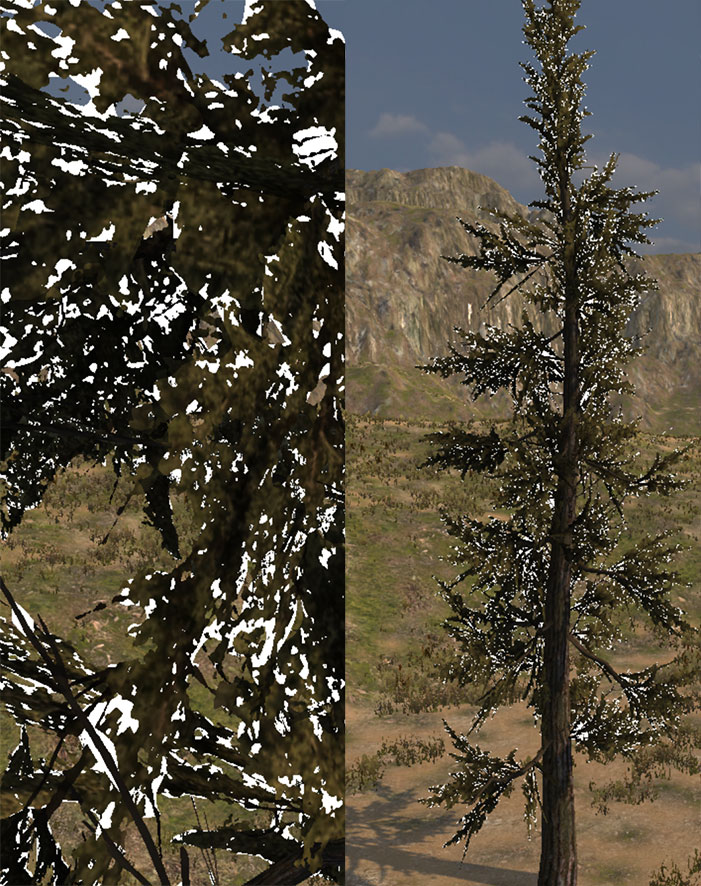
problemtree.jpg (233.9 kB)
Comment
Add comment · Show 5
10 |3000 characters needed characters left characters exceeded
▼
  • Viewable by all users
  • Viewable by moderators
  • Viewable by moderators and the original poster
  • Advanced visibility
Viewable by all users
avatar image bobin115 · May 02, 2015 at 06:28 PM 0
Share

what shader does it use?

avatar image Afassolas · May 03, 2015 at 04:21 AM 1
Share

these are standard unity trees that have the problem

avatar image Kiwasi · May 03, 2015 at 04:54 AM 0
Share

I've seen the same problem. Didn't get around to finding a fix.

avatar image bobin115 · May 03, 2015 at 07:10 AM 1
Share

could you try to increase the cutoff?

avatar image machosalad · May 03, 2015 at 10:59 AM 1
Share

I also have the same problem. I "fixed" it be changing the Camera Background color to (0,0,0,0).

4 Replies

· Add your reply
  • Sort: 
avatar image
0

Answer by Leirlux · May 04, 2015 at 10:38 AM

Tell me a thing: try to create a new project with its new scene and the same materials and create it from zero. What @bobin115 said could probably fix your problem, it's probably because you have selected a "standard" shader for a "cutout" one. Try selecting another shader, such as Transparent > Cutout > BumpedSpecular. And tell us the result. Also, check that the tiling of the texture of those trees are 1 on both X and Y.

Comment
Add comment · Show 1 · Share
10 |3000 characters needed characters left characters exceeded
▼
  • Viewable by all users
  • Viewable by moderators
  • Viewable by moderators and the original poster
  • Advanced visibility
Viewable by all users
avatar image Afassolas · Jun 03, 2015 at 07:31 AM 0
Share

no nothing changed, but what machosalad said worked

avatar image
0

Answer by Afassolas · May 04, 2015 at 01:26 PM

I solved this by changing in Player settings, Rendering path from Deferred to Forward.

Comment
Add comment · Show 2 · Share
10 |3000 characters needed characters left characters exceeded
▼
  • Viewable by all users
  • Viewable by moderators
  • Viewable by moderators and the original poster
  • Advanced visibility
Viewable by all users
avatar image Leirlux · May 04, 2015 at 04:43 PM 0
Share

Was it that easy to fix? So deferred lighting is not as good as it seemed ... :(

avatar image Afassolas · Jun 04, 2015 at 08:44 AM 0
Share

Yeah it was not a good solution

avatar image
0

Answer by Skirbyl · May 20, 2015 at 10:56 AM

Hi, I was going fine in my unity project until I came across this problem, after troubleshooting and trying several work arounds, I came across a solution which seemed to be the only way it would work, it seems like a legitimate solution.

Instructions: 1. Import your texture of a tree branch with Transparent background (PNG Format) 2. Apply These Settings : Texture type: Texture Alpha from Grayscale unticked Alpha Is transparent ticked Wrap Mode:Clamp Filter Mode: Bilinear (Does not matter as far as I've tried) Aniso Level: 0-16 (Does not matter as far as I've tried)

  1. Create New Material and apply these settings: Shader:Legacy Shaders/Transparent/Diffuse Apply your PNG Tree Branch Image

  2. Now, apply this material to the leaves of your tree, you will recieve the warning that you must have a nature shader applied, hit apply. Voila! Hopefully..

Anyway, from experimenting, this works everytime for me, and as far as I've experimented, you can use different transparent shaders with your branch material before essentially "converting" it through the tree creator.

I really hope this sums up this solution for everybody, it seems to be a real frustration.

Lemme know if it works too! I'm interested to know if this was a purposeful procedure or whether it is a bug they are still trying to iron out.

Comment
Add comment · Share
10 |3000 characters needed characters left characters exceeded
▼
  • Viewable by all users
  • Viewable by moderators
  • Viewable by moderators and the original poster
  • Advanced visibility
Viewable by all users
avatar image
0

Answer by E2R_Ben · Jun 03, 2015 at 08:16 PM

It also seems to work in deffered if you turn off "receive shadows"

Comment
Add comment · Show 1 · Share
10 |3000 characters needed characters left characters exceeded
▼
  • Viewable by all users
  • Viewable by moderators
  • Viewable by moderators and the original poster
  • Advanced visibility
Viewable by all users
avatar image Afassolas · Jun 04, 2015 at 08:20 AM 0
Share

turn off "receive shadows" where ? Is this thing a bug? It practically cancels the use of Unity trees in ver 5

Your answer

Hint: You can notify a user about this post by typing @username

Up to 2 attachments (including images) can be used with a maximum of 524.3 kB each and 1.0 MB total.

Follow this Question

Answers Answers and Comments

26 People are following this question.

avatar image avatar image avatar image avatar image avatar image avatar image avatar image avatar image avatar image avatar image avatar image avatar image avatar image avatar image avatar image avatar image avatar image avatar image avatar image avatar image avatar image avatar image avatar image avatar image avatar image avatar image

Related Questions

White outline around tree leaves after upgrade to Unity 5 1 Answer

Import a PNG image where white is transparent and black remains black (or use PNG's transparency information) 0 Answers

How do I Fade Terrain Tree's to Blend with Billboard? 1 Answer

transparency trails on trees blowing in the wind 0 Answers

White trees in a dark scene 3 Answers


Enterprise
Social Q&A

Social
Subscribe on YouTube social-youtube Follow on LinkedIn social-linkedin Follow on Twitter social-twitter Follow on Facebook social-facebook Follow on Instagram social-instagram

Footer

  • Purchase
    • Products
    • Subscription
    • Asset Store
    • Unity Gear
    • Resellers
  • Education
    • Students
    • Educators
    • Certification
    • Learn
    • Center of Excellence
  • Download
    • Unity
    • Beta Program
  • Unity Labs
    • Labs
    • Publications
  • Resources
    • Learn platform
    • Community
    • Documentation
    • Unity QA
    • FAQ
    • Services Status
    • Connect
  • About Unity
    • About Us
    • Blog
    • Events
    • Careers
    • Contact
    • Press
    • Partners
    • Affiliates
    • Security
Copyright © 2020 Unity Technologies
  • Legal
  • Privacy Policy
  • Cookies
  • Do Not Sell My Personal Information
  • Cookies Settings
"Unity", Unity logos, and other Unity trademarks are trademarks or registered trademarks of Unity Technologies or its affiliates in the U.S. and elsewhere (more info here). Other names or brands are trademarks of their respective owners.
  • Anonymous
  • Sign in
  • Create
  • Ask a question
  • Spaces
  • Default
  • Help Room
  • META
  • Moderators
  • Explore
  • Topics
  • Questions
  • Users
  • Badges
